


Invoices arrive by email, contracts arrive as scanned amendments, and bills of lading arrive stamped by three customs offices, yet most teams still open, key, forward, and chase each one by hand. The cost compounds quietly: Ardent Partners puts the average cost of processing one invoice at $9.40, about 22 percent of invoices fall out as exceptions, and documents with personal data sit in inboxes with no retention rule or audit trail. Many tools sold as document workflow automation solve only one slice, such as e-signature or templated creation, and expect every file to be uploaded to their cloud. A clear view of the four capabilities, accuracy tested by document type, and a cost-per-document model show which platform actually removes the manual work.
Key Takeaways
|
What Document Workflow Automation Covers?
The term document workflow automation describes the software layer that takes a document from the moment it enters your organization to the moment a decision is made and recorded, without a person forwarding files, chasing approvals, or re-keying data. A document arrives, the system identifies it, extracts its data, routes it to the right person or system, and archives it in a way an auditor can check years later.
The category is often confused with two neighbors. E-signature tools solve the last step of a workflow, and document management systems solve storage and version control, while document workflow automation covers the whole chain between them..
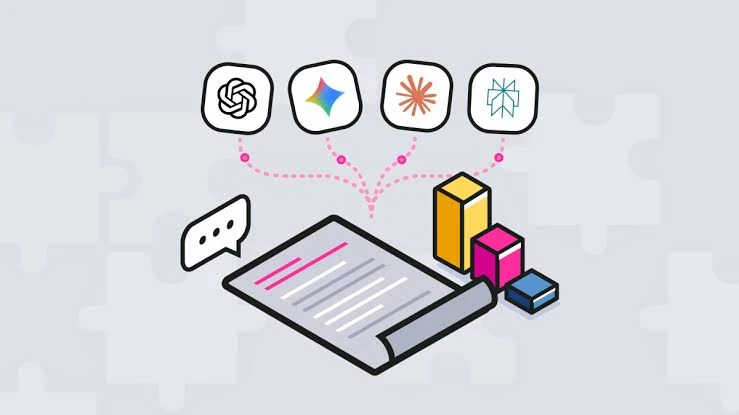
That chain increasingly includes AI that reads content rather than matching templates. Gartner predicted in July 2025 that 80 percent of enterprise software and applications will be multimodal by 2030, up from less than 10 percent in 2024, which makes reading scans, images, and mixed layouts a baseline expectation.
4 Core Capabilities: Capture, Classify, Extract, and Route
Buyers get better results when they evaluate document workflow automation as four capabilities rather than one feature. The table shows what each one does and where tools on the market are usually strong or weak.
| Capability | What it does | Where tools are usually strong | Where tools are usually weak |
|---|---|---|---|
| Creation of documents | Generates contracts, forms, and letters from data and templates | Templated documents and e-signature | Negotiated, free-form drafts |
| Data extraction | Captures, classifies, and pulls fields into a system of record | Standard invoices and forms from repeat senders | New layouts, handwriting, stamps, and non-English text |
| Approval routing | Sends the document to the right person or system by rules | Conditional, single-department routing | Multi-department chains with exceptions |
| Compliant storage | Retains, indexes, and records every access and edit | Basic retention and search | Jurisdiction-specific retention and granular access |
The products ranking for this topic, such as Adobe Acrobat Sign, Tungsten Automation, Templafy, and Folderit, each lean toward one or two of these columns. A legal team buying contract automation and a finance team buying invoice capture are often shown the same demo, although their weakest link sits in different rows.
The practical rule is to find the capability your current process fails at and pay for strength there. Routing and creation are widely available, so the premium belongs to whichever capability is breaking today.
3 Technology Layers of Document Workflow Automation: OCR, AI Understanding, and Workflow Engine
A modern document workflow automation stack layers three technologies, and each one fails differently.
- OCR and capture: Converts scans and photos into text and detects layout, and its quality caps everything downstream.
- AI understanding: Classifies the document, extracts fields, and, with language models, reads clauses and free text that templates cannot describe.
- Workflow engine: Applies routing rules, approvals, deadlines, and escalations, then writes results to ERP, CRM, or a document management system.
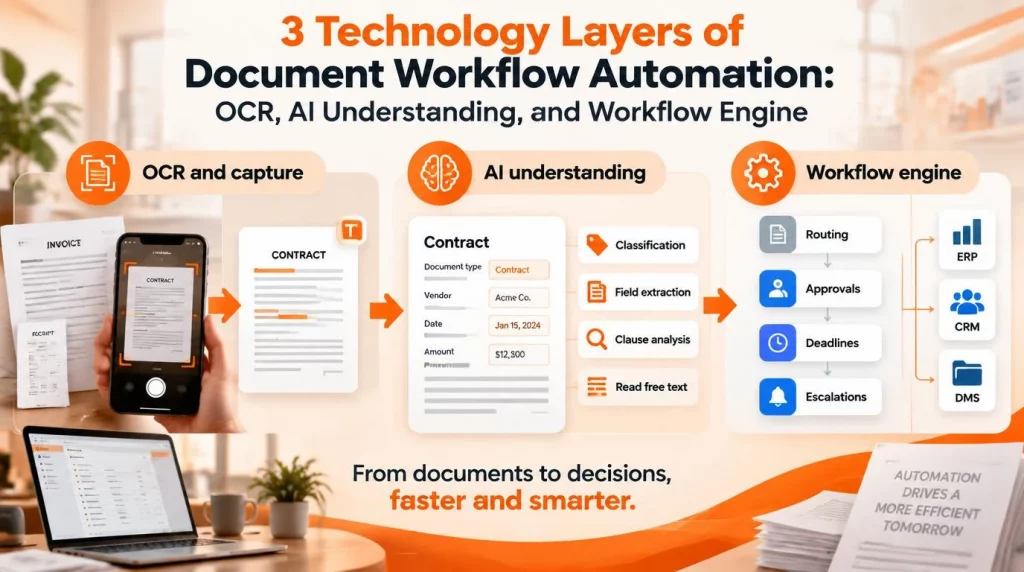
Template-based extraction works well when the same sender sends the same layout every month. Language-model reading earns its cost on documents that have never been seen before, such as a contract amendment with a handwritten margin note or a delivery note in Vietnamese with diacritics that older OCR engines often mangle.
Agents add a decision layer on top. Instead of rejecting a non-standard file into a manual queue, an agent can read it, infer its structure from context, and flag only genuine ambiguity for a person, which is the pattern our guide to the AI agent workflow builder walks through step by step.
5 Industry Use Cases and What Each Should Prioritize
Priorities for document workflow automation differ by industry, because the valuable information sits in different places.
| Industry | Typical documents | What to prioritize |
|---|---|---|
| Legal services | Contracts, amendments, court filings | Clause and obligation extraction and version comparison over raw speed |
| Banking and financial services | Loan files, KYC documents, statements | Complete audit trails and data residency |
| Logistics | Bills of lading, customs declarations, delivery notes | Carrier-specific layouts, stamps, and non-English text |
| Healthcare | Referrals, claims, consent forms | Access by role and retention rules for patient records |
| Accounts payable | Invoices, purchase orders, receipts | Three-way matching and exception handling |
Accounts payable is usually the first department to move, because invoice volume is high, the fields are well understood, and published benchmarks make the business case easy to check. Logistics and banking often follow, while legal and healthcare tend to start later because of the stricter review their documents need.
Legal teams face the hardest extraction problem, since value lives in negotiated language rather than fixed fields; our overview of the AI agent for legal work covers contract review in more depth.
4 Implementation Best Practices: Thresholds, Approval, Focus, Feedback
In document workflow automation, accuracy is the number vendors quote in aggregate and the number buyers should never accept in aggregate. A platform advertising very high accuracy is usually describing one clean document type, so the evaluation should test each of your main types separately.
| Type of document | What to measure | Planning expectation (illustrative) |
|---|---|---|
| Invoices from repeat suppliers | Field accuracy and straight-through processing rate | Highest automation rate of the three |
| Bills of lading and customs papers | Accuracy on stamped and handwritten fields | Middle, with more human review |
| Contracts and legal correspondence | Correct clause type, party, and obligation | Lowest without models tuned on your library |
A sound document workflow automation test uses 100 or more real documents per type, including poor scans, and records three numbers: field-level accuracy, the share of documents that pass with no human touch, and the share routed to manual review. The residual manual share is the figure that decides your savings.
Further practices keep the rollout on track:
- Confidence thresholds per type: Each document type gets its own threshold for routing to a person, adjustable as results improve.
- Human approval before final action: Any extraction that triggers a payment, contract, or legal step is confirmed by a named person.
- One document type first: The pilot covers one type and one department before others are added.
- Feedback loop: Corrections made by reviewers feed back into templates, prompts, or models every month.
Integration closes the loop. The finished record, with its extracted fields and approval history, should land in the ERP, CRM, or document management system automatically, and a document workflow automation platform that cannot write back to your system of record simply moves the re-keying to a later step.
The routing and approval steps belong in the same monitored pipeline as the rest of your AI workflow automation, so exceptions, deadlines, and escalations are visible in one place.
3 Common Challenges That Stall Projects After the Pilot of Document Workflow Automation
Three challenges stall most document workflow automation projects after a promising pilot.
- Unstructured documents: Template engines reject files that do not match a known layout, sending the hardest and most valuable documents straight to the manual queue.
- Cloud-only processing: Many leading platforms require every document to be uploaded to their environment, which is often unacceptable for loan files, patient records, and litigation documents.
- Retention and access rules: Retention periods differ by document type and country, and a single misfiled record with personal data can trigger an incident long after the workflow closed.
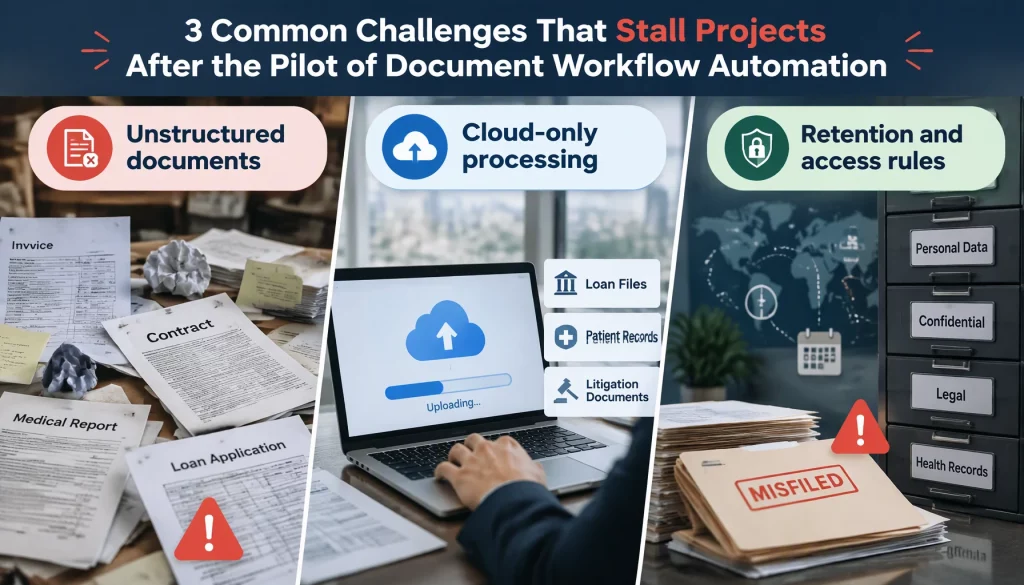
Retention rules in document workflow automation are specific, not generic. In Vietnam, accounting documents used directly for bookkeeping must be kept for at least ten years under the accounting law, and Law No. 91/2025/QH15 on Personal Data Protection, in force since January 1, 2026, lets people request deletion of their data once the processing purpose is fulfilled. A platform has to hold both rules at once, keeping accounting evidence while handling deletion requests on everything else.
Older RPA-based capture adds a fourth challenge. Bots that copy fields from fixed screen positions break whenever a template or portal changes, and our comparison of AI agent vs RPA explains when an agent that reads the document is the better fit for those steps.
Audit requirements complete the list. For any document with personal data, the system should record who accessed it, who changed it and when, which version was approved, and on which data the decision was made.
4 Accuracy and Exception Handling Lessons from Accounts Payable
Published benchmarks and practical experience in accounts payable point to a few lessons that apply to most document workflow automation programs.
The Ardent Partners State of ePayables benchmarks show the size of the gap: an average cost of $9.40 per invoice against $2.78 for best-in-class teams, and exception rates of 22 percent against 9 percent. The difference comes largely from how exceptions are prevented and resolved, not only from faster capture.
| Payback model (illustrative) | Before automation | After automation |
|---|---|---|
| Cost per document | $9.40 | $2.78 |
| Monthly volume | 5,000 invoices | 5,000 invoices |
| Monthly processing cost | $47,000 | $13,900 |
| Monthly saving before platform cost | Not applicable | $33,100 |
The model uses the average and best-in-class figures from Ardent Partners as the before and after cases, which assumes a team actually reaches best-in-class performance. At 500 documents a month the same saving is about $3,300, which may not cover license, integration, and review costs, so the minimum viable volume should be calculated before any contract.
Measurement keeps document workflow automation gains honest. Cost per document, exception rate, and days from receipt to approval should be tracked monthly against the pre-automation baseline, because savings that are not measured tend to be overstated in the next budget cycle.
- Exceptions are the product: Most savings come from reducing and resolving exceptions, so the exception queue deserves more design effort than clean documents.
- Confidence beats raw accuracy: A system that routes uncertain documents to a person is safer than one that is slightly more accurate but never admits doubt.
- Language and layout coverage must be tested: Vietnamese and mixed-language documents should be in the test set from the start, not added after go-live.
- Customer infrastructure changes the risk profile: Processing documents where they already live removes the upload step that blocks many regulated projects.
Conclusion
In short, document workflow automation delivers value when it is evaluated as four capabilities, tested by document type, and justified by cost per document at real volume. Accounts payable benchmarks show how wide the gap between average and best-in-class teams can be, and retention and access rules show why regulated documents need more than fast capture. This month, your team can collect 100 real documents for each of its three main types, measure accuracy and manual share on two shortlisted platforms, and calculate payback at current volume.
The next question is how reading, approval, and audit work together on infrastructure you control. Our platform features page shows how AI Hive runs document agents with human approval gates and full logs, including on-premise.