
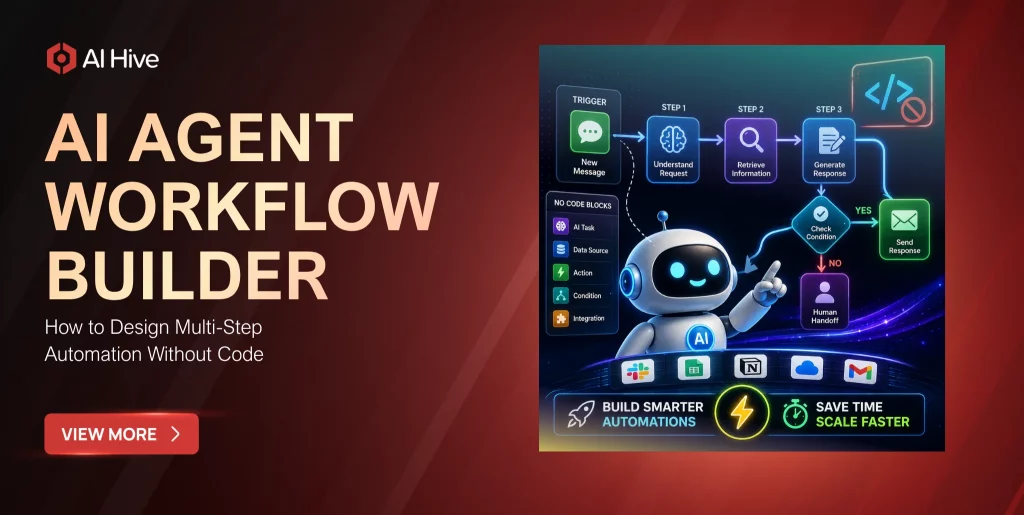

Building an AI agent used to require a team of machine learning engineers, months of development, and a six-figure infrastructure budget. That equation changed dramatically in 2026. No-code AI agent workflow builders now let operations managers, product leads, and business analysts design multi-step automation workflows through visual interfaces-dragging nodes, connecting triggers, and deploying agents that handle real enterprise tasks without writing a single line of code.
The shift is not theoretical. The AI agent market reached $7.84 billion in 2025 and is projected to hit $52.62 billion by 2030, according to MarketsandMarkets. Much of that growth comes from platforms that democratize agent creation, moving the bottleneck from engineering capacity to workflow design skill. This guide explains how modern AI agent workflow builders work, what they can and cannot automate, and how to evaluate which platform fits your organization’s operational needs.
What Is an AI Agent Workflow Builder?
An AI agent workflow builder is a platform that lets you create, configure, and deploy AI agents through a visual interface rather than through code. You design workflows by arranging pre-built blocks-triggers, actions, conditions, AI reasoning steps-into sequences that the platform executes automatically. The “agent” component means these workflows go beyond simple if-then automation: they can interpret unstructured inputs, make contextual decisions, recover from errors, and interact with users in natural language.
The distinction from traditional no-code automation tools like Zapier or Make (which remain excellent for connecting apps) is that AI agent workflow builders add a reasoning layer. A traditional automation moves data between systems based on rules you define. An AI agent workflow reads an email, understands the sender’s intent, decides which of several possible actions to take, executes that action across connected systems, and composes a contextual response-all within a single workflow execution.
How Modern Visual Workflow Builders Work
The visual builder experience has converged around a consistent interaction model across platforms. Understanding this model helps you evaluate whether a specific platform’s implementation meets your requirements.
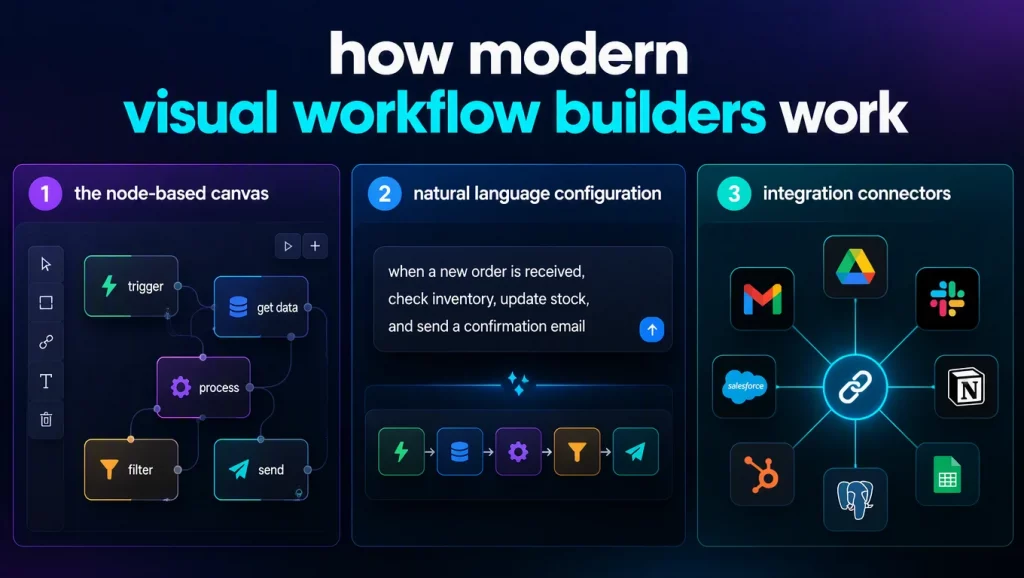
1. The Node-Based Canvas
Most platforms present a canvas where you place and connect nodes. Each node represents one step in your workflow: a trigger (incoming email, scheduled time, webhook), an AI reasoning step (classify this document, extract these fields, decide the next action), a system action (update CRM record, send Slack message, create ticket), or a control flow element (branch, loop, wait for human approval).
You connect nodes with arrows that define the execution sequence. When a trigger fires, the platform walks through the connected nodes in order, passing data from each step’s output to the next step’s input. The visual representation makes it easy to see the entire workflow at once, identify branching logic, and spot gaps in exception handling.
2. Natural Language Configuration
The 2026 generation of workflow builders added a significant capability: natural language workflow creation. Instead of manually placing every node, you describe what you want the workflow to do in plain English-“When a customer emails about a return, check their order history, generate a return label if the item is within the return window, and send them instructions”-and the platform generates the initial node graph automatically. You then refine the generated workflow visually, adjusting decision criteria, adding error handling, and connecting specific integrations.
This hybrid approach combines the speed of natural language specification with the precision of visual editing, and it has proven effective for getting non-technical users past the blank-canvas problem that stalls many automation initiatives.
3. Integration Connectors
The practical value of a workflow builder depends on its integration library. A workflow that cannot connect to your CRM, helpdesk, ERP, or communication tools is a demo, not an operational asset. Leading platforms offer 150-9,000+ pre-built connectors, with n8n supporting 400+ integrations, Make offering structured scenario building, and Zapier providing the broadest app coverage at 9,000+ integrations.
For enterprise deployments, the integration question extends beyond connector count. You need to verify that connectors support the specific actions your workflow requires-not just basic reads, but updates, deletes, webhook subscriptions, and bulk operations. AI Hive’s AI agent platform addresses this by offering 500+ pre-configured agent templates that include tested integrations for specific industry workflows.
Five Workflow Patterns Non-Technical Teams Can Build Today
The best way to understand what no-code AI agent workflow builders can accomplish is through concrete patterns that business teams are deploying in production right now.
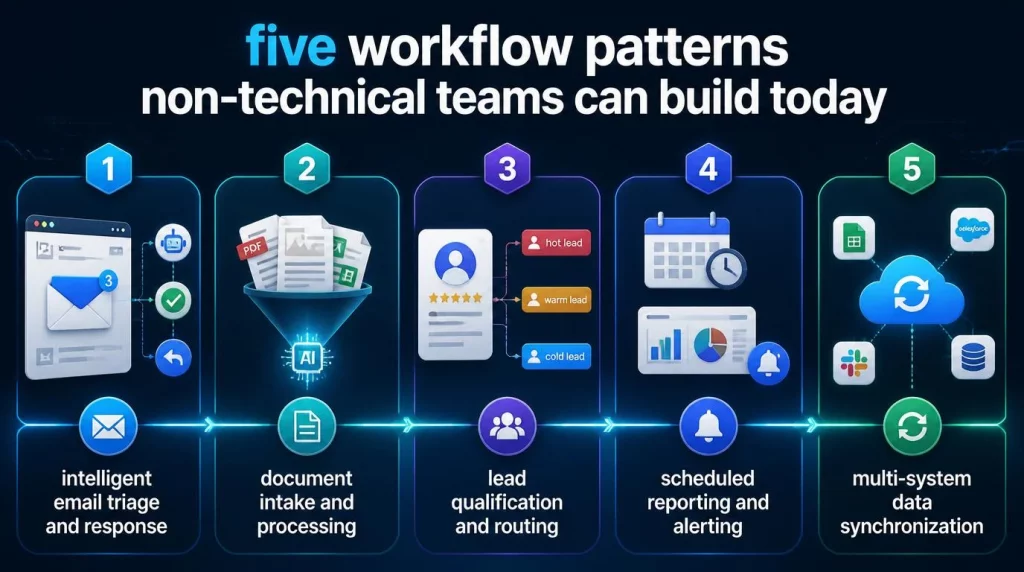
Pattern 1: Intelligent Email Triage and Response
Your support team receives 500 emails daily. The workflow reads each incoming email, classifies it by topic and urgency using an AI reasoning node, routes urgent issues to human agents immediately, handles routine inquiries (password resets, order status, shipping questions) with AI-generated responses based on your knowledge base, and logs all interactions in your helpdesk system. Teams implementing this pattern typically automate 40-60% of their email volume within the first month.
Pattern 2: Document Intake and Processing
Finance, legal, and compliance teams process standardized documents-invoices, contracts, applications-that follow predictable structures with frequent exceptions. A no-code workflow ingests documents from email attachments or upload portals, extracts key fields using AI vision and language understanding, validates extracted data against business rules, flags exceptions for human review, and routes approved documents to downstream systems. This pattern reduces manual data entry by 70-80% for organizations processing high document volumes.
Pattern 3: Lead Qualification and Routing
Sales teams waste significant time evaluating whether inbound leads match their ideal customer profile. A workflow builder can create an agent that receives new lead submissions, enriches the lead data from public sources and your CRM history, scores the lead against configurable qualification criteria, routes qualified leads to the appropriate sales representative based on territory, deal size, or product interest, and sends personalized follow-up sequences automatically for leads that need nurturing.
Pattern 4: Scheduled Reporting and Alerting
Operations managers need regular visibility into key metrics without manually pulling data from multiple systems. A workflow triggered on a schedule queries your analytics platforms, databases, and SaaS tools, aggregates the data into a structured report, applies AI analysis to identify trends and anomalies, and delivers the report via email, Slack, or a dashboard. When anomalies exceed defined thresholds, the workflow triggers alerts and can initiate investigation workflows automatically.
Pattern 5: Multi-System Data Synchronization
Enterprises operate dozens of SaaS applications, and data consistency across systems is a persistent challenge. A workflow builder can create agents that monitor changes in your source-of-truth system, validate changed data against business rules, propagate updates to connected systems in the correct order, handle conflicts when the same record has been modified in multiple systems, and log synchronization history for audit purposes.
Evaluating AI Agent Workflow Builders: What to Look For
The market has at least 14 competing platforms in 2026, and the evaluation criteria extend well beyond feature checklists. These factors determine whether a platform will serve your organization at scale.
Reasoning Quality
The AI reasoning capability is what separates agent workflow builders from traditional automation. Test each platform’s ability to handle ambiguous inputs, follow multi-step instructions accurately, and maintain context across conversation turns. Reasoning quality varies significantly between platforms, and the difference becomes apparent only when you test with your actual workflow data rather than demo scenarios.
Governance and Compliance Controls
Enterprise deployment requires audit trails, role-based access controls, approval gates, and data handling policies that satisfy regulatory requirements. A platform that lets anyone deploy any workflow without oversight creates compliance risk. Look for platforms that support environment separation (development, staging, production), deployment approvals, and detailed execution logging. Enterprise AI agent governance capabilities are non-negotiable for regulated industries.
Scalability and Reliability
A workflow that handles 50 executions per day during a pilot needs to handle 5,000 per day in production without degradation. Evaluate the platform’s execution limits, rate limiting policies, queue management under load, and historical uptime guarantees. Ask vendors for reference customers running at the scale you expect to reach within 12 months.
Total Cost of Ownership
No-code platforms price differently-per execution, per active workflow, per user seat, or hybrid models. Calculate your expected costs at production volume, including overage charges, premium connector fees, and support tier costs. Some platforms offer unlimited executions on self-hosted plans (n8n), while others charge per execution with costs that scale linearly with usage.
Common Pitfalls in No-Code Agent Workflow Design
The accessibility of no-code builders introduces a new category of risk: workflows designed by people who understand their business process but not the engineering principles that make automation reliable.
- Ignoring error handling. The happy path works in every demo. Production workflows encounter API timeouts, malformed data, rate limits, and unexpected input formats. Every node in your workflow should have a defined failure behavior-retry, skip, alert, or escalate.
- Over-automating too quickly. Start with human-in-the-loop designs where the AI suggests actions but a human approves them. Gradually increase autonomy as you build confidence in the agent’s decision quality. Fully autonomous AI workflow automation should be the end state, not the starting point.
- Neglecting testing. Visual builders make it easy to modify workflows, but they also make it easy to introduce regressions. Maintain a test suite of representative inputs-including edge cases-and run them against every workflow change before deploying to production.
- Building silos. When multiple teams build workflows independently, you get duplicate logic, inconsistent data handling, and integration conflicts. Establish a lightweight governance process that reviews new workflows for overlap and consistency with existing automation.
Conclusion
No-code AI agent workflow builders have matured from experimental tools into production-ready platforms that enable non-technical teams to deploy sophisticated automation. The technology is ready; the challenge is organizational-establishing the right governance, training, and design practices to ensure that democratized automation creates operational value rather than unmanaged complexity.
If your team is exploring no-code workflow builders and wants guidance on selecting the right platform for your industry and compliance requirements, contact AI Hive’s automation specialists to discuss your specific use case.