

A workflow tool that delighted one team in a pilot can fail the moment five departments, two thousand users, and an internal audit arrive on the same instance. Security asks why it has its own login, finance asks why the license bill doubled at renewal, and the auditor asks who approved a payment eighteen months ago, and the platform has no good answer to any of them. Most guides to enterprise workflow automation are written by vendors describing their own features, so they skip lock-in, data residency, and the point where licensing costs overtake building in-house. A neutral checklist, a cost model, and a readiness score for each process let you choose a platform that survives all three conversations.
Key Takeaways
|
What Enterprise Workflow Automation Means in 2026
Enterprise workflow automation is software that runs processes across departments, such as finance, HR, procurement, IT, and customer operations, on one platform with shared identity, permissions, and audit controls. It differs from a team-level automation tool in scale and in obligations: the platform becomes part of your control environment once it touches payroll, vendor payments, or patient records.
The scope has widened since 2024. Buyers now expect deterministic process logic and AI decision points in the same flow, which is the shift our guide to AI workflow automation describes in detail.

Volume is the first practical difference. A platform that handles fifty approval chains for one team may struggle with thousands of concurrent instances across departments, each with its own exception patterns and compliance rules.
Governance is the second. Internal audit will ask for evidence, not assurances, and the platform has to produce it on demand.
The market has converged from several directions. Business process management suites, RPA vendors, IT service platforms, and integration tools all now sell enterprise workflow automation with AI features, so two products with the same label can have very different strengths in process modeling, integration depth, or governance.
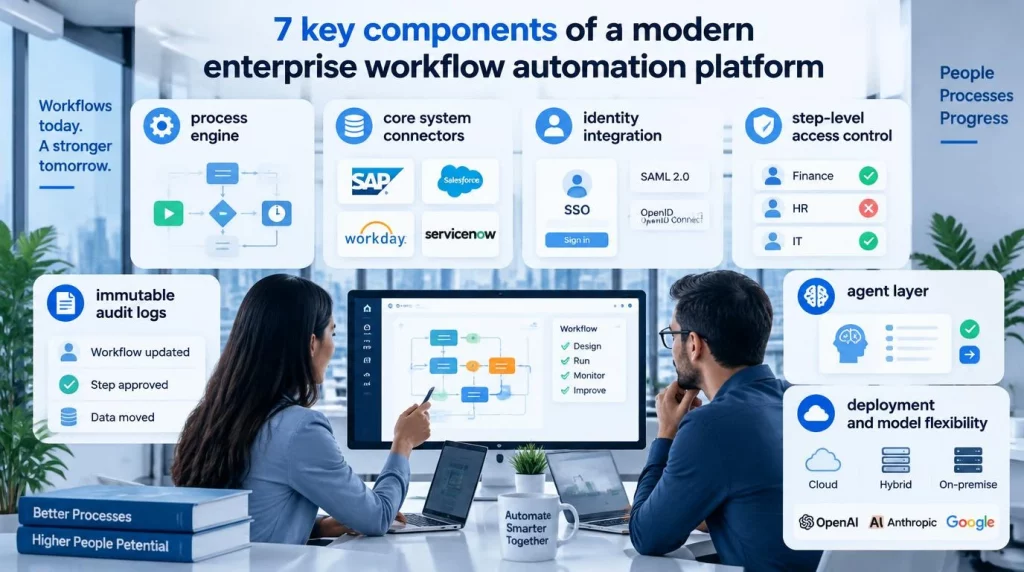
7 Key Components of a Modern Enterprise Workflow Automation Platform
A modern enterprise workflow automation platform combines seven components, and the gaps usually show up in the last four.
- Process engine: The engine models, runs, and versions workflows with parallel steps, timers, and retries.
- Core system connectors: Maintained connectors to ERP, CRM, HR, and ticketing systems, not only generic webhooks.
- Identity integration: Single sign-on through your identity provider using SAML 2.0 or OpenID Connect, with automated user provisioning.
- Step-level access control: Permissions enforced at each workflow step, so a payment approver never sees HR onboarding data.
- Immutable audit logs: The platform keeps write-once records of who changed a workflow, who approved a step, and what data moved, exportable to your security tooling.
- Agent layer: AI agents that resolve or escalate cases the rules do not cover.
- Deployment and model flexibility: Cloud, hybrid, or on-premise hosting, and the ability to use more than one AI model provider.
Connectors deserve the hardest testing. A connector that breaks silently when a vendor changes its API creates failed instances nobody notices until month-end, which is why maintained, monitored integrations matter as much as the process engine; our guide to AI agent integration covers the patterns for connecting agents to core systems.
6 Top Use Cases by Department
Enterprise workflow automation pays off fastest in high-volume, cross-department processes where approvals and handoffs currently move by email.
| Department | Process | What automation changes |
|---|---|---|
| Finance | Invoice approval and vendor payments | Routes invoices by amount and cost center, with approvals logged for audit |
| Procurement | Purchase requests and vendor onboarding | Collects documents, runs checks, and creates vendor records across systems |
| HR | Employee onboarding and offboarding | Provisions and removes access in every system on a single trigger |
| IT | Access requests and change approvals | Applies approval chains by risk and records each decision |
| Customer operations | Refunds, disputes, and escalations | Moves cases between teams with deadlines and full history |
| Compliance | Policy attestations and control testing | Schedules, collects, and archives evidence automatically |
Exception-heavy processes in this table, such as disputes and vendor onboarding, are where rule-based flows struggle most. Teams weighing bots against agents for those steps can use our comparison of AI agent vs RPA to decide which steps stay deterministic.
6 Criteria to Compare Enterprise-Ready Platforms
Vendor pages describe governance features one by one, but an enterprise workflow automation buyer needs them scored together. The table sets out what enterprise-ready looks like and the common gap in tools built for smaller teams.
| Criterion | Enterprise-ready | Common gap in SMB-first tools |
|---|---|---|
| Core system connectors | Maintained connectors to ERP, CRM, and identity systems | Webhook-only integrations that fail silently on API changes |
| Role-based access | Permissions enforced per workflow step | Permissions only at workspace level |
| Audit logging | Immutable, exportable, retained as regulation requires | An activity feed visible only inside the vendor’s dashboard |
| Deployment | Cloud, hybrid, and on-premise options in production | Cloud-only, single-region hosting |
| Model flexibility | Tasks routed across several AI model providers | Locked to one model vendor |
| Exception handling | An agent layer that resolves or escalates non-standard cases | Hard failure or a growing manual queue |
Three governance checks deserve a live test rather than a slide. Single sign-on should run through your real identity provider, such as Okta, Microsoft Entra ID, or Ping Identity, with users provisioned and removed automatically. Step-level access should be tested with a real cross-department scenario, for example a finance approver who must never see an HR case on the same instance.
The audit log test is the strictest part of any enterprise workflow automation evaluation. A compliance lead should request a sample export, confirm that your security or GRC tooling can ingest it without a custom parser, and check that entries cannot be edited after the fact and are retained for the period your regulation requires.
Deployment options vary widely across well-known platforms. Camunda and n8n can be self-hosted, Pega and Appian offer client-managed deployment alongside their clouds, Microsoft Power Automate runs as a cloud service that reaches local data through an on-premises data gateway, and Kissflow is delivered as SaaS. Each claim should be confirmed against current documentation and a reference customer on the same deployment model.
Every vendor should be scored on every row before the first demo, because demos are built to show strengths. A reference customer for your exact deployment model, on-premise, hybrid, or multi-region cloud, is worth more than any feature list.
4-Step Implementation Roadmap: From Identity to Center of Excellence
An enterprise workflow automation program succeeds or stalls on which processes it starts with. A readiness score on three factors keeps budget away from processes that were never good candidates.
| Factor | Ready (score 2) | Needs work (score 1) | Not ready (score 0) |
|---|---|---|---|
| Data standardization | Structured inputs in a consistent format | Mixed formats with a few templates | Every input arrives differently |
| Frequency of runs | Thousands of runs a month | Hundreds a month | A few dozen a year |
| Exception rate | Under about 10 percent of cases | 10 to 30 percent | Over 30 percent |
The thresholds are our planning guidance. A process scoring five or six is a strong candidate for rule-based automation, three or four usually needs intake redesign or an agent layer for exceptions, and two or below should stay manual for now.
The rollout then follows a familiar order:
- Identity and audit first: SSO, provisioning, and log export are configured and tested before any business process goes live.
- Pilot department: Three to five high-scoring processes in one department prove the platform and the operating model.
- Exception layer: Agents are added at the exception points of live flows once the baseline is measured.
- Center of excellence: A small central team owns standards, reusable components, and review of new workflows.
Teams that design these flows in an AI agent workflow builder can place rules, agents, and approval steps on one canvas, which simplifies review with risk and compliance teams.
ROI Drivers: Where Savings Come From and Where Costs Hide
The return on enterprise workflow automation depends on hours saved, error reduction, and cycle time, but the cost side is where most surprises happen. Licensing units scale differently as programs grow, and both sides of the equation deserve the same rigor.
Benefits arrive in three forms. Staff hours fall on high-volume processes, errors and rework drop because rules apply the same way every time, and cycle times shrink when approvals no longer wait in inboxes. Hours are the easiest to count, so most business cases lead with them and treat faster cycles and fewer errors as upside. Error reduction can still be measured as fewer reversed transactions or rework tickets, and cycle time as the median hours from request to completion, both of which the platform’s own logs can report.
Microsoft’s published Power Automate pricing illustrates the main units: $15 per user per month for Premium, $150 per bot per month for the Process plan, and $215 per bot per month for Hosted Process. The illustrative model below applies those units to a mid-size program.
| Scenario | Licensing basis | Illustrative monthly cost |
|---|---|---|
| 1,000 users on a per-user plan | $15 per user | $15,000 |
| 30 unattended processes on a per-bot plan | $150 per bot | $4,500 |
| Internal platform team of three engineers | Loaded cost of about $10,000 each | About $30,000, plus infrastructure |
The comparison shows why the licensing unit matters more than the list price in enterprise workflow automation. A per-user model grows with headcount even when automation volume does not, while a per-process model grows with the number of automations, and self-building only wins when your process count and customization needs are high enough to keep a platform team fully used.
Three drivers usually decide the return: the hours removed from the highest-volume processes, the exception rate after automation, and the share of cases that still need a person. Tracking those three per process, monthly, tells you where to invest next.
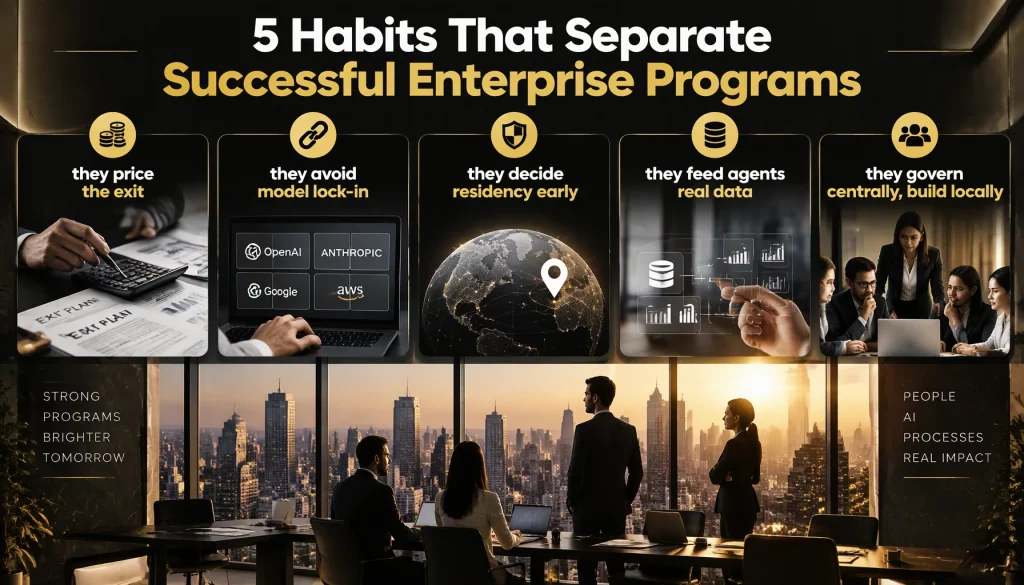
5 Habits That Separate Successful Enterprise Programs
Successful enterprise workflow automation programs share a handful of habits that vendor content rarely mentions.
- They price the exit: Before signing, they estimate what it would take to move workflows, connectors, and logs to another platform, because proprietary no-code engines make migration a rebuild.
- They avoid model lock-in: A platform tied to one model provider exposes every workflow to that provider’s prices, rate limits, and outages.
- They decide residency early: Legal teams confirm which workflows may send data outside the country before the architecture is fixed.
- They feed agents real data: An agent layer only helps when it can read the same systems of record a human reviewer checks.
- They govern centrally, build locally: A small central team sets standards and reviews, while departments build within them.
Model routing is one of the clearest levers on the running cost of enterprise workflow automation. The RouteLLM study from LMSYS and UC Berkeley, presented at ICLR 2025, showed that a trained router sending simple queries to a cheaper model cut costs by up to 85 percent on MT Bench while keeping 95 percent of GPT-4’s quality, with smaller savings of 35 to 45 percent on harder benchmarks.
Those numbers come from benchmarks rather than enterprise workflows, so they indicate the size of the opportunity, not a guaranteed saving. A platform that can route each step to a suitable model, and run some models on your own infrastructure, keeps both cost and residency under your control.
Measurement is the last habit. Mature enterprise workflow automation programs publish a short monthly scorecard per process, covering volume, exception rate, hours saved, and open incidents, so sponsors see value and weak automations get fixed or retired instead of quietly accumulating cost.
Conclusion
Enterprise workflow automation is a governance decision, a cost model, and an architecture choice that shapes your flexibility for years. Step-level access, immutable audit logs, the right licensing unit, a readiness score for each process, and an agent layer for exceptions separate platforms that scale from those that stall at the security review. This quarter, your team can score its top twenty processes for readiness and model three-year licensing cost for two shortlisted platforms at projected volume.
The next question is how rules, agents, and people run under one governance layer on infrastructure you choose. Our platform features page shows how AI Hive supports hybrid and on-premise deployment with more than one model provider.