


Three vendors pitch you an AI virtual agent, a chatbot, and an AI agent in the same week, and by Friday you cannot tell which one solves your problem. The stakes are real: Klarna announced in 2024 that its assistant did the work of 700 full-time agents, and by 2025 its CEO said that a focus on cost had lowered quality. This guide defines the category, compares it with chatbots and AI agents, and shows what separates deployments that hold up from the ones that get walked back. You will finish with a framework for choosing before your next demo.
Key Takeaways
|
What Is an AI Virtual Agent, and How Is It Different From a Chatbot?
An AI virtual agent is a conversational system that understands freeform text or speech, keeps context across a session, and completes a task in connected systems instead of only answering. IBM defines a virtual agent as a combination of natural language processing, intelligent search, and robotic process automation in a conversational interface, and it contrasts chatbots that respond with virtual agents that can understand, learn, and do.
It is not a scripted chatbot, and it is not a background automation script. A customer who wants to change a flight shows the difference. A basic chatbot points that customer to a policy page, whereas an AI virtual agent looks up the booking, checks the fare rules, calculates the change fee, and confirms the new itinerary inside the same conversation.
Three tests separate the two in a vendor demo.
- Context: A chatbot treats each message alone or follows a script, while the virtual agent carries context across the whole session.
- Action: A chatbot returns information, while the virtual agent changes something in a connected system, such as a booking or a ticket.
- Intent: A chatbot matches keywords or fixed paths, while the virtual agent interprets the request even when the wording changes.
A virtual agent that cannot securely reach your core systems fails the second test, which makes it a chatbot with better marketing.
AI Virtual Agent vs Chatbot vs AI Agent: Side-by-Side Comparison
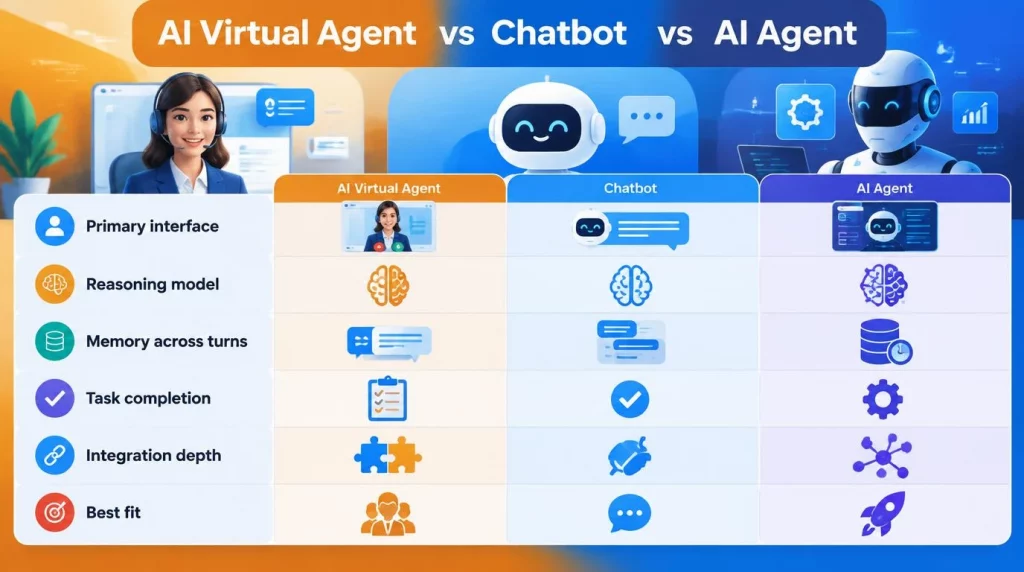
Marketing language in this space routinely blurs three categories, so the definitions come first. A chatbot answers questions from a fixed script, a decision tree, or a static knowledge base. An AI agent pursues a goal by planning steps, calling tools or APIs, and adjusting to the results, and it does not need a chat interface at all.
| Dimension | Chatbot | AI virtual agent | AI agent |
|---|---|---|---|
| Primary interface | A chat window only | Chat, voice, or a messaging channel | Often none, because it runs in the background |
| Reasoning model | Fixed rules or a decision tree | Context-aware, intent-based reasoning | Multi-step planning with tool use |
| Memory across turns | Minimal or none | Full session context, sometimes long-term | Persistent state across a whole workflow |
| Task completion | Answers questions only | Completes a bounded task end to end | Orchestrates entire processes across systems |
| Integration depth | Shallow, often FAQ-only | Moderate to deep | Deep, multi-system, API-driven |
| Best fit | High-volume, low-risk queries | Customer-facing service and support | Internal process automation |
The categories overlap. Both chatbots and an AI virtual agent can be built as specialized types of AI agent, but not every AI agent involves a conversation. For a deeper look at how the first two diverge in practice, see our comparison of AI agent vs chatbot.
What Are the Core Capabilities of a Modern AI Virtual Agent?
Capabilities decide whether an AI virtual agent survives contact with production, so buyers should test them one at a time. Five matter most, and the last two are where vendors differ the most.
- Intent understanding: The agent interprets nuanced phrasing and context shifts in the middle of a conversation instead of matching keywords.
- Tool use: The agent reads and writes in operational systems such as a CRM or a billing platform through APIs, which lets an AI virtual agent turn an answer into a completed task.
- Bounded autonomy: The agent decides within limits you set, and it hands off or asks for approval outside them.
- Escalation with context: The agent passes the full conversation and its reasoning to a person, so the customer never repeats themselves.
- Auditability: The agent logs intent, tool calls, data access, and outcome per session, which compliance teams need to trace an error to its cause.
Autonomy is a setting, not a switch, and the table below shows three common configurations.
| Autonomy setting | What the agent may do | Typical use |
|---|---|---|
| Suggest | The agent drafts the action and waits for a person to approve it | Refunds above a limit, contract changes |
| Act within limits | The agent executes reversible actions up to a threshold | Password resets, order changes |
| Act and report | The agent executes and logs the result for later review | Status lookups, appointment reminders |
Full autonomy across a whole process belongs to the AI agent category and carries its own risks. Our guide to the autonomous AI agent covers those risks and the guardrails that contain them.
One demo can test most of this. You should ask the vendor to complete a real task in your systems, force a handoff halfway through, and then open the log for that session. An AI virtual agent that cannot show its own tool calls has not earned any autonomy.
Which Use Cases Work for an AI Virtual Agent Across Industries?
Use cases cluster around high-volume, repetitive conversations where the answer depends on data in another system. The patterns below are typical designs, not client cases.
| Use case | Typical task for an AI virtual agent | Systems touched | Human checkpoint |
|---|---|---|---|
| Customer support, tier 1 | The agent verifies identity, checks an order, and issues a refund under a set limit, at any hour | CRM, order system, payments | Refunds above the limit |
| IT and HR help desk | The agent resets access, answers benefits questions, and opens tickets | ITSM, HR system | Access changes |
| Banking and insurance | The agent takes card dispute intake and reports loan or claim status | Core banking, identity | Any movement of money |
| Healthcare | The agent schedules appointments, checks eligibility, and collects pre-visit intake | Scheduling, EHR, payer portals | Any clinical question |
| Personal productivity | The agent schedules meetings and sorts email for one employee | Calendar, mail | Sending on the user’s behalf |
Regulated industries face a different calculus, because a wrong answer or a mishandled data field carries compliance consequences and not only a poor experience. In our view, a narrowly scoped agent, such as one that only handles dispute intake, beats a generalist agent asked to do everything at once, because you can test it fully before go-live. Our roundup of enterprise AI agent use cases collects named examples across six functions.
Picking the first use case is a ranking exercise. You should score each candidate task on monthly volume, how repeatable its steps are, and the cost of a wrong answer. High volume, repeatable steps, and a low cost of error make the best first task for an AI virtual agent, and a task that fails any one of the three should wait for the second phase.
What Technology Stack Sits Behind an AI Virtual Agent?
An AI virtual agent is a stack, not a model, and each layer is a place where a vendor can be strong or weak. The table lists the seven layers and one question to ask about each.

| Layer | What it does | Question to ask the vendor |
|---|---|---|
| Language model | The model behind an AI virtual agent understands the request and writes the reply | Which models are supported, and can we switch them? |
| Knowledge retrieval | Retrieval grounds answers in your own documents | How are permissions applied to each user’s questions? |
| Orchestration and memory | The orchestrator keeps context and plans the next step | What happens to state when a session ends? |
| Tool and system integration | The agent reads and writes through APIs in the CRM, billing, and ITSM | How are credentials scoped, and are calls logged? |
| Guardrails and handoff | Policy checks run first, and a person takes over when they fail | Which actions require approval, and who sets the threshold? |
| Channels and voice | The agent serves web chat, messaging, and voice | What do speech layers add to latency and cost? |
| Observability and evaluation | The platform records transcripts, tool calls, and quality metrics | Who reviews the failures, and how often? |
IBM’s definition lists robotic process automation as one ingredient, and our breakdown of AI agent vs RPA explains where rule-based automation stops and reasoning begins. In practice, deterministic steps run best as fixed automation that the language model calls as a tool, which keeps the reasoning layer small and the audit trail short.
What Are the Benefits and Limits of an AI Virtual Agent?
The benefits of an AI virtual agent are real and measurable, and so are the limits. The evidence below is mostly from one company because few deployments publish numbers, so treat it as a reference point and not a benchmark.
Klarna’s February 2024 announcement is the most cited case. In its first month the assistant handled 2.3 million conversations, two-thirds of Klarna’s service chats, and Klarna said it did the work of 700 full-time agents. It also reported that resolution time fell from 11 minutes to under two and that repeat inquiries dropped 25 percent.
- Speed and coverage: An AI virtual agent answers at any hour and in many languages, and Klarna’s results announcement says its assistant ran in 23 markets in more than 35 languages.
- Consistency: The same policy applies to every conversation, which removes variation between shifts and sites.
- Scale on demand: Volume spikes reach the queue without a hiring cycle, as long as the systems behind the agent can carry the load.
- Quality risk: A system tuned for cost can lower the quality of resolution, as the next section shows.
- Integration cost: A tool that looks cheap on a price sheet can become expensive once connectors to legacy systems are built and maintained.
- Accountability: Someone must own wrong answers. In 2024 a Canadian tribunal held Air Canada liable for wrong information that its website chatbot gave a customer in Moffatt v. Air Canada, so escalation paths and audit logs are a design requirement.
How Do Leading AI Virtual Agent Platforms Price and Position Themselves?
Pricing units differ so much across AI virtual agent platforms that a like-for-like comparison needs arithmetic. The table reflects each vendor’s own pages as read on September 24, 2026, and the vendors other than AI Hive are named without links because they compete with our platform.
| Platform | How it prices | What to watch |
|---|---|---|
| Intercom Fin | From $0.99 per outcome, with helpdesk seats from $29 per seat per month billed annually | Standalone use has a minimum monthly commitment, and an outcome includes a customer who does not ask again |
| Salesforce Agentforce | Flex Credits at $500 per 100,000, with 20 credits per standard action and 30 for a voice action, or $2 per conversation for customer-facing agents | The conversation model cannot run alongside Flex Credits in the same org |
| Microsoft Copilot Studio | A $200 monthly pack of 25,000 Copilot Credits, with pay-as-you-go coverage after that | The per-user Microsoft 365 Copilot license is $30 per month and is a separate line |
| AI Hive | The homepage lists no price and describes a no-code Agent Studio and a Marketplace of 100+ agents for building an AI virtual agent | Deployment options are SaaS, on-premise, and hybrid, and the homepage cites 500+ active clients |
At the listed rates, one standard Salesforce action costs $0.10, because 20 credits at $500 per 100,000 is $0.10. The $2 conversation model therefore equals 20 actions, so an agent that uses fewer than 20 standard actions per conversation costs less on credits. Intercom’s per-outcome model works differently: you pay when a conversation resolves, so a quiet month costs little and a resolution spike costs more.
A fair bake-off uses the same 50 real conversations for every vendor. You should record resolution, escalations, and the bill under each vendor’s own unit, because a cheap unit can hide an expensive conversation.
When Do AI Virtual Agents Succeed, and When Do They Fail in Production?
Deployments that hold up share a few traits, and the ones that get reversed share the opposite. Klarna shows both outcomes for an AI virtual agent in one company: after the 2024 results, its CEO said in May 2025 that a focus on cost led to lower quality, and the company began recruiting human support staff again, as Customer Experience Dive reported.
Gartner’s data points the same way. Its December 2025 survey of 321 customer service leaders found that only 20 percent had reduced agent staffing because of AI, and 42 percent were creating specialized roles such as conversational AI designers. In June 2025 Gartner had predicted that half of the organizations expecting to cut service staff significantly would abandon those plans by 2027.
| Factor | Deployments that hold up | Deployments that get walked back |
|---|---|---|
| Scope | One narrow task, tested end to end | A generalist agent launched across everything |
| Handoff | A human takeover with full context | A dead end that repeats questions |
| Success metric | Resolution quality, repeat contacts, and cost | Cost per conversation alone |
| Integrations | Clean APIs into the systems of record | Custom middleware built after go-live |
| Ownership | A named team that reviews failures weekly | No owner once the pilot ends |
For an AI virtual agent, the pattern behind the table is simple: the technology rarely fails first, and the operating model does. Teams that skip a narrow pilot, underestimate integration cost, or ignore change management for the human team repeat the same errors that Klarna hit on its way to a hybrid model.
How Should an Enterprise Choose Between the Three?
Selecting between these technologies is not a matter of picking the most advanced option. It is a matter of matching the technology to the task, the risk tolerance, and the systems you already run.
- Error tolerance: Low-risk, high-volume questions belong on a chatbot, while tasks with financial or clinical consequences need the reasoning and audit trail of an AI virtual agent or an AI agent.
- System count: A task confined to one knowledge base rarely justifies an AI agent, while a task that spans several systems will overwhelm a basic chatbot.
- Review needs: Tasks that need real-time approval favor a virtual agent with a human step, while background processes tolerate an AI agent with periodic audit review.
- Data residency: When regulation keeps data in a specific jurisdiction or environment, on-premise or hybrid deployment removes most cloud-only vendors from the shortlist.
- Internal talent: Organizations without an AI engineering team should weigh a pre-built template from a marketplace against a long custom build.
The table below shows where different buyers should start.
| Your situation | Start with | Why |
|---|---|---|
| A small business with one support inbox | A chatbot, or a virtual agent on a per-outcome plan | Low volume makes minimums and setup effort the main cost |
| A contact center with high-volume repeat requests | An AI virtual agent on the top five intents | Repetition gives the fastest measurable resolution gains |
| A bank, insurer, or health provider | A virtual agent with audit logging and hybrid or on-premise hosting | Data residency and traceability come before capability |
| An operations team with back-office backlogs | An AI agent with approval steps | The work has no chat window and touches several systems |
A small team can start in five steps.
- Pick one task: The first task should be high-volume and low-risk, such as order status or password resets.
- Set a baseline: Your team records current resolution time, repeat contacts, and cost per conversation before launch.
- Run in shadow mode: The agent drafts answers while people send them, and the team compares the two.
- Launch with handoff: Automatic replies go live for that one task, with a human takeover for everything outside it.
- Review weekly: The team reads failed conversations every week and widens the scope only when the metrics hold.
Conclusion
An AI virtual agent earns its place when the task is narrow, the systems behind it are reachable, and a person can take over with full context, and it fails when a team optimizes for cost alone. This week, your team should list the five most common conversations it wants to automate, count the systems each one touches, and decide which action needs an approval step.
The next questions come after the pilot: how you price it when volume grows, and how you measure quality once the novelty fades. If you want to map your workflows to the right category, explore our enterprise AI agent platform and talk to the team about a narrow first deployment.