


Your engineers spent three sprints wiring a large language model into the claims workflow, and it still cannot close a single ticket without someone copying data between three systems. That gap is the whole AI agent vs LLM question: the model writes the answer, but nothing in it remembers the customer, calls the CRM, or checks whether the job is done. Teams that miss the distinction either build agents for one-line questions and pay for it, or expect a model to run a process it was never wired to touch. One decision rule, plus honest numbers on cost and reliability, tells you which layer each workflow needs.
Key Takeaways
|
What Is an LLM, and What Is an Agent?
An LLM predicts the next words in a sequence and returns an answer in one pass, while an agent is a system that uses an LLM to decide and take actions toward a goal. The AI agent vs LLM distinction is therefore between a component and a system built around it.
A large language model is strong at single-turn cognitive work: drafting a policy summary, extracting fields from a contract, or answering a scoped question from a knowledge base. It does not check whether that contract matches your CRM record, escalate an exception, or come back tomorrow to finish the task. Each new prompt starts from zero unless something outside the model rebuilds the context.
An AI agent keeps the model as its reasoning engine and adds what the model lacks. In a claims process, the agent reads the claim, looks up the policy in the core system, checks fraud rules, asks for a missing document, and only then routes the case to a person for the judgment call. None of those steps is text generation; they are actions, and a model alone can describe an action but cannot perform it.
How Do Agents Use LLMs?
Agents call the LLM again and again, once for each decision in a loop, rather than once per question. Anthropic’s engineering guide Building effective agents, published in December 2024, describes agents as systems where the model dynamically directs its own process and tool use, and it contrasts them with workflows, where code orchestrates the model along predefined paths.
Inside that loop, the LLM plays a few distinct roles. In the AI agent vs LLM picture, these roles are what the model contributes, while the agent supplies everything around them.
- Planner: The model breaks the goal into steps and decides which one comes next.
- Tool caller: The model picks a tool and fills in its arguments as structured output, and the agent’s code runs the call.
- Reader: The model interprets tool results, documents, and messages and decides whether they answer the question.
- Judge: The model checks whether the goal is met, or whether to retry, re-plan, or hand off to a person.
Anthropic’s advice is to find the simplest solution that works and add complexity only when needed. Many tasks that look like they need an agent are better served by a fixed workflow that calls the model at set points, which is cheaper and easier to test.
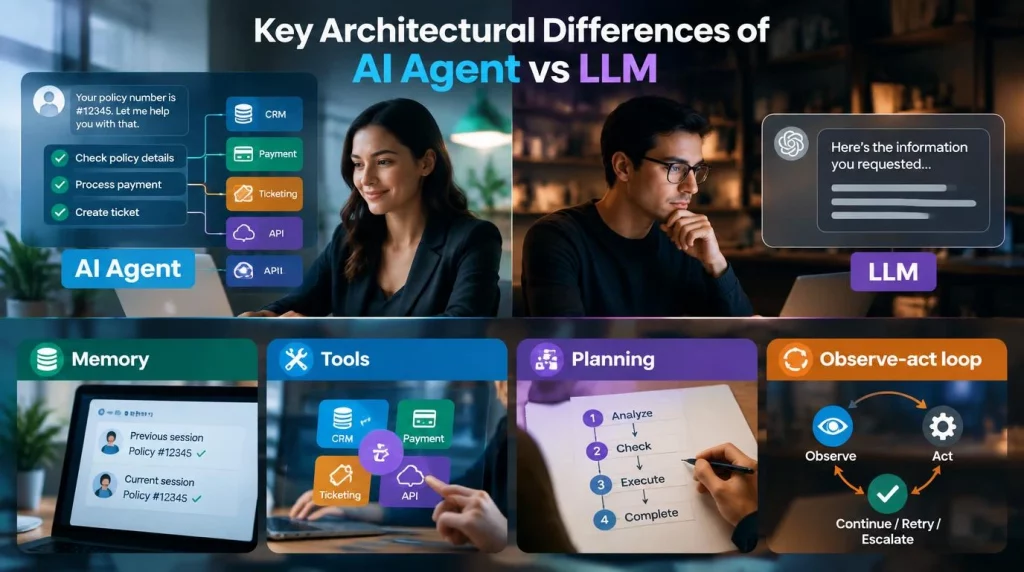
Key Architectural Differences of AI Agent vs LLM
Four components separate a real agent from a model with a long system prompt. Remove them and the AI agent vs LLM gap disappears, because what remains is a model that writes well and does nothing else.
- Memory: The agent stores what happened in earlier steps or sessions, so it does not ask a customer for the same policy number twice.
- Tools: The agent calls a CRM, a payment processor, a ticketing system, or an internal API, turning an answer into a completed action.
- Planning: The agent breaks a goal into an ordered sequence before it acts.
- Observe-act loop: After each action, the agent checks the result and continues, retries, or escalates.
| Component | Plain LLM | AI agent |
|---|---|---|
| State | Only the current context window | Session and long-term memory stores |
| Control flow | One pass from input to output | A loop with stop conditions and limits |
| Side effects | None | Writes to real systems through tools |
| Guardrails needed | Output filtering and review | Permissions, approval gates, audit logs, and limits |
The guardrail row is the one teams underestimate. A wrong LLM answer is a review problem, while a wrong agent action is an incident in a live system.
Agents also sit next to older automation. Robotic process automation replays fixed clicks and breaks when a screen changes, and many enterprises let an agent handle the judgment while RPA handles stable, high-volume steps. Our breakdown of AI agent vs RPA explains where a hybrid beats replacing one with the other.
AI Agent vs LLM: Capability Comparison
The capability gap is easiest to see on the same request. The table runs common tasks through each approach, and it shows that the AI agent vs LLM choice is about scope, not intelligence.
| Task | What a single LLM call does | What an AI agent does |
|---|---|---|
| “What is our refund window?” | Answers correctly from one policy document | Adds nothing useful, because one call already finishes the job |
| A customer asks for a refund | Drafts a reply for staff to send | Checks the order, confirms eligibility, issues the credit, logs the case, and escalates exceptions |
| Summarizing a 40-page contract | Returns a summary in one pass | Adds value only if it must compare the contract with a CRM record or a template |
| A new employee needs system access | Explains the request process | Opens the request, checks the manager approval, provisions access, and confirms |
Agents and chatbots get confused for the same reason. A chatbot built on a single LLM call can sound capable while doing nothing outside the chat window, and our comparison of AI agent vs chatbot lists the technical markers that separate the two before you sign a contract.
When Do You Need an Agent vs Just an LLM?
Most teams need a short set of questions, answered honestly for one workflow, not a debate. The signals below are our rule of thumb, and they settle most AI agent vs LLM decisions in a single meeting.
A single LLM call is enough when all four of these hold:
- Single turn: The task finishes in one exchange, such as summarizing, classifying, drafting, or translating.
- No outside check: Nothing outside the model needs to be verified or updated for the task to be done.
- Low blast radius: A person can easily catch a wrong answer before it causes harm.
- Stable output: The same input run twice gives a similar answer.
You need an agent when two or more of these hold:
- Multi-system scope: The task touches more than one system, such as a CRM, a policy engine, and an inbox.
- Step dependencies: Step three needs the result of step one.
- Persistent context: The process must remember what happened across a session, a day, or a week.
- Judgment-heavy exceptions: The exceptions need reasoning that a single prompt cannot encode safely.
- Event triggers: The work should start on a schedule or an event, not only when someone asks.
Zero or one agent signal means a well-scoped LLM call, or a short chain of them, is the more defensible and cheaper decision.
The answer also depends on who is asking. The table shows how the AI agent vs LLM call usually differs by role.
| Your situation | Usual starting point | Why |
|---|---|---|
| CTO with a small platform team | LLM calls inside fixed workflows | Predictable cost and simple testing while skills grow |
| VP Engineering with a backlog of multi-system requests | One agent with approval gates on writes | The agent removes manual handoffs, and the gates limit risk |
| CIO in a regulated industry | Workflows first, agents only after audit logging is in place | Every agent action must be explainable to an auditor |
| Innovation lead proving value | An LLM pilot with a measured baseline | A cheap win funds the agent work that follows |
Deployment completes the architecture. AI Hive’s enterprise AI agent platform lets teams start with a narrow workflow or agent and run it in the cloud, a private cloud, or on-premise, so the AI agent vs LLM choice can change per workflow without a new stack each time.
Cost and Complexity Trade-offs of AI agent and LLM
Agents cost more, run slower, and fail in more ways than a single call, and those trade-offs decide whether the business case survives. This is the part of the AI agent vs LLM comparison most pages skip.
Cost rises with every loop. Anthropic reported in June 2025 that its agents use about 4 times more tokens than chat interactions, and multi-agent systems about 15 times more. Model prices set the base: Anthropic’s pricing page on October 2, 2026 lists Claude Haiku 4.5 at $1 per million input tokens and $5 per million output tokens, and its published example puts 10,000 support conversations at about $37 on that model.
Reliability is the other half of the AI agent vs LLM trade-off, and it falls as steps grow. The tau-bench benchmark from Sierra researchers (Yao and colleagues, 2024) tested agents that talk to simulated users and call domain tools, and found that a GPT-4o function-calling agent succeeded on fewer than half of the tasks. Its new pass^k measure showed the same agent solving fewer than 25 percent of retail tasks consistently across eight trials.
| Factor | Single LLM call | AI agent |
|---|---|---|
| Model calls per task | One | Several, plus tool calls |
| Latency | Usually a few seconds | Grows with each step and tool round trip |
| Failure modes | A wrong or generic answer | A wrong action, a stuck loop, or a tool error |
| Testing | Judge the output | Judge the whole path and the final system state |
| Operations | Prompt and model updates | Monitoring, permissions, limits, and incident response |
Teams on either side of the AI agent vs LLM line cut overhead in a few proven ways. Simple requests can go to a single model call while only multi-step work reaches the agent, routine steps can run on a smaller model, repeated context can be cached, and every run can carry a step limit and a cost limit. Anthropic’s pricing documentation also lists prompt caching and a 50 percent batch discount, which suit agent steps that repeat the same instructions.
None of this argues against agents. It argues for building them only where the task justifies the overhead, and for budgeting for monitoring, limits, and human fallbacks from day one. Gartner’s June 2025 forecast that over 40 percent of agentic AI projects will be canceled by the end of 2027 cites escalating costs, unclear value, and weak risk controls, not weak models.
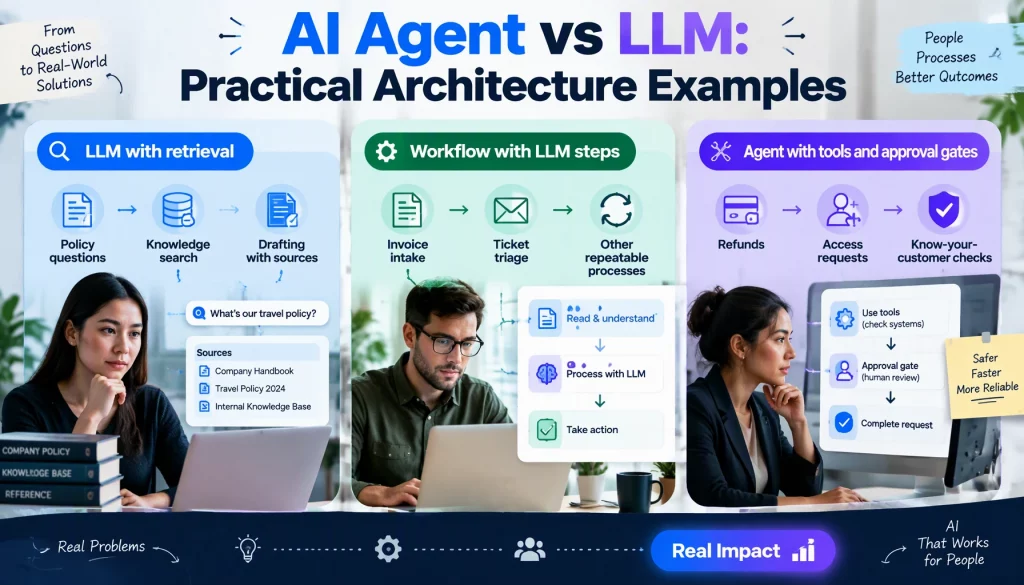
AI Agent vs LLM: Practical Architecture Examples
Three reference designs cover most enterprise needs, from no agent at all to a governed multi-agent setup. They are illustrative patterns rather than client cases.
| Pattern | How it works | When to use it |
|---|---|---|
| LLM with retrieval | One model call answers from documents retrieved for the question | Policy questions, knowledge search, and drafting with sources |
| Workflow with LLM steps | Fixed code runs each step and calls the model to classify, extract, or draft | Invoice intake, ticket triage, and other repeatable processes |
| Agent with tools and approval gates | The model plans and calls tools in a loop, and risky actions wait for a person | Refunds, access requests, and know-your-customer checks |
In AI agent vs LLM planning, the middle pattern is underused. Many processes that teams want to hand to an agent are stable enough for a workflow, which gives predictable cost and easy audit while still using the model where judgment is needed.
The third pattern is where agents earn their place. Banks run know-your-customer checks that gather documents, screen watchlists, and flag real exceptions, and insurers triage first notice of loss from intake to routing. Our roundup of enterprise AI agent use cases covers more of these patterns and the systems each one touches.
Conclusion
The AI agent vs LLM question is about matching the layer to the job: a model drafts, summarizes, and answers, while an agent remembers, calls tools, and finishes multi-step work at a higher cost and with more ways to fail. The decision rule, the cost data, and the three reference patterns let you make that call per workflow instead of per vendor pitch. This month, your team should score its top three AI requests against the agent signals and price the LLM-only version of each before building anything bigger.
Once an agent is justified, the next questions are how much autonomy it gets and how you test it before go-live. If you want to map your highest-value workflow against these patterns, talk to our team at AI Hive and we will price both approaches with you.