


Businesses spend thousands of hours each year on workflows that follow the same logic every single time: read this input, classify it, draft a response, move it to the right system. These are not creative tasks. They are repeatable processes that happen to require a human because no tool has been able to read and reason across text the way a person can – until now.
Claude automation changes that equation by deploying Anthropic’s Claude AI as an active participant inside your workflows, responding to triggers, processing inputs, and delivering structured outputs automatically. This guide covers what claude automation can actually do for your team, how to set it up without an engineering team, and how to recognize when your needs have grown past what Claude’s native tools can handle.
Key Takeaways
|
What Is Claude Automation?
Claude automation is a term that gets used in two very different ways, and the distinction determines whether your implementation succeeds or stalls at the demo stage.
The first meaning – and the one that fills most search results – is simply “using Claude to help with tasks in a chat window.” That is useful, but it is not automation. The second meaning, which is what this article addresses, is deploying Claude as a trigger-based participant in a workflow that runs without a human prompt at each step. Claude watches for something to happen – a new support email arriving, a file landing in a folder, a scheduled time – and acts on it automatically, processing the content and writing the result to wherever it belongs.
Two developments made this practical for teams without dedicated AI engineers. First, Anthropic expanded Claude’s capabilities beyond the chat interface to include computer use, file system access, and agentic desktop control. Second, Zapier’s native Claude integration now connects Claude to over 6,000 business apps through trigger-action logic that requires no code to configure. As a result, the range of what’s possible today spans from a solo operator automating invoice follow-ups in 20 minutes, to a 200-engineer build center running parallel 24/7 migration tracks across legacy enterprise infrastructure.
Claude Automation Features and Capabilities
Most teams that struggle with Claude automation are not struggling because of the technology. They are struggling because they picked the wrong deployment layer for the workflow they are trying to automate.
Claude’s automation surface area divides into three layers: no-code interfaces for individual and small team use, API-connected automations for event-driven business workflows, and developer-level multi-agent orchestration for complex or high-volume processes. If you want to understand how Claude vs Gemini for business automation and other leading models compare on the criteria that matter most for your workflow, that comparison is worth reading before you finalize your model selection.
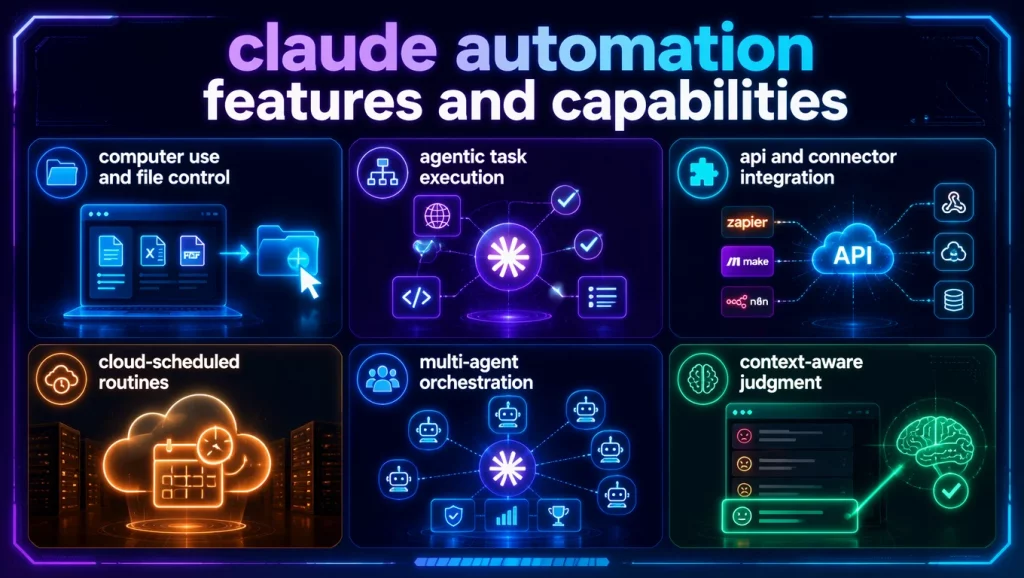
Here is what each capability covers in practice:
- Computer use and file control: Claude reads, renames, organizes, and acts on files through Claude Cowork and the desktop app, with no API configuration or code required from your team.
- Agentic task execution: Claude plans and runs multi-step workflows involving web browsing, code writing, and parallel subtask coordination via dynamic workflows in Claude Code.
- API and connector integration: Claude’s API connects to Zapier, Make, n8n, or direct webhook calls, creating event-triggered automations across your existing tool stack without rebuilding your infrastructure.
- Cloud-scheduled Routines: Released April 2026, Claude Code Routines run automated workflows on Anthropic’s cloud infrastructure on a defined schedule. Your laptop does not need to stay on for these to run.
- Multi-agent orchestration: Claude Code’s dynamic workflows spawn independent subagents, each with their own context window, enabling fan-out processing, adversarial verification, and tournament-style evaluation at enterprise scale.
- Context-aware judgment: Unlike rules-based tools that match patterns, Claude reads the actual content of a message or document and applies reasoning. It can distinguish an angry customer from a confused one sitting in the same inbox folder.
1. Claude.ai Interface Automations (No-Code)
Claude’s desktop app and Cowork mode give any team member direct access to file-based automation without writing a line of code. You grant Claude access to a folder, describe the task in plain language, and Claude works through it systematically.
The time savings are more consistent than most teams expect before they try it. One documented example from a technology journalist showed that screenshot renaming alone – Claude scanning each image, identifying its contents, and renaming the file descriptively – eliminated 15 to 20 minutes of manual work per article. For a content team producing 20 articles per month, that recovers 5 to 7 hours with zero technical setup. Storage cleanup through Cowork works the same way: Claude flags files that are technically valid but no longer relevant to your current workflow, a judgment call that a conventional disk scanner cannot make because it only applies size and file type rules.
2. Claude Routines – Scheduled Automation Without the Laptop
Claude Code Routines represent the most underreported shift in Claude’s automation capabilities since the tool launched. Released April 2026 as a research preview, Routines run multi-step development workflows on Anthropic’s cloud infrastructure on a defined schedule, even when your machine is off.
The practical applications include nightly code reviews, automated dependency updates, scheduled test runs, and weekly data summaries. For teams already on Claude Pro ($20/user/month) or Claude Team ($25/user/month), Routines is included in the plan rather than a separate add-on. The daily run limit varies by plan: 5 per day on Pro, 15 on Max, and 25 on Team and Enterprise. For many recurring operational workflows, that allowance is enough to meaningfully reduce the manual load on your team without adding a new budget line.
3. Claude Code and Dynamic Workflows (Developer-Level)
Claude Code’s dynamic workflows let Claude write and orchestrate its own multi-agent coordination logic in real time. Instead of a single context window handling a complex task from start to finish, Claude spawns subagents – each with a focused goal and an isolated context – and then coordinates their outputs into a final result.
This architecture addresses specific failure modes that emerge in long-running single-context tasks: goal drift (losing fidelity to the original objective across many turns), agentic laziness (stopping before a complex task is actually complete), and self-preferential bias (favoring its own earlier outputs when asked to verify them). These are the same patterns that made enterprise-scale system migration viable for LG CNS, and they are well-suited to any task involving parallel processing across large volumes: triage queues, codebase migrations, and multi-source research aggregation.
4. Claude Plus Third-Party Connectors (Zapier, Make, n8n)
Zapier’s Claude integration connects Claude to over 6,000 apps through trigger-action logic. You define what happens in App A – a new email, a form submission, a new spreadsheet row – and Claude processes the content and delivers a structured output to App B, whether that is a CRM field, a Slack message, or a drafted reply in your inbox. No server setup is required.
What separates this from pure routing is the reasoning layer. Zapier alone moves data between apps based on predefined rules. Adding Claude means the automation can read the full content of an email, assess its urgency, classify the issue type, and draft a contextually appropriate response, rather than simply moving the email to a folder because a keyword matched.
Top 5 Best Use Cases for Claude Automation
Claude automation delivers the most value in workflows that share three characteristics: they are high-volume, they are text-heavy, and they require contextual judgment that a rules-based tool cannot apply. If your automation only needs to move data from one place to another when a condition is met, Zapier alone is probably enough. If it needs to read, reason, and decide, Claude belongs in the loop.
The following five categories are where teams consistently report measurable time savings after deploying claude automation.
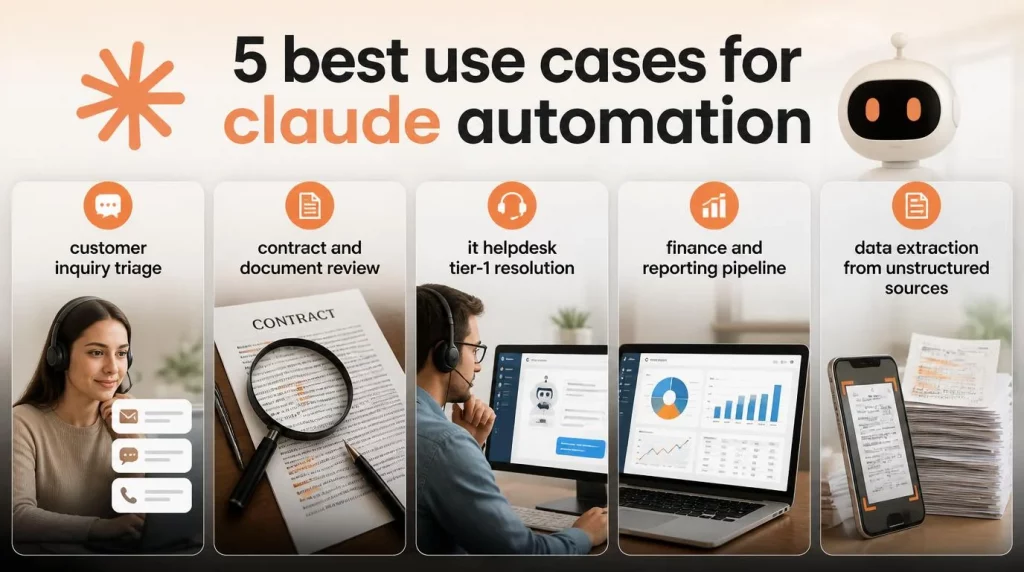
1. Customer Inquiry Triage
A support inbox receiving 300 messages per day is difficult to staff at consistent quality. Claude reads each message as it arrives, classifies it by category and urgency, and drafts a response for agent review. The agent approves or edits the draft before it sends. As a result, first-response time drops from hours to minutes, and agent attention concentrates on the cases that actually need a human decision.
2. Contract and Document Review
A legal team reviewing 50 contracts per week does not need a lawyer reading every line of every standard agreement. Claude reads each document, extracts key clauses, flags non-standard terms, and outputs a structured summary in a consistent format. Consequently, lawyers focus on the eight contracts that genuinely need their judgment, not the routine paperwork that follows a familiar template.
3. IT Helpdesk Tier-1 Resolution
When 70% of your IT tickets are password resets, VPN issues, and software provisioning requests, those tickets should not consume engineer time. Claude resolves tier-1 tickets autonomously through integration with your ITSM platform, escalating only the cases that require human expertise. If your organization is evaluating how to structure AI Hive IT automation solutions for a helpdesk environment, the platform’s pre-built IT agent templates cover the most common tier-1 resolution patterns out of the box.
4. Finance and Reporting Pipeline
PwC’s 2025 research found that 58% of CFOs expect AI to significantly reshape finance operations within three years. Invoice processing, margin analysis summaries, and reconciliation prep are the first workflows finance teams are automating with Claude plus Zapier. The outputs go directly into review-ready formats rather than raw data dumps that someone still has to clean up manually.
5. Data Extraction from Unstructured Sources
Weekly PDF reports, email summaries, and call transcripts contain information your team needs in structured form. Claude reads each input and writes the extracted data – numbers, names, decisions, action items, dates – directly to a spreadsheet row or CRM field. The alternative, without automation, is a team member doing this manually for 2 to 3 hours every week with no end date.
How to Set Up Claude Automation – Tools, Connectors, and Workflow Design
Your setup path comes down to one question: does your workflow need Claude to respond to events, run on a schedule, or coordinate multiple processes in parallel? The answer determines whether you need the no-code path, the developer path, or something in between.
Two distinct paths exist. The no-code path is operational within an afternoon for any team member, regardless of technical background. The developer path handles substantially more complexity but requires engineering time to configure and maintain over time.
No-Code Path – Claude.ai Plus Zapier
This path connects Claude to your existing tools through Zapier’s trigger-action interface. You do not need code, a server, or any infrastructure beyond your existing Claude and Zapier accounts.
- Step 1: Set up a Claude Pro or Team account. Pro ($20/user/month) provides Cowork access and the daily Routines allowance. Team ($25/user/month) increases those limits and adds admin controls for shared workflows across your organization.
- Step 2: Connect Claude to your tools in Zapier. Go to Zapier, search for “Anthropic Claude,” and add it as an action step in any Zap. Select your trigger app – Gmail, Notion, HubSpot, Typeform, or whichever tool your team already uses – and define the event that starts the automation.
- Step 3: Write your system prompt with enough specificity to be useful. Your prompt is the instruction set Claude follows on every single input that flows through the automation. Name the output format you expect. Define the classification categories Claude should apply. Specify what Claude should do when the input is ambiguous or incomplete. A prompt that says “summarize this email” produces inconsistent results across hundreds of messages. By contrast, a prompt that says “extract sender intent, urgency rated low/medium/high, and a 2-sentence reply draft” produces something consistently reviewable and actionable.
- Step 4: Test on 10 to 15 real inputs before activating. Pull actual examples from your workflow and run them through the automation in test mode. Review every output. The edge cases that break your automation are almost always hiding in your real data, not in the examples you invent specifically for testing.
- Step 5: Activate and monitor for two weeks. Review a daily sample during the first two weeks of production operation. Most failure modes – hallucinations on ambiguous inputs, missed classification categories, formatting inconsistencies – surface within the first 200 runs, not after months in production.
Developer Path – Claude Code, Routines, and Dynamic Workflows
For teams with engineering resources, Claude Code’s dynamic workflow system and Routines handle the complexity that no-code tools cannot reach. Claude writes its own coordination logic, spawning subagents with isolated context windows, running them in parallel, verifying outputs adversarially, and synthesizing the results into a final deliverable. This approach is well-suited to codebase migrations, large-scale triage queues, and research aggregation across dozens of sources simultaneously.
Claude Code Routines extend this further by scheduling workflow execution on Anthropic’s cloud infrastructure with no persistent machine required. You configure a Routine once through the Routines menu in Claude Code’s redesigned desktop app, and it runs on your defined schedule. Token budget control is built in, so you can cap a workflow at a specific token limit to manage API cost predictably across recurring runs.
Real-World Outcomes: What Claude Automation Actually Delivers
The skeptical question every operations leader asks before deploying claude automation is fair: what has it actually delivered in a real business context, not a demo? The documented results across three use cases below address that question directly.
1. LG CNS – Enterprise Migration at Half the Conventional Cost
LG CNS, the digital transformation arm of LG Group ($4.2 billion in 2025 revenue, approximately 7,000 employees), used Claude Code to migrate a construction company’s 20-year-old project management system to a modern stack. The LG CNS case study (Anthropic) documents the full outcome: 2,888 of 2,913 APIs converted at a 99.1% completion rate, with 1,340 screens moved from a proprietary legacy frontend to React.
Specifically, the entire migration was completed in 7 months at roughly 50% of the cost of a conventional rebuild, with backend and frontend conversion running simultaneously on parallel 24/7 tracks. The director of LG CNS’s 200-engineer Build Center described the result plainly: “The ROI is not simply that we did it faster. The ROI is that we made a previously difficult-to-start project possible.”
What makes this result applicable beyond LG’s scale is the methodology underneath it: small, scoped tasks defined in YAML, context chained through the local file system, and a thin orchestration harness designed to preserve Claude’s reasoning capacity rather than constrain it with excessive rules. Enterprises building their own Claude Code implementations are replicating this specific pattern.

2. Individual Productivity – Time Recovered on Work That Compounds
A technology journalist at How-To Geek documented five automations using Claude’s desktop app and Cowork mode. Screenshot renaming alone cut 15 to 20 minutes of manual work per article. Additionally, a context-aware storage cleanup surfaced 50 gigabytes of unused files in 5 minutes – files a conventional disk scanner had missed because they were technically valid, just no longer relevant to the journalist’s current workflow.
These are not enterprise-scale numbers, but they reflect a pattern that holds at every team size: claude automation recovers time that was previously too fragmented to optimize through any other means.
3. Finance Teams – Structured Outputs from Unstructured Data
The CFO Connect finance automation research documented finance teams automating invoice processing, margin analysis summaries, and reconciliation preparation using a Claude plus Zapier plus Claude Code stack. The documented setup time for a first production workflow was 20 to 45 minutes, followed by iteration for production readiness.
PwC’s parallel 2025 research adds strategic context: 58% of CFOs expect AI to significantly reshape finance operations within three years, which means teams building automation fluency now are creating a durable capability gap relative to those still waiting for the category to mature.
Claude Automation Cost Control and Scaling
Claude automation cost surprises most first-time enterprise deployers, and the reason is almost always the same: they used the wrong model for the task volume they were running.
Cost is a function of three variables – which model tier you select per task, how many tokens each run consumes, and how frequently your triggers fire over time. To understand the full cost breakdown across Claude’s plan tiers and how they map to enterprise use cases, the Claude enterprise pricing guide provides a detailed breakdown of what each tier includes and where the real cost levers sit.
Complex reasoning work – architecture design, multi-document synthesis, large codebase analysis – warrants Opus-class models. Classification, summarization, tier-1 response drafting, and structured data extraction run well on lighter models at a fraction of the per-token cost. Running Opus on every task in a high-volume automation can be 10 to 20 times more expensive than matching the model to the task complexity.
Claude Code’s dynamic workflows include built-in token budgeting to address this directly. You can prompt a workflow with a specific budget, such as “use 10k tokens,” and execution caps at that limit, which gives you predictable cost control for recurring automations before you have fully mapped the token usage profile of a new workflow.
The table below maps each deployment method to its appropriate use case, approximate cost structure, and practical ceiling, including the point where Claude’s native tools end and an enterprise orchestration layer begins.
| Method | Best For | Approx. Cost | Practical Ceiling |
|---|---|---|---|
| Claude.ai Pro + Cowork + Routines | Individual and small team automations | $20/user/month (Pro) or $25/user/month (Team) | 5–25 Routines/day depending on plan; single-user file access |
| Claude API + Zapier/Make/n8n | SME event-driven workflows, CRM automation | $0.003–$0.015 per 1K tokens + Zapier plan cost | Rate limits; no native multi-agent orchestration; no compliance audit trail |
| Claude Code + Dynamic Workflows | Engineering teams, large migrations, parallel processing | Usage-based, variable with token budgeting | Requires developer resources; significant governance overhead |
| Enterprise AI Platform (e.g., AI Hive) | Mid-market to enterprise orchestration across departments | Custom pricing | No agent ceiling; on-premise available; multi-LLM flexibility; built-in governance |
The ceiling on Claude’s native tools is well-defined. When your automation spans multiple departments, needs a compliance-grade audit trail for regulated outputs, or requires AI Hive on-premise deployment options for data sovereignty under Vietnam’s AI Law 134/2025 or comparable data residency requirements, you have moved past what Claude alone can manage cleanly. At that point, a dedicated enterprise AI orchestration layer becomes the architecturally correct choice, not a convenience upgrade.
5 Common Mistakes in Claude Automation and How to Avoid Them
Most claude automation failures do not announce themselves with an obvious error message. They accumulate quietly – in output quality that drifts, compliance gaps that go unnoticed, and cost spikes that appear weeks after the automation was already running at full volume.
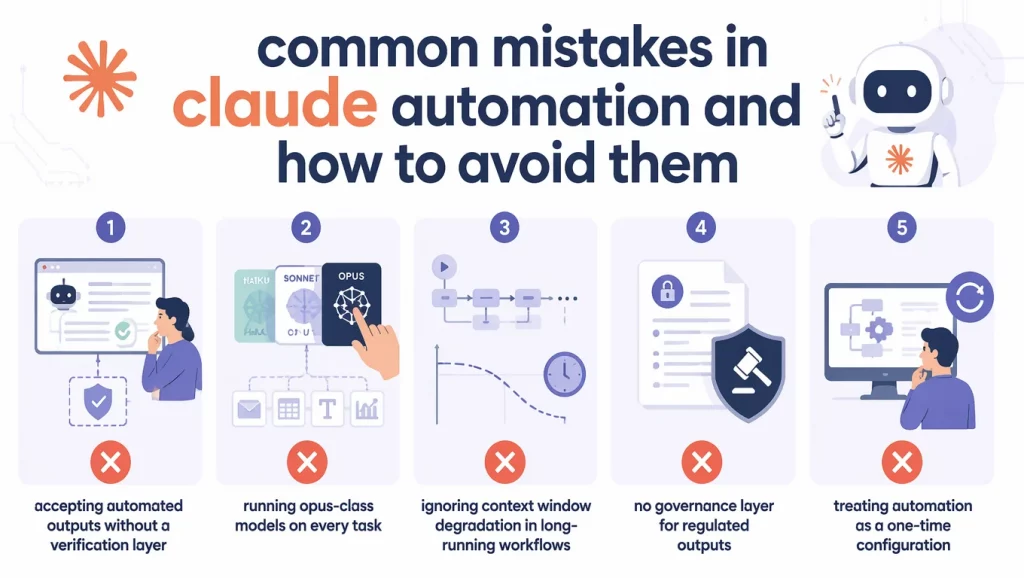
Mistake 1: Accepting Automated Outputs Without a Verification Layer
Claude is not error-free, and in automated pipelines, errors do not stay isolated. A hallucinated clause in a contract summary, or a misclassified customer complaint routed to the wrong team, creates downstream problems that are harder to diagnose than the original manual process. Every production automation needs either a human review gate for high-stakes outputs, or an adversarial subagent for lower-stakes, high-volume flows. Claude Code’s adversarial verification pattern specifically addresses this by spawning a second agent to challenge the first agent’s output against a defined rubric before results are accepted.
Mistake 2: Running Opus-Class Models on Every Task
This is the most predictable cause of unexpected cost spikes. A password reset ticket does not warrant the same model as an architecture review or a multi-document synthesis task. Specifically, the per-token cost difference between Haiku and Opus is large enough that the choice matters significantly at any meaningful automation volume. Map your workflow tasks to model tiers before you deploy at scale.
Mistake 3: Ignoring Context Window Degradation in Long-Running Workflows
Anthropic’s documentation identifies goal drift as a specific failure mode in long-running single-context sessions: the original objective becomes progressively less precise across many turns, particularly after context compaction. Constraints such as “do not include personally identifiable information” can silently disappear from the effective context after several compaction cycles. The solution is task decomposition – breaking large workflows into scoped subtasks with explicit handoffs between them, which is also what makes Claude Code’s multi-agent patterns more reliable than single-context runs at equivalent scale.
Mistake 4: No Governance Layer for Regulated Outputs
Any automated output that touches a customer record, a financial transaction, or a compliance-relevant document requires an audit trail. Claude’s native tools do not provide this out of the box. In healthcare, for example, organizations automating patient-facing workflows without a governance layer face compliance exposure that compounds with every action the automation takes. Specifically, the on-premise AI deployment for healthcare context illustrates why regulated industries require a different infrastructure posture than general-purpose cloud-based automation.
Mistake 5: Treating Automation as a One-Time Configuration
Claude models update on a regular cadence. Business processes change. Data structures evolve. An automation that produces consistent outputs in month one may degrade noticeably by month six if the underlying prompt and model configuration have not been reviewed in the meantime. Schedule quarterly reviews of active automations and track output quality metrics over time, not just at launch.
Conclusion
Claude automation has a wider range than most teams discover before they start. The entry point is genuinely accessible: an operations manager with a Claude Pro account and a Zapier connection can have a working customer inquiry automation live by the end of an afternoon. The ceiling, as the LG CNS case demonstrated, extends to migrating 20-year-old enterprise systems at half the conventional cost and in half the expected timeline. What determines which outcomes your team reaches is not access to Claude. It is how well you match the deployment method to the workflow complexity, how consistently you govern the outputs, and whether you recognize when to add an orchestration layer above what Claude provides natively.
If your team is ready to move from individual Claude automations to coordinated, enterprise-grade AI workflows – with governance controls, on-premise deployment options, and dedicated engineering support – AI Hive can help you scope the right architecture for your use case. Contact the AI Hive team to start the conversation.