

Your operations lead builds an agent in an afternoon on a no-code AI agent builder, the demo works, and then IT asks who approved its access to the customer database. That is the moment many citizen-built agents stall, because Deloitte’s 2026 State of AI in the Enterprise found that only 21 percent of organizations have a mature governance model for agentic AI. Speed was never the hard part. The teams that ship pick a builder that is truly no-code for the people building, put guardrails around the agents from day one, and know in advance which limits will force them back to engineers.
Key Takeaways
|
What Do No-Code AI Agent Builders Offer?
A no-code AI agent builder lets the people who know a process build the agent for it, without waiting for an engineering sprint. Instead of writing code, a builder assembles the agent from a goal, a prompt, connectors to business systems, and rules for when a person must approve.
It is not the same as a low-code platform, and it is not a chat window on top of a model. Low-code tools expect some scripting for advanced logic, while a genuine no-code AI agent builder keeps the whole build in visual configuration and natural language. The platform, not the builder, handles orchestration: the order of reasoning steps and tool calls.
It also differs from classic workflow automation, which follows fixed if-then rules. The table shows the line between the two.
| Dimension | Workflow automation | No-code AI agent builder |
|---|---|---|
| Decision logic | Fixed if-then rules | Reasoning from the goal and the context |
| Ambiguous input | The flow fails or stops | The agent interprets intent and picks a next step |
| Tool use | Pre-mapped integrations in a fixed order | The agent chooses and sequences tools |
| Best fit | Repetitive, predictable tasks | Variable tasks that need judgment |
The two work well together: fixed automation handles the predictable steps, and the agent handles the exceptions. Our guide to the AI agent builder category explains how builders package these pieces for business teams.
What Are the Strengths and Limitations?
The main strength of a no-code AI agent builder is that knowledge moves straight from the process owner into the agent. A claims adjuster knows which policy exceptions break automated processing better than any requirements document can describe them.
Demand is real. Gartner’s 2026 CIO and Technology Executive Survey found that 17 percent of organizations had deployed AI agents, while 42 percent expected to do so within the next 12 months. Much of that work will fall on business teams rather than central engineering.
The limits of a no-code AI agent builder are just as real, and most of them appear after the demo.
| Strength | The matching limit |
|---|---|
| Business experts build directly | They can grant an agent more data access than the task needs |
| A first version takes hours or days | Testing, versioning, and rollback are often thin |
| Templates and connectors speed up the start | Connector depth varies, and custom systems still need code |
| Usage pricing keeps entry costs low | Credits and execution caps can run out in a busy month |
Teams that outgrow a single builder usually move to a full-stack AI agent platform, where the same visual builder sits next to monitoring, access control, and deployment options. In our view, the question is not whether a builder has limits but whether you see them before an agent goes live.
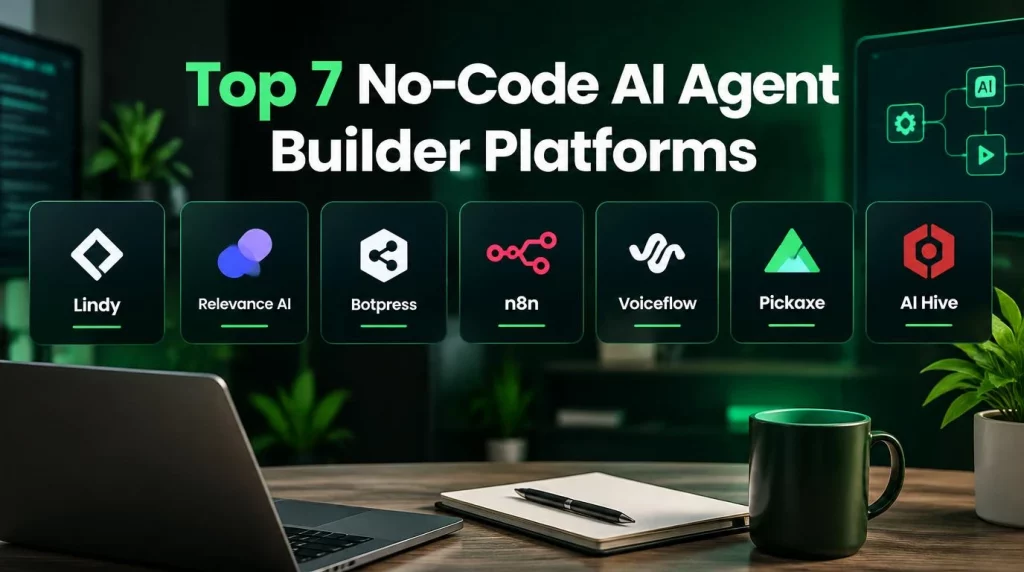
Top 7 No-Code AI Agent Builder Platforms Available
The comparison below answers the question generic lists skip: can a non-technical person actually build with each no-code AI agent builder, and where does it stop? It draws on each vendor’s own pricing and documentation pages read on October 2, 2026, and prices change often.
| Platform | Truly no-code? | Best for | Notable limits |
|---|---|---|---|
| Lindy | Yes: agents are described in natural language | Individuals and small teams automating email, meetings, and inbox work | Credits run from $29.99 to $199.99 per user per month and expire monthly, and the plans connect up to five inboxes |
| Relevance AI | Mostly: a visual builder for multi-agent “workforces” | Go-to-market and operations teams | Its pricing page shows the Enterprise tier on request, so cost needs a quote |
| Botpress | Partly: a visual studio, with an Execute Code card for custom JavaScript | Customer-facing chat and support agents | The Plus plan is $150 per month billed annually, and advanced logic moves into code |
| n8n | No, low-code: visual nodes, but expressions and code nodes are common | Technical operations teams that want self-hosting | Cloud plans start at €20 per month for 2,500 workflow executions, and the self-hosted edition uses a fair-code license |
| Voiceflow | Mostly: a visual canvas for chat and voice agents | Agencies and teams building customer conversations | Business pricing is on request |
| Pickaxe | Yes: form-based builders with white labeling | Agencies and creators who resell AI tools | The Gold plan is $29 per month billed annually, with limits on documents and actions per agent |
| AI Hive | Yes: a no-code AI agent builder (Agent Studio) for business users, with a Python SDK for engineers | Enterprises that need governance and private hosting | Built for enterprise programs rather than single-user tools |
Two patterns stand out. Tools that are truly no-code tend to target individuals or agencies, while tools built for complex workflows tend to slide toward low-code.
Beyond the table, five criteria separate an enterprise-grade no-code AI agent builder from a consumer tool. Your team can score each shortlisted vendor against them.
- Security and compliance: The vendor holds recognized reports such as SOC 2 Type II or ISO 27001, and supports HIPAA terms where health data is involved.
- Deployment flexibility: Agents can run in a public cloud for speed or in a private cloud or on-premise when data residency rules apply.
- Governance controls: Every agent has an owner, a version history, release approval, and configurable human checkpoints.
- Integration depth: Native connectors reach the ERP, CRM, and core systems you actually run, not only popular SaaS apps.
- Total cost of ownership: The estimate covers usage at peak volume, implementation, maintenance, and specialist help, not only the license. For a wider view of the market, including frameworks and orchestration tools, see our roundup of AI agent tools.
Which Use Cases Fit a No-Code AI Agent Builder?
A no-code AI agent builder fits best where the process owner understands the exceptions and the risk of a wrong action is manageable. The table maps common roles to typical agents.
| Who builds it | Typical agent | Why no-code fits |
|---|---|---|
| Finance operations lead | Matching invoices to purchase orders, with approval above a set amount | The lead knows the exceptions, and the approval step limits risk |
| Support team lead | Answering order and policy questions, with handoff to a person | Content changes often, and the lead can update it without a ticket |
| Sales operations | Researching leads and drafting first-touch emails for review | A person reviews every message before it goes out |
| HR operations | Answering policy questions from a vetted knowledge base | Answers come from approved documents only |
| Agency owner | Branded assistants resold to clients | White labeling and per-client workspaces matter more than deep integrations |
The pattern across these rows is the same. Each agent has a clear owner, a narrow scope, and a human checkpoint where a mistake would cost money or trust. In our view, a no-code AI agent builder should not be the first choice for actions that cannot be undone, such as payments or deletions.
Some candidates look like good fits and are not. A process that changes every week because the business has not settled it yet will produce an agent that nobody can test, and a task that touches five systems with custom logic in each is an engineering project wearing a no-code label. Your team should fix the process first, then automate it.
When Do You Still Need Code?
You still need code when an agent must do something the visual builder cannot express safely. That boundary appears earlier than most no-code AI agent builder marketing suggests.
- Custom or legacy integrations: A system without a ready connector needs an engineer to build and maintain one.
- Validation and business rules: Strict checks, such as matching an account to the logged-in customer, belong in code, not in a prompt.
- Testing at scale: Replaying hundreds of past cases before each release needs scripts and an evaluation set.
- Performance and cost tuning: Model routing, caching, and limits on long runs usually sit in code or platform configuration.
- Security reviews: Security teams want permissions, logs, and data flows they can inspect, which visual tools do not always expose.
The practical answer is a platform with two doors: business users build in a visual studio, and engineers extend the same agents in code when the limits appear. AI Hive’s enterprise AI agent platform follows that model, with a no-code Agent Studio for business teams, a Python SDK for engineers, and cloud, private cloud, or on-premise deployment.
When a use case needs more than a template, AI Hive’s AI Engineers for Hire model adds engineering time for the hard part, such as a custom connector or a validation rule, without moving the whole agent back into a development queue. In our view, that split keeps ownership with the business team while the risky pieces get proper code review.
How Do You Get Started With a No-Code AI Agent Builder?
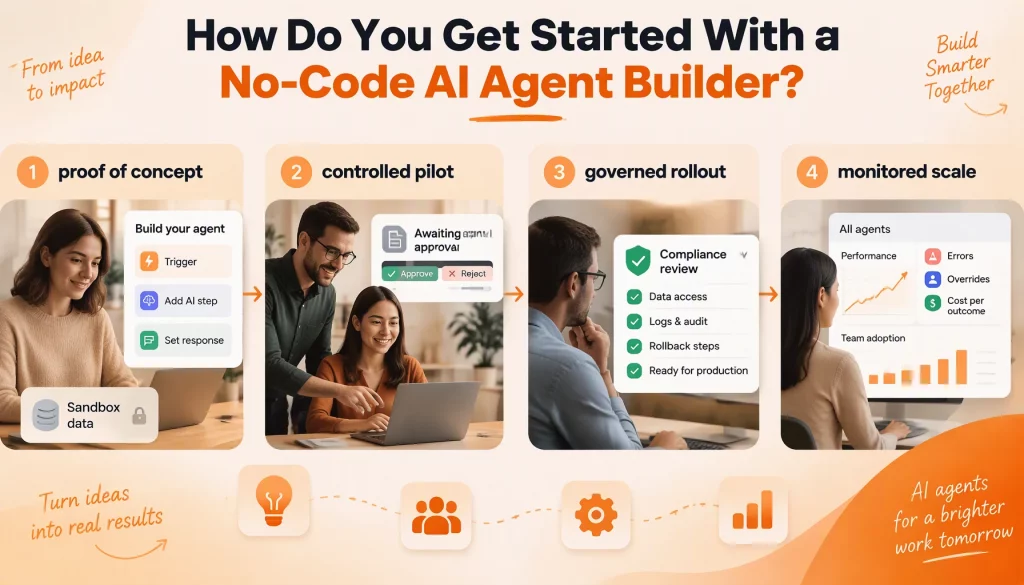
A staged path keeps a no-code AI agent builder program fast without letting risky agents slip into production. Four stages work for most enterprises.
- Proof of concept: A business user builds the agent in a sandbox with masked or sample data, to test the idea rather than to prove readiness.
- Controlled pilot: The agent runs on real data for one team or region, and a person approves its outputs before they take effect.
- Governed rollout: IT and compliance review the agent’s data access, logs, and rollback steps before it acts on its own in production.
- Monitored scale: The agent spreads to more teams, with one dashboard tracking errors, overrides, and cost per outcome for every agent.
The third stage is where most programs stall. Deloitte’s State of AI in the Enterprise 2026, based on 3,235 IT and business leaders in 24 countries, found that only 21 percent of organizations have a mature governance model for agentic AI. Governance therefore has to live in the platform, through access controls and release approvals, rather than in each builder’s good intentions.
Regulated industries need more weight on stages two and three. Agents that touch payments, credit decisions, or patient records usually fall under model risk or privacy rules, so they need an auditable decision trail and often private or on-premise hosting.
In financial services, model risk management usually asks for documented validation and independent review before go-live, so a no-code AI agent builder used there must record why each decision was made. In healthcare, an agent should never see more patient data than a person in the same role, and a longer governed rollout is a sign of a responsible program rather than a delay.
Production Limits Teams Hit With No-Code Tools
The limits below show up in vendor documentation, security guidance, and the “fake no-code” complaints that appear in practitioner forums. We have no internal incident data to publish here, so each limit points to where you can check it yourself.
| Limit | How it shows up | Safeguard |
|---|---|---|
| Over-broad access | The builder connects a whole database when the task needs three fields | Each agent gets a scoped service account that someone reviews before release |
| Usage caps | Credits or executions run out in a peak week, and the agent pauses | Model peak volume and agree on an overage rule in writing |
| Hidden code | Advanced steps need JavaScript, expressions, or self-hosting | The vendor builds your use case live, without code, during evaluation |
| No versioning | A prompt change breaks yesterday’s behavior with no rollback | Version history and a test run gate each release |
| Thin audit trail | Nobody can explain why the agent took an action | Every run logs its inputs, tool calls, and results |
Security guidance names the same risks. The OWASP Top 10 for Agentic Applications lists tool misuse and identity and privilege abuse among its top risks, and it recommends least agency: give each agent only the permissions its task needs. That principle matters more in a no-code AI agent builder program, where the people granting access are often not security specialists.
Conclusion
A no-code AI agent builder pays off when three things line up: a tool that is truly no-code for the people who build, guardrails on access and release, and a clear path to engineers when the limits appear. Fast building is easy to buy, while governance and integration depth decide whether agents survive production. This month, your team should list three candidate agents, run each through the comparison table, and ask your shortlisted vendors to build one of them live without code.
After the first agents go live, the next questions are how you monitor a growing portfolio and how you keep costs predictable as usage climbs. If you want to see a governed no-code approach inside your own environment, talk to our team at AI Hive for a walkthrough built around your systems.