

The agent worked in the demo, then the compliance team asked what it would do with a malformed invoice, and nobody could answer. That silence is where most AI agent development budgets stall, and Gartner expects over 40 percent of agentic AI projects to be canceled by the end of 2027 because of rising costs, unclear value, or weak risk controls. The fix is rarely a better model: it is a simpler architecture, tools with narrow permissions, tests built from real cases, and a release checklist that answers the compliance question before anyone asks it.
Key Takeaways
|
What Does AI Agent Development Involve?
AI agent development covers four jobs that a normal software project does not: choosing how much autonomy the system gets, giving it tools, grounding it in your data, and proving that its actions are safe. The code is the smaller part of the work.
The first decision in any AI agent development project is whether you need an agent at all. Anthropic’s Building effective agents guide, published in December 2024, separates workflows, where code orchestrates the model and tools along predefined paths, from agents, where the model directs its own process and tool use. Its advice is to find the simplest solution possible and increase complexity only when needed, because agentic systems trade latency and cost for better task performance.
That advice shapes the whole project. A support flow that always checks an order and then drafts a reply is a workflow, and a fixed workflow is cheaper to test and easier to audit. An investigation that needs different steps for every case is where an agent earns its extra cost.
- Scoping: The team defines the goal, the systems in play, and the actions the agent may take without approval.
- Building: Engineers wire the model to tools, memory, and retrieval, then write the prompts and tool descriptions.
- Proving: The team tests against real cases, including the ugly ones, and records how the agent behaves.
- Running: An owner monitors results, reviews failures, and updates the agent as processes and models change.
Core Architecture Components of an AI Agent
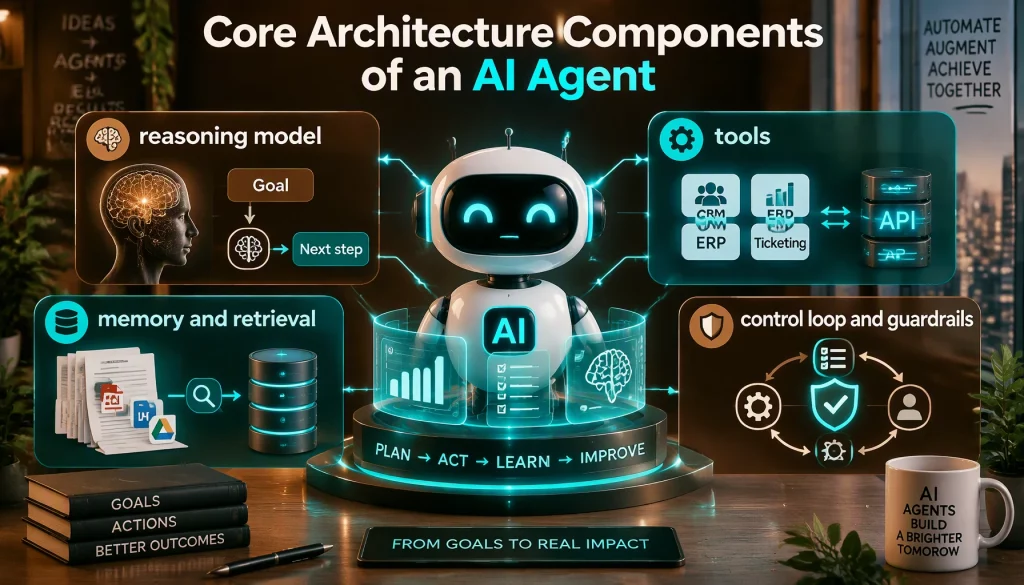
Every agent that survives real enterprise data has the same four parts: a reasoning model, tools, memory, and a control loop with guardrails. AI agent development goes wrong most often when one of the four is treated as optional.
| Component | What it does | Design question to settle early |
|---|---|---|
| Reasoning model | Reads the goal and the current state, then decides the next step | Which model tier does each step need, and can you switch models later? |
| Tools | The agent reads and writes in the CRM, ERP, or ticketing system through APIs | Which actions are read-only, and which need approval? |
| Memory and retrieval | Keeps context within a task and grounds answers in your documents | What must the agent remember across sessions, and what must it forget? |
| Control loop and guardrails | Runs the plan, checks results, stops on limits, and hands off to a person | What ends a run: success, a step limit, a cost limit, or a failed check? |
Memory design is not optional in AI agent development for anything beyond a single turn. An underwriting agent that forgets a customer’s stated income between step two and step five produces inconsistent decisions, and an inconsistent decision in a regulated process becomes a compliance incident.
Tools deserve the most engineering care in AI agent development. Anthropic’s guidance lists tool documentation and testing among its three core principles for agents, alongside simplicity and transparency, because a vague tool description causes wrong calls more often than a weak model does. For a deeper walkthrough of how these layers fit together, see our guide to AI agent architecture, which compares single-agent and multi-agent designs component by component.
Which Type of Agent Should You Build?
The right type depends on the cost of a wrong decision, not on how advanced a design sounds. Enterprises build four broad types, and each trades autonomy for predictability differently.
- Workflow agents: A fixed sequence runs the model at set steps, which makes this type the fastest to build and the easiest to audit.
- Planning agents: The model breaks a goal into steps and reorders them based on results, which suits contract review or claims intake.
- Multi-agent systems: Several specialized agents divide the work, such as one that gathers data and one that drafts a report.
- Autonomous operational agents: The agent watches a data stream and acts on its own triggers, which carries the heaviest governance burden.
Multi-agent designs look attractive, but they multiply cost and failure points. Anthropic reported in June 2025 that its multi-agent research system used about 15 times more tokens than a chat interaction, so a second agent should solve a problem that one agent cannot. Our guide to multi-agent orchestration covers the coordination patterns and failure modes for teams that do need several agents.
In AI agent development, a fraud agent that can freeze accounts without review moves faster, but your risk team will ask what happens the first time it freezes the wrong account. That question should pick the type before any code is written.
AI Agent Development Lifecycle: Building a Support Agent Step by Step
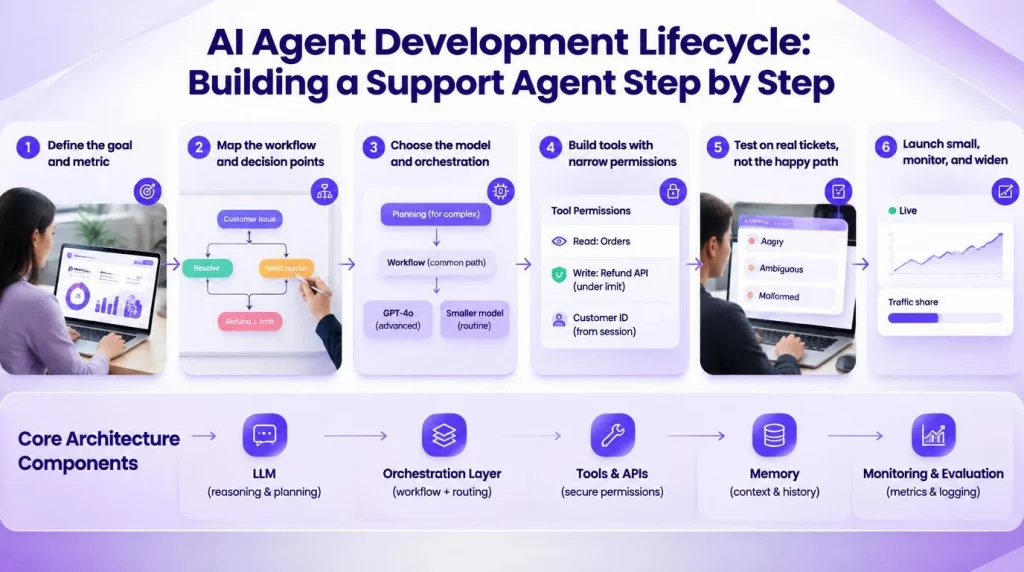
A repeatable AI agent development lifecycle is what separates a pilot that ships from one that stays in a sandbox. The walkthrough below builds a tier-1 customer support agent that answers order questions and issues small refunds, and each step names the artifact it should produce.
- Define the goal and metric: The team picks one outcome, such as the share of order-status tickets resolved without a person, and records today’s baseline.
- Map the workflow and decision points: The team draws every step, including where the agent must stop and hand off, such as any refund above a set limit.
- Choose the model and orchestration: A fixed workflow handles the common path, and a small planning step handles unusual tickets, with a cheaper model on routine steps.
- Build the tools with narrow permissions: The agent gets read access to orders and write access only to the refund API under the limit, with the customer ID taken from the session.
- Test on real tickets, not the happy path: The team replays several hundred past tickets, including angry, ambiguous, and malformed ones, and scores the outcomes.
- Launch small, monitor, and widen: The agent answers a small share of traffic first, every action is logged, and scope grows only when the metrics hold.
Mapping the workflow visually before coding saves rework, which is the gap a visual AI agent workflow builder closes by letting business and engineering teams adjust decision logic without a full sprint for each change.
The API cost of this agent is smaller than most AI agent development budgets assume. Anthropic’s pricing documentation works through 10,000 support conversations at about 3,700 tokens each and puts the total near $37 on Claude Haiku 4.5.
| Model (list price per million tokens, input / output) | Estimated cost per 10,000 support conversations | How the estimate is derived |
|---|---|---|
| Claude Haiku 4.5 ($1 / $5) | About $37 | Anthropic’s published example |
| Claude Sonnet 5 ($2 / $10) | About $74 | Both rates are double Haiku’s, so the same usage costs twice as much |
| Claude Opus 5.5 ($4 / $20) | About $148 | Both rates are four times Haiku’s |
These are list prices read on September 28, 2026, before prompt caching or batch discounts, and real conversations with tool calls use more tokens than a simple chat. Even so, the table shows why the model bill rarely decides whether AI agent development pays off: integrations, testing, and human review usually cost far more.
Tools and Frameworks for AI Agent Development in 2026
The AI agent development framework market consolidated over the past year, which makes the choice easier than it was. The table reflects vendor announcements through September 2026.
| Framework | Style | What changed recently | Best fit |
|---|---|---|---|
| LangGraph | Graph-based state machine for agent workflows | Version 1.0 became generally available on October 22, 2025 | Stateful workflows that need explicit control and checkpoints |
| Microsoft Agent Framework | Successor to AutoGen and Semantic Kernel | Version 1.0 reached general availability in April 2026, and AutoGen moved to maintenance mode in October 2025 | Teams on .NET or Azure, and existing AutoGen or Semantic Kernel users who need a migration path |
| CrewAI | Role-based teams of agents | Active open-source project with MCP support | Fast prototypes of multi-agent roles |
| OpenAI Agents SDK | Lightweight agent runtime from OpenAI | Released in March 2025 as OpenAI’s official agent SDK | Teams standardized on OpenAI models |
| Google Agent Development Kit | Agent toolkit inside the Google Cloud stack | Native agent-to-agent (A2A) protocol support | Teams on Google Cloud and Vertex AI |
| Claude Agent SDK | Agent loop built on the Claude Code runtime | Ships file, shell, and search tools | Coding and document-heavy agents on Claude |
Anthropic’s guidance adds a useful caution about frameworks: they speed up the start but can add layers that hide the prompts and responses underneath, so many teams begin with direct model API calls. Our AI agent framework comparison goes deeper on LangGraph, CrewAI, and the enterprise platforms that sit on top of them.
The build-or-buy question in AI agent development sits on top of the framework choice. An open-source framework gives you the agent logic, but audit trails, access control, and monitoring stay your job, while a platform supplies those at the cost of some flexibility. In our view, most enterprises should own the workflow logic and buy the plumbing.
Testing and Evaluation Challenges
Testing an agent means judging what it did, not only what it said. That shift is the hardest part of AI agent development for teams used to deterministic software, because the same input can produce different paths.
Three problems show up in almost every project. The agent can call the right tool with slightly wrong arguments, take an unnecessary step that adds cost, or lose an earlier constraint by the fifth step of a long task. None of these fail a unit test, and all of them fail a customer.
- Outcome-based test sets: The team scores whether the ticket was resolved correctly and within policy, using past cases with known answers.
- Adversarial cases: The set includes malformed inputs, conflicting instructions, and prompt injection attempts hidden in documents.
- Trajectory review: Reviewers read the full sequence of tool calls for a sample of runs, since a correct answer can hide an unsafe path.
- Regression runs on every change: A new prompt, tool, or model version reruns the whole set before release.
After launch, three metric groups tell you whether the agent is earning its place: task accuracy, process efficiency such as cycle time and cost per task against the manual baseline, and trust signals such as how often people override the agent and why. A rising override rate usually means the agent’s context has drifted from the cases it now sees.
Production Readiness Checklist
An agent is ready for production when every row below has an owner and evidence, not when the demo works. Your team can use the checklist as a release gate for AI agent development work.
| Area | Ready when | Evidence to keep |
|---|---|---|
| Scope | The goal, allowed actions, and approval thresholds are written down | A one-page scope document signed by the process owner |
| Evaluation | The agent passes an outcome-based test set, including adversarial cases | Test results for the release version |
| Permissions | Every tool uses its own scoped credential, with least privilege | An access review record |
| Logging | Every action is logged with inputs, tool calls, and results | A sample audit trail a compliance officer can read |
| Human handoff | Low-confidence cases and high-risk actions route to a person with full context | Handoff rate and review times |
| Limits | Step, time, and cost limits stop a runaway run | Configured limits and one test that triggers each |
| Deployment | Hosting meets data residency needs: SaaS, private cloud, or on-premise | An architecture diagram approved by security |
| Ownership | A named owner monitors results and can switch the agent off | An on-call entry and a runbook |
Deployment fit matters most when AI agent development happens in regulated industries. Banks, insurers, and hospital systems often cannot route certain data through a third-party cloud without extensive contract and audit work, so a platform that supports on-premise or hybrid hosting removes a blocker that no amount of prompt tuning can fix.
Your starting point depends on your situation, so the table below shows where to begin.
| Your situation | Where to begin | Why |
|---|---|---|
| CTO with a thin platform team | A platform with built-in logging, approvals, and connectors | The team spends its time on the workflow, not the plumbing |
| VP Engineering with a strong internal team | An open-source framework plus your own governance layer | Full control, with the maintenance cost in view |
| CIO in a regulated industry | Deployment and audit design before the first build | Hosting and logging are hard to retrofit |
| Mid-market innovation lead | One workflow agent with one metric | A narrow win funds the next agent |
Common Development Anti-Patterns to Avoid
The same AI agent development mistakes appear in public post-mortems, vendor guidance, and security research, and most of them are cheap to avoid if you spot them early. Each one below comes with a fix.
- Starting with the most autonomous design: Teams build a free-running agent for a task that a fixed workflow could handle, which Anthropic’s guidance warns against because it adds cost and latency without better results.
- Shared admin credentials: One broad service account turns a single prompt injection into a company-wide incident, so each tool should carry its own scoped credential.
- Safety rules in the prompt only: A rule that lives only in instructions can be talked around, while a rule in the tool’s own validation code cannot.
- Demo-set testing: A test set of clean examples hides the malformed and adversarial inputs that break agents in production.
- No stop conditions: An agent without step or cost limits can loop and run up a bill before anyone notices.
- Agent-washed vendor claims: Gartner warned in June 2025 about vendors rebranding chatbots and RPA as agents, so each claim needs a live test with your own data.
The OWASP Top 10 for Agentic Applications names several of these directly, including tool misuse and identity and privilege abuse, and it recommends least agency: give an agent only the permissions its task needs. In our view, that one principle prevents more AI agent development failures than any model upgrade.
Conclusion
AI agent development succeeds on design choices made before the first line of code: the simplest architecture that does the job, tools with narrow permissions, tests built from real cases, and a release checklist with a named owner. Frameworks and model prices have settled enough that neither is the main risk anymore; governance and integration are. This month, your team should run the readiness checklist against its most advanced pilot and fix the first row that has no evidence.
After the first agent ships, the questions move to scale: how you orchestrate several agents, and how you keep costs predictable as usage grows. If you want the logging, approvals, and deployment options already built, explore AI Hive’s platform features and map your next agent onto them.