


Shopify development has always involved switching between the admin dashboard, a code editor, documentation tabs, and the CLI. That workflow is familiar, but it is also slow. Every context switch costs minutes, and those minutes compound across a typical development sprint into hours of lost productivity.
Claude Code changes that equation by bringing Shopify development into a single terminal interface. With the official Shopify AI Toolkit released in April 2026, developers can now use Claude Code to create products, manage collections, build custom apps, edit Liquid templates, and run store operations using natural language commands. This guide covers the practical setup, daily workflows, and best practices that experienced Shopify teams are using to integrate Claude Code Shopify into their development process.
What Is Claude Code and Why It Matters for Shopify Development
Claude Code is a terminal-native AI agent developed by Anthropic that runs directly in your shell environment. Unlike browser-based AI assistants, Claude Code reads your repository, proposes changes, and executes tool calls including file edits, bash commands, git operations, and MCP server calls with your explicit permission at each step.
For Shopify developers, Claude Code eliminates the gap between asking a question and implementing the answer. Instead of reading documentation, copying code snippets, and adapting them manually, you describe what you want in plain English and Claude Code generates, validates, and applies the changes within your project context. The model has full visibility into your codebase, which means it understands your existing theme structure, app configuration, and coding patterns before making any suggestion.
In addition, Claude Code’s 200,000-token context window means it can hold your entire Shopify theme, app configuration files, and relevant documentation simultaneously. This context depth is what separates Claude Code from simpler code completion tools that operate on individual files without awareness of the broader project structure. For a comprehensive review of Claude Code’s capabilities, our Claude Code review covers performance benchmarks and real-world testing results.
Setting Up Claude Code with the Shopify AI Toolkit
The Shopify AI Toolkit is a free, open-source plugin that connects Claude Code directly to the Shopify platform. Shopify released the toolkit on April 9, 2026, and it has quickly become the standard integration method for AI-assisted Shopify development.
Prerequisites
Before starting, you need Claude Code Shopify installed and authenticated with your Anthropic API key, the Shopify CLI installed and configured for your development store, a Shopify Partner account or development store with API access, and Node.js 18 or later. The setup process assumes familiarity with terminal-based development workflows.
Installation and Configuration
You install the toolkit directly from the Claude Code CLI with a single command:
claude plugin install shopify-ai-toolkit
This command downloads the plugin, registers the Shopify Dev MCP server inside your Claude Code configuration, and prompts you for your store domain and Admin API access token on first run. Once the installation finishes, run claude mcp list to confirm the Shopify server shows a connected status before issuing your first command.
Once connected, Claude Code gains access to Shopify’s documentation, GraphQL API schemas, and the ability to execute store operations through the CLI.
Specifically, the Dev MCP server provides documentation and development guidance, API schema validation in real time, and access to Shopify’s GraphQL Admin API for executing store changes. The server validates every API call against Shopify’s current schema before execution, which prevents the common frustration of building against outdated documentation. For a side-by-side look at this approach next to the native MCP connection method, our complete guide to Claude and Shopify integration compares both paths in detail.
Daily Development Workflows with Claude Code and Shopify

Theme Development and Liquid Template Editing
Claude Code understands Liquid syntax, Shopify’s template hierarchy, and the constraints of the Online Store 2.0 architecture. You can describe a layout change in natural language, and Claude Code will identify the correct template file, propose the Liquid code modifications, and preview the structural impact on related templates before you approve the change.
For example, requesting “add a size chart section to the product page that reads from a product metafield” triggers Claude Code to check your existing product template structure, generate the section schema and Liquid rendering code, and update the relevant JSON template to include the new section. The entire workflow happens in your terminal without opening the Shopify admin or a separate code editor.
Product and Inventory Management
Claude Code Shopify can create, update, and manage products through the Shopify Admin API. Commands like “create a new product called Winter Collection Jacket with three size variants and set initial inventory to 50 units per variant” execute directly against your store. The AI validates the data structure, handles variant creation, and confirms inventory levels before committing the changes.
Consequently, bulk operations that would take hours in the admin dashboard complete in minutes. Updating pricing across 200 products, adding a new tag to items in a specific collection, or generating product descriptions from existing specifications become single-command operations with Claude Code handling the API pagination and error handling automatically.
Discount Codes and Promotional Campaigns
Claude Code also handles the promotional side of store management, a task that normally means clicking through the Shopify discount panel field by field. A command like “create a 20% off discount code called SUMMER26 for the Swimwear collection, limit it to one use per customer, and expire it on August 31” triggers Claude Code to build the discount object through the Admin API, set the correct usage limits and eligibility rules, and confirm the code is live before reporting back.
Because Claude Code validates the request against Shopify’s discount schema first, it catches configuration errors, such as an expiration date that has already passed or a collection that does not exist, before the API call executes. This validation step matters most during high-volume campaigns like Black Friday, when a marketing team may need a dozen discount codes created and scheduled within a single afternoon.
Order Management and Fulfillment Checks
Claude Code Shopify queries live order data through the same Admin API connection, which means you can check on fulfillment status without opening the orders dashboard. Requests such as “list every order placed in the last 7 days that has not shipped” or “find orders where the shipping address does not match the billing country” return structured results directly in the terminal.
For write operations on orders, such as issuing a partial refund or cancelling a fulfillment, Claude Code still requires an explicit confirmation step before it commits the change. Order data touches customer trust directly, and a batch operation applied to the wrong order segment is far more costly to reverse than a theme edit.
Custom App Development
Building Shopify apps with Claude Code follows the same pattern: describe the functionality, review the generated code, and iterate. Claude Code scaffolds app structures that follow Shopify’s current best practices, including proper webhook handling, session token authentication, and App Bridge integration for embedded apps.
The AI Toolkit’s real-time schema validation is particularly valuable during app development. When Shopify updates its API, Claude Code’s understanding updates simultaneously, which eliminates the lag between API changes and developer awareness that causes production issues in many Shopify apps. Our guide on Claude Code for enterprise development explores advanced app development patterns in depth.
Best Practices for Using Claude Code in Shopify Projects
Experienced Shopify teams treat Claude Code Shopify as a productivity layer inside a disciplined engineering process, not as a replacement for development judgment. The following practices have emerged from teams that have integrated Claude Code into their daily workflows successfully.
First, always use a development or staging store for Claude Code operations before applying changes to production. Claude Code executes real API calls with real consequences, and a misunderstood command can modify live product data or customer-facing content. The tool’s permission model provides a confirmation step, but building the habit of development-first testing prevents costly mistakes.
Second, version control everything. Claude Code integrates with git natively, which means every change it proposes can be committed, reviewed in a pull request, and rolled back if necessary. Teams that skip this step lose the audit trail that makes AI-assisted development manageable at scale.
Third, scope your requests specifically. “Fix the checkout” produces vague results. “Update the checkout.liquid template to display estimated delivery dates from the shipping_rates metafield below each shipping option” gives Claude Code the context it needs to generate precise, implementable code. The quality of the output correlates directly with the specificity of the input.
Claude Code vs Other AI Development Tools for Shopify
The Shopify AI Toolkit supports multiple AI coding agents including Claude Code, Cursor, GitHub Copilot, and Gemini CLI. Each tool has a different interaction model and strengths.
Claude Code Shopify operates entirely in the terminal with full project context and agentic capabilities, meaning it can execute multi-step workflows autonomously within your permission boundaries. Cursor provides a visual IDE experience with inline AI suggestions. GitHub Copilot focuses on code completion within existing editor workflows. Gemini CLI offers Google’s model in a terminal interface similar to Claude Code.
For Shopify-specific development, Claude Code’s advantage lies in its MCP integration depth and the size of its context window. The ability to hold an entire theme codebase, the Shopify API schema, and project-specific documentation in a single context means Claude Code makes fewer errors from incomplete information than tools with smaller context windows. Teams that manage complex Shopify Plus stores with custom apps, extensive theme customizations, and multiple integrations consistently report that Claude Code produces more accurate first-pass code than alternatives.
Claude Code vs No-Code Shopify Connectors
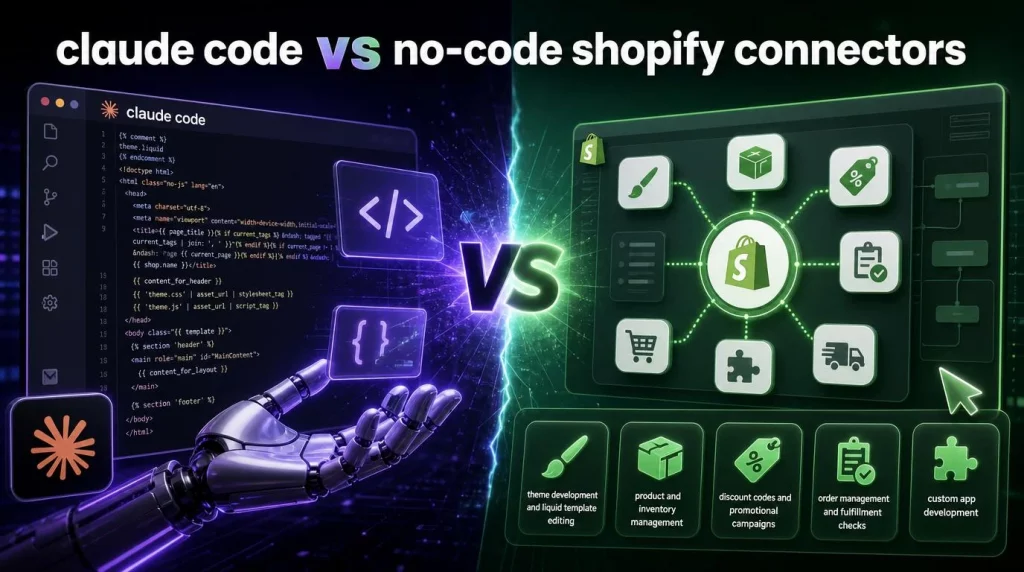
Not every store needs a terminal-based workflow. Shopify’s ecosystem also includes no-code connector apps, point-and-click tools that link your store to prebuilt automations without requiring any engineering input. These connectors solve a narrower problem than Claude Code does, and the table below outlines where each approach fits.
| Approach | Setup | Best for | Main limitation |
|---|---|---|---|
| Claude Code + AI Toolkit | Terminal, git, API credentials | Custom app development, theme edits, bulk data operations | Requires command-line and Shopify development knowledge |
| No-code Shopify connectors | Point-and-click, no engineering input | Prebuilt syncs, simple trigger-based automations | Limited to the workflows the connector ships with |
| Shopify Magic / Sidekick (native) | Built into the admin | Content generation, merchant-facing Q&A | No codebase access, not a development tool |
A no-code connector is the right choice when a store owner needs a specific, well-defined automation, such as syncing inventory between two systems, and does not have engineering resources on hand. Claude Code is the right choice when the task requires custom logic, touches the theme codebase, or needs to adapt to store-specific edge cases that a prebuilt connector cannot anticipate. In practice, Claude Code is not a one-button solution: it rewards teams that already have command-line and git habits, and it asks more of the user upfront than a connector app does. Teams running Shopify Plus stores with substantial customization typically outgrow no-code connectors within the first few months and move core operations to a terminal-based workflow like Claude Code.
Conclusion
Claude Code with the Shopify AI Toolkit represents a genuine shift in how Shopify stores are built and managed. The integration brings documentation, API access, code generation, and store operations into a single terminal workflow that eliminates the context switching that slows development teams down.
The developers gaining the most from this integration are those who treat Claude Code Shopify as a capable but supervised team member: they provide specific instructions, review outputs carefully, and maintain the engineering discipline that makes AI-assisted development reliable rather than risky.
For enterprises looking to go beyond individual developer productivity and deploy AI agents that manage Shopify operations at scale, reach out to the AI Hive engineering team at to discuss how our platform integrates Claude-powered agents into your existing Shopify infrastructure.