

Every Shopify merchant reaches a tipping point where customer service inquiries outpace the team’s capacity to respond. The most common tickets – “Where is my order?”, “How do I return this?”, and “When will my refund arrive?” – are repetitive, time-sensitive, and expensive to handle manually. A Shopify customer service chatbot addresses this bottleneck by automating the interactions that follow predictable patterns, allowing your human agents to focus on the conversations that genuinely require empathy and judgment.
The economics tell a compelling story. Stores handling 750 WISMO tickets per month spend roughly $3,000 using human agents versus approximately $300 using AI automation – a saving exceeding $32,000 per year from a single ticket type. Conversational AI is projected to save $80 billion in contact-center labor costs by 2026, according to Juniper Research. For Shopify merchants operating on thin margins, this is not a technology trend to monitor from the sidelines; it represents an operational efficiency that directly protects profitability.
Why Customer Service Automation Matters for Shopify Stores in 2026
Customer service demand rises alongside Shopify sales, especially after purchase. A store processing 500 monthly orders may receive 150 to 250 support tickets, with most questions related to order status, returns, and product information.

Customer service automation matters because:
- High ticket volume: Repetitive inquiries increase as order numbers grow, placing more pressure on support teams.
- Accessible store data: Shopify, shipping carriers, inventory systems, and store policies already contain the information needed to resolve most requests.
- Faster response times: A Shopify customer service chatbot can retrieve tracking details, return policies, and stock availability within seconds.
- Growing market adoption: Around 71% of online retailers now use some form of AI automation for customer support.
- Changing customer expectations: About 31% of retail and ecommerce customers consider chatbots the most effective customer service channel.
Therefore, Shopify stores that automate routine support can shorten response times, reduce ticket backlogs, and create a more consistent post-purchase experience.
How a Shopify Customer Service Chatbot Handles WISMO Queries
WISMO – “Where Is My Order?” – accounts for 30-50% of all ecommerce support tickets. This single query type represents the highest-volume, lowest-complexity category in your support queue, which makes it the ideal candidate for automation.
A modern Shopify customer service chatbot handles WISMO through a direct integration with Shopify’s order API and shipping carrier APIs. When a customer asks about their order, the chatbot identifies the customer (via email, order number, or logged-in session), retrieves the order details from Shopify, queries the carrier for real-time tracking status, and delivers a response that includes the current location, estimated delivery date, and a tracking link.
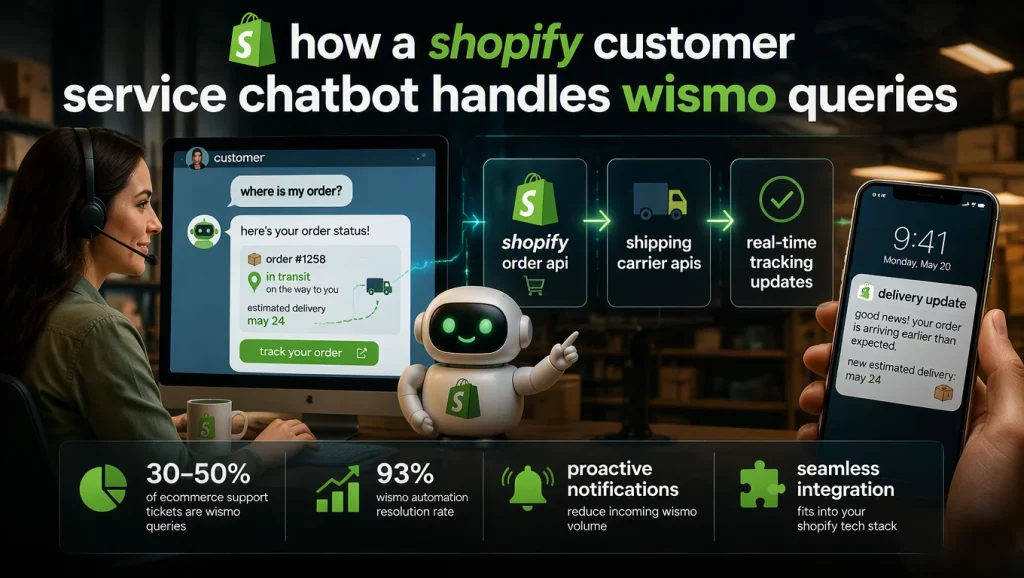
The resolution rate for WISMO automation is remarkably high. Industry benchmarks show that Shopify chatbots resolve “Where Is My Order?” questions at a 93% rate, meaning only 7% of order status inquiries require human intervention – typically cases involving lost shipments or carrier exceptions that need manual investigation.
Beyond reactive responses, advanced chatbots have shifted toward proactive communication. Rather than waiting for a customer to ask about their order, the chatbot detects shipping delays or delivery exceptions and sends a preemptive notification with updated delivery estimates. This approach reduces incoming WISMO volume by addressing the customer’s concern before it becomes a support ticket.
For merchants interested in understanding the broader landscape of AI chatbot solutions available for Shopify, the choice of platform determines how deeply your WISMO automation integrates with your existing tech stack.
Automating Returns and Exchanges on Shopify
Returns are one of the highest-volume support categories for Shopify stores, but they require more business logic than simple order tracking. A Shopify customer service chatbot can automate the process by checking each request against store policies and order data.
The automated workflow can include:
- Return eligibility: The chatbot checks the order date, return window, and product category rules.
- Resolution options: Customers can choose a refund, store credit, or product exchange.
- Return logistics: The chatbot generates a prepaid shipping label and provides clear return instructions.
- Transaction updates: Advanced platforms can process refunds, update inventory, and send confirmation emails.
- Human escalation: Requests above a defined value or risk threshold can be transferred to a support agent.
The right level of automation depends on order value and risk tolerance. Stores selling lower-value products may allow full refund automation, while stores selling expensive items should set approval limits and escalate high-value returns to human agents.
Shopify Customer Service Chatbot: Handling Refund Inquiries and Payment Issues
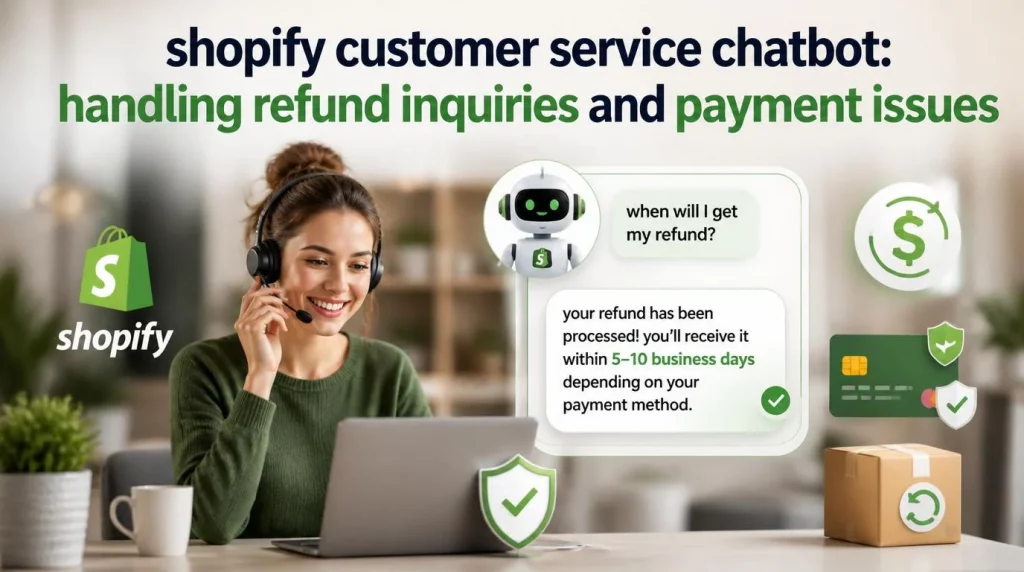
Refund-related inquiries require a distinct approach because they involve financial transactions and carry higher stakes for both the merchant and the customer. A customer asking “When will I get my refund?” expects a specific timeline, not a vague reassurance.
A properly configured chatbot handles refund inquiries by checking the return status in your system, identifying whether the returned item has been received and inspected, providing the specific refund timeline based on the payment method (credit card refunds typically take 5-10 business days after processing, while store credit is immediate), and proactively communicating if there are delays in processing.
The chatbot should also handle common edge cases: partial refunds when the customer is exchanging for a lower-priced item, refunds on orders that used discount codes (where the refund amount may differ from the customer’s expectation), and refunds to expired or replaced payment methods. Pre-configuring these scenarios prevents the chatbot from delivering incorrect information that creates additional support tickets.
Businesses report an average 340% first-year ROI from Shopify AI chatbot implementations, with average returns of $3.50 for every $1 invested in AI customer service. The refund automation component contributes significantly to this ROI because refund inquiries are among the most time-consuming tickets for human agents to handle – each one requires looking up order details, checking return status, calculating refund amounts, and communicating timelines.
Choosing the Right Shopify Customer Service Chatbot Platform
The Shopify chatbot integration market in 2026 offers platforms ranging from simple widget-based chatbots to full AI agent platforms. Your selection should prioritize four capabilities.
- Native Shopify integration depth. The chatbot must connect to Shopify’s Admin API to access order data, customer profiles, product catalogs, and inventory in real time. Platforms that rely on webhook-based data synchronization introduce latency and potential data staleness that degrades the customer experience.
- Action authority versus information-only. Determine whether you need a chatbot that can take transactional actions (process returns, issue refunds, apply discounts, create orders) or one that provides information and routes customers to self-service portals. The former requires deeper API integration and carries more implementation complexity, but delivers higher automation rates.
- Multi-channel coverage. Your customers contact you through your website, email, social media DMs, and potentially SMS. The chatbot platform should unify these channels so a customer who starts a return conversation on Instagram and follows up via email receives a consistent experience without repeating information.
- Escalation intelligence. The quality of the handoff from chatbot to human agent determines whether automation improves or harms the customer experience. The best platforms transfer full conversation context, customer history, and a sentiment assessment to the human agent, eliminating the “Can you tell me your order number again?” frustration that drives customers away.
Gorgias stands as Shopify’s Premier Partner for customer experience, powering support for 40% of the top 1,500 Shopify brands. Other strong contenders include Tidio for live chat and AI hybrid approaches, Flyweight for zero-configuration order tracking, and specialized platforms like AskYura that focus on refund and return automation.
Understanding how AI agents function at the enterprise level helps merchants evaluate whether their chosen platform can scale alongside their business growth.
Implementation Best Practices
Deploying a Shopify customer service chatbot effectively requires more than installing an app and activating it. These practices separate successful implementations from ones that frustrate customers and create more work for your team.
- Start with your top three ticket types. Analyze your support data to identify the three inquiry categories that consume the most agent time. Configure the chatbot to handle these three categories thoroughly before expanding to additional use cases. Attempting to automate everything at once typically results in shallow coverage across many topics rather than deep competence in the areas that matter most.
- Write responses in your brand voice. Generic chatbot responses undermine the brand experience you have built through your store design, marketing, and product selection. Invest time in writing chatbot responses that sound like your brand, not like a generic support system. If your brand is casual and friendly, the chatbot should reflect that tone. If your brand is premium and precise, the chatbot’s language should match.
- Configure escalation thresholds thoughtfully. Set confidence thresholds that route uncertain conversations to human agents. A chatbot that provides a wrong answer is worse than one that says “Let me connect you with a team member who can help.” Start with higher escalation thresholds (more human involvement) and gradually reduce them as you verify the chatbot’s accuracy on resolved conversations.
- Monitor and iterate weekly. Review the chatbot’s conversation logs every week for the first two months after deployment. Identify patterns where the chatbot fails to resolve inquiries, where customers abandon the conversation, and where the chatbot provides inaccurate information. Use these insights to refine your knowledge base, adjust escalation rules, and fill coverage gaps.
McKinsey’s research indicates that a 10-point CSAT improvement correlates with a 4-8% increase in repeat purchase rate for ecommerce brands. This correlation means that every improvement to your chatbot’s resolution quality directly impacts your bottom line.
Measuring Success: Key Metrics for Your Shopify Customer Service Chatbot
After deployment, track these metrics to evaluate your chatbot’s impact and identify areas for improvement.
- Automated resolution rate measures the percentage of conversations the chatbot resolves without human intervention. A healthy target for WISMO and basic return inquiries is 70-85% within the first 60 days of deployment.
- Average handling time compares the time from first customer message to resolution. Chatbot-handled conversations should resolve in under 2 minutes on average, compared to 8-15 minutes for human-handled conversations.
- Customer satisfaction score (CSAT) should be tracked separately for chatbot-handled and human-handled conversations. Initial CSAT for chatbot conversations may be slightly lower than human interactions, but should converge within 60-90 days as the system improves.
- Escalation rate tracks how often the chatbot transfers to a human agent. A decreasing escalation rate over time indicates that the chatbot is learning and improving. A stable or increasing rate suggests gaps in the knowledge base or configuration issues.
- Cost per resolution is the metric that justifies the investment. Calculate it by dividing total chatbot platform costs by the number of conversations resolved without human intervention, and compare it to your cost per human-handled ticket.
Conclusion
A Shopify customer service chatbot transforms your support operation from a cost center into a competitive advantage. The technology has matured to the point where WISMO resolution, returns processing, and refund handling can be automated with confidence rates above 80% for standard scenarios. The merchants who deploy these systems effectively reduce support costs by 30-40%, improve response times from hours to seconds, and free their human agents to focus on the high-value conversations that build lasting customer relationships.
Our team at AI Hive builds intelligent customer service agents that go beyond scripted responses – we deliver AI systems that understand your store’s specific policies, integrate with your entire tech stack, and improve with every conversation. Connect with AI Hive’s specialists to design a customer service automation strategy that scales with your store.