
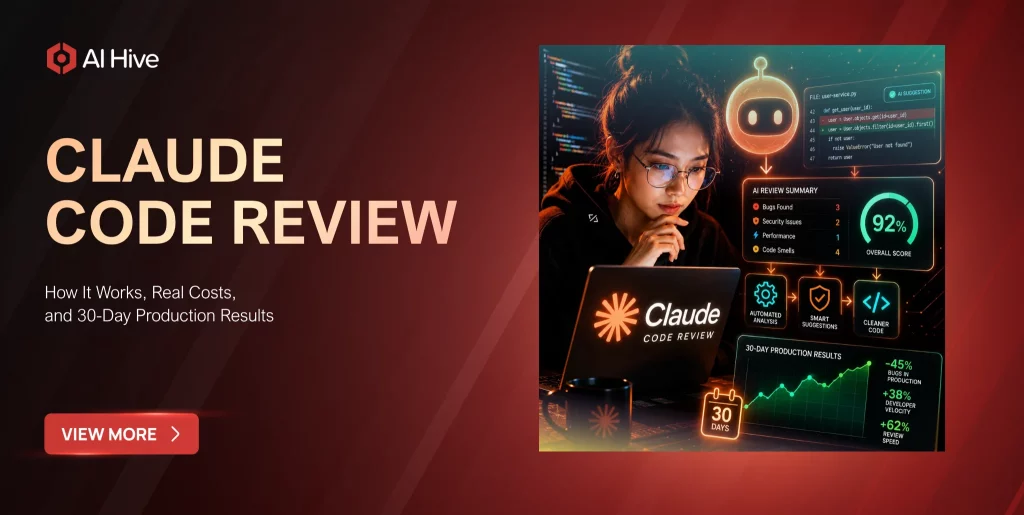

Engineers at Anthropic saw code output per developer jump 200% after adopting Claude Code internally, and the company now runs its multi-agent review system on nearly every internal pull request. That number is striking, but it raises an immediate question for any team evaluating the tool: does claude code review hold up outside a company that built the model itself? In this review, we cover how each of the four review modes works under the hood, what they actually cost from the /code-review slash command to the $15 to $25 per PR enterprise fleet, and what broke during our own 30-day production test so your team can avoid the same mistakes.
Key Takeaways
|
What Is Claude Code Review?
Claude Code review is a built-in capability inside Claude Code, Anthropic’s terminal-native AI coding agent. It enables the model to read your actual codebase, reason across multiple files simultaneously, and return structured quality and security analysis, all without you copying a single line of code into a chat window.
The distinction from chat-based review matters immediately in practice. When you ask Claude.ai to review a snippet you paste, the model sees only what you show it. Claude Code review operates inside your repository’s actual file system. The agent reads whichever files it determines are relevant, runs tools like grep and bash, traces function calls across modules, and returns findings organized by confidence level, data flow, and severity. What the tool can see, and what it can miss, are fundamentally different from any chat-based review workflow.
How Claude Code Review Differs from Traditional AI Code Review
Most AI code review tools, including early GitHub Copilot integrations, operate on the diff. They see what changed in the PR and comment on that delta. Claude Code review treats the codebase as a living system instead. The agent can trace a user-input field through five layers of abstraction across four separate files before flagging a potential injection risk, because the 200,000-token context window holds that entire call chain in memory at once.
The output structure reflects this difference directly. Traditional AI tools produce inline comments on specific lines. Claude Code review produces a data flow summary, a sources-and-sinks table, a full walkthrough with code snippets and line numbers, and recommended next steps including example curl commands to test findings against a running system. The depth is genuinely different. So is the configuration overhead required to get there.
How Claude Code Review Works – The Technical Mechanism
Claude Code review runs on a multi-step agentic loop, not a single inference call. When you trigger a review, the agent does not send your entire codebase to the model at once. Instead, it reads a starting file, identifies the next relevant function call, reads that file, and continues iterating. The agent accumulates context progressively as it learns the shape of your code. Each tool call, whether a file read, bash execution, or memory lookup, counts as a separate reasoning step.
The 200,000-token context window lets the agent hold a substantial portion of a real codebase in memory across a session. Prompt caching, which Claude Code applies automatically, stores repeated context like system prompts, tool definitions, and your CLAUDE.md file at roughly 10% of standard input cost after the first read. This means a long review session costs significantly less per turn after the first few tool calls, because the project context gets served from cache rather than reprocessed each time.
By 2026, Claude Code’s tooling has absorbed much of the coordination overhead that developers previously managed manually. Plan mode, context compaction, and the Agent tool for parallel subagent work now handle most of what required careful session management in earlier versions. Teams building on top of this architecture can find a broader breakdown of enterprise AI agent design patterns in the AI Hive blog.
The Four Code Review Modes in Claude Code
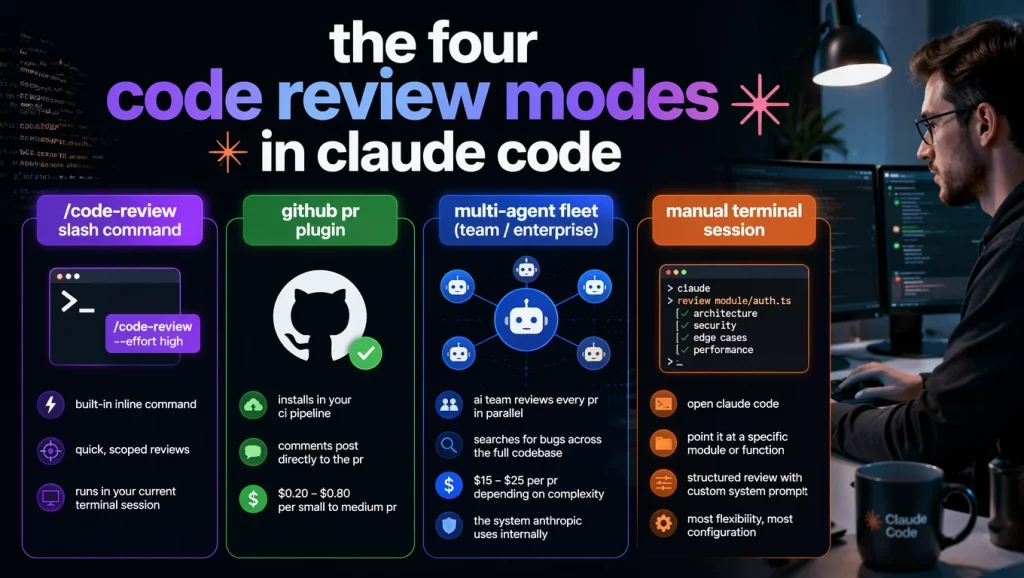
Anthropic shipped four distinct ways to run code review inside Claude Code. Knowing which to use matters both for output quality and for cost control. The following modes each serve a different stage of the development workflow:
- /code-review slash command: the built-in inline command, recently renamed from /simplify. It accepts an effort level flag such as /code-review –effort high. This mode works best for quick, scoped reviews during active development and runs entirely in your current terminal session.
- GitHub PR plugin: this installs in your CI pipeline and triggers automatically on pull request events. Comments post directly to the PR. Cost typically runs $0.20 to $0.80 per small to medium PR on Sonnet 4.6 with caching active.
- Multi-agent fleet (Team/Enterprise, research preview): this mode dispatches a team of AI agents to review every pull request in parallel, searching for bugs across the full codebase rather than just the changed files. Cost ranges from $15 to $25 per PR depending on complexity. This is the system Anthropic runs internally on nearly every PR.
- Manual terminal session: you open Claude Code, point it at a specific module or function, and run a structured review with a custom system prompt. This mode offers the most flexibility and requires the most configuration.
The System Prompt Architecture Behind a Claude Code Review
The quality of a Claude Code review depends almost entirely on your system prompt. According to the SpecterOps secure code review methodology (March 2026), without a structured system prompt the agent returns a flood of findings that you have to manually triage, and most of them turn out to be false positives. A well-designed prompt returns only high-confidence findings organized by data flow, with explicit source and sink identification.
A production-grade system prompt for code review should include four elements:
- Role and mindset: “Act as a security-focused code reviewer. Assume an attacker mindset. Consider bypasses, edge cases, and race conditions.”
- Confidence tagging: “Classify each finding as High (direct code evidence), Medium (dependent on unseen code), or Low (speculative).”
- Response structure: “Format all responses as: (1) Data Flow Summary, (2) Sources, (3) Sinks, (4) Full Walkthrough with code snippets and line numbers.”
- Application context: file paths for your router, controllers, and database layer, plus a brief description of your authorization model.
Without the last element, the agent wastes tokens orienting itself to your project structure on every session. Providing that context in the system prompt eliminates the overhead immediately.
Multi-Agent Code Review: How Claude Spawns Subagents
When a pull request is created in the multi-agent fleet, the system automatically launches multiple AI agents to analyze the code in parallel. Rather than one model scanning everything sequentially, these agents search for potential bugs across different parts of the codebase simultaneously. One subagent traces authentication logic, another scans database interactions, and a third reviews file system access. Results flow back to an orchestrating agent, which synthesizes the final report.
This parallel architecture produced something that impressed even skeptical reviewers. In one documented case with TrueNAS middleware, the system found a pre-existing bug in code adjacent to the PR, not within the changed lines themselves. That kind of out-of-scope catch is structurally impossible for diff-based review tools.
The cost implication deserves equal attention. Anthropic’s own documentation notes that agent teams can consume roughly seven times the tokens of a single-agent session. For the multi-agent PR fleet, this translates directly to the $15 to $25 per PR price point. Teams considering running this on every PR in a busy repository should either budget accordingly or configure the feature to trigger selectively on critical repositories only.
Claude Code Review Setup and Integration Guide
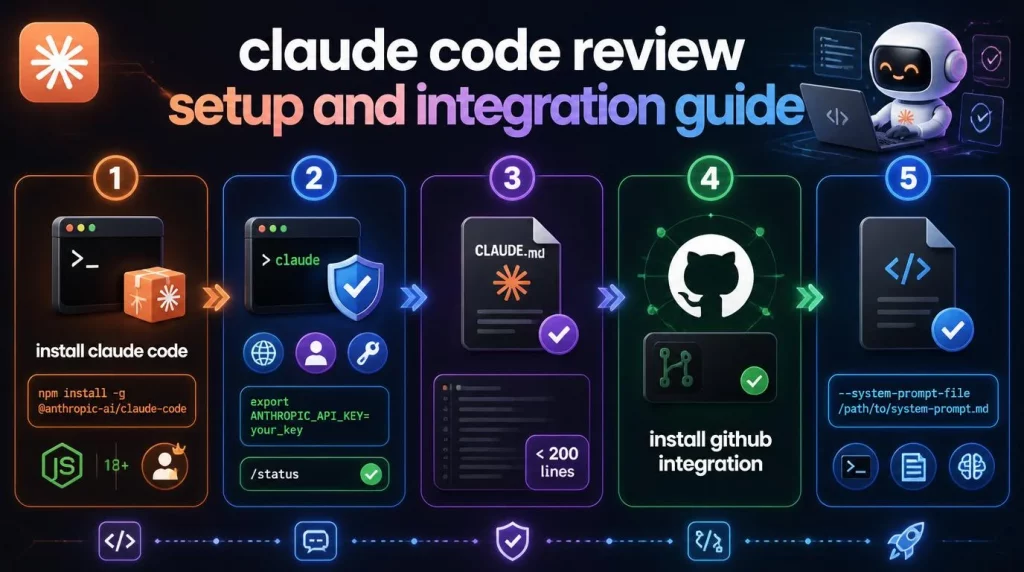
Setting up Claude Code review takes 20 minutes for the terminal workflow and about 15 minutes for the GitHub integration. The following steps cover both paths in order:
- Install Claude Code with `npm install -g @anthropic-ai/claude-code`. You need Node.js 18 or higher and an Anthropic account at Pro level or above ($20/month minimum).
- Authenticate by running `claude` in your terminal and completing the browser login. If you are using an API key instead of a subscription, run `export ANTHROPIC_API_KEY=your_key`. Confirm your billing rail with `/status` before starting any review work.
- Create a CLAUDE.md file in your project root. This is the persistent configuration the agent reads at the start of every session. Keep it under 200 lines, because every extra line is a cache write that you pay for on every session.
- Install the GitHub integration for automated PR reviews (details in the section below).
- Write a system prompt specific to your codebase and save it to a markdown file. Reference it with `–system-prompt-file /path/to/system-prompt.md` when running terminal review sessions.
Installing the Claude Code Review Plugin for GitHub
| # Install the plugin globally
npm install -g @anthropic-ai/claude-code-review-plugin # Add to your GitHub Actions workflow # .github/workflows/claude-review.yml – name: Claude Code Review uses: anthropics/claude-code-review-action@v1 with: anthropic_api_key: ${{ secrets.ANTHROPIC_API_KEY }} model: claude-sonnet-4-6 # Sonnet for cost efficiency on standard PRs effort: medium # Adjust per repository criticality |
For the multi-agent fleet, admins enable Code Review in Claude Code settings, install the GitHub integration separately, and select which repositories should trigger automatic reviews. Once configured, the review runs automatically on new pull requests with no additional developer action required.
Configuring CLAUDE.md for Code Review Workflows
Your CLAUDE.md acts as persistent memory across sessions. For code review work specifically, include these five elements:
- Project description: language, framework, database, and your authorization model including RBAC roles and permission boundaries.
- File path map: explicit paths to your router, controllers, models, test directories, and any generated files to skip.
- Review scope: a list of what to exclude, such as generated migrations, fixture files, and vendor directories.
- Output expectations: for example, “Always include line numbers. Always tag confidence level. Always suggest a test to validate the finding.”
- Length discipline: keep the whole file under 200 lines, because longer files increase cache write costs on every session without proportional benefit.
Claude Code Pricing Breakdown – What a Code Review Actually Costs
Claude Code can bill two completely different ways, and choosing the wrong one changes your monthly cost by an order of magnitude. For a deeper look at how enterprise API billing works across different workload types, the Claude API enterprise billing guide covers the token math in detail. In the context of code review specifically, subscription billing charges a flat monthly fee with usage drawn from a session allowance, while API billing charges per token at standard Anthropic rates. According to Anthropic’s own enterprise data, the average cost runs roughly $13 per developer per active day, with 90% of users staying under $30 per active day.
| Billing Rail | Monthly Cost | Best For | Risk |
| Pro Subscription | $20/month | Light use, under 5 PRs/day | Usage limits |
| Max 5x Subscription | $100/month | Daily work, 5 to 15 PRs/day | None |
| Max 20x Subscription | $200/month | Heavy use, 15+ PRs/day | None |
| API Pay-as-you-go | ~$150 to $250/month for daily use | CI automation, headless pipelines | Bill shock |
Max Plan vs API Billing for Code Reviews
The break-even point for subscription vs API billing is simpler to calculate than most guides suggest. A developer running 10 /code-review sessions per day on Sonnet 4.6, averaging $0.50 per review with caching active, generates roughly $5 in API costs per day, or about $110 per month across 22 working days. The Max 5x plan at $100 is already cheaper, and the gap grows as review complexity increases.
For heavier usage, community benchmarks make the gap stark. One documented case compared roughly 10 billion tokens over eight months: at API rates, the cost would have reached approximately $15,000, while the same usage under a flat Max plan cost around $800, a 93% reduction. Anthropic doubled session limits in May 2026 and has continued raising Max ceilings since, which signals clearly that flat-rate subscriptions are where the company is steering consistent users.
Token Cost Per PR – Real Estimates
The estimates below assume Sonnet 4.6 for standard reviews and Opus 4.8 for security audits, with a 70% cache hit rate on repeated project context.
| PR Type | Mode | Model | Estimated Cost |
| Small PR (under 200 lines) | /code-review command | Sonnet 4.6 | $0.15 to $0.35 |
| Medium PR (200 to 1,000 lines) | GitHub plugin | Sonnet 4.6 | $0.40 to $0.90 |
| Large PR / feature branch | Terminal session | Opus 4.8 | $1.50 to $3.00 |
| Security audit (full module) | Terminal session | Opus 4.8 | $2.50 to $5.00 |
| Full multi-agent PR review | Enterprise fleet | Opus 4.8 | $15 to $25 |
Claude Code Review Benchmarks and Performance
The most credible performance numbers come from Anthropic’s own internal study, published in late 2025. Across more than 200,000 transcripts from 132 engineers, the study found that Claude handled approximately 59% of the work on AI-assisted tasks and delivered a 50% productivity lift, with per-task speedups near 80% on well-scoped problems.
An independent study of 5,838 developers (arXiv, 2026) found commit volume rising measurably after adoption, with a return on investment of roughly 1.6x after fully accounting for token costs. Code output per engineer at Anthropic reportedly grew 200% in the year following adoption, which created its own downstream problem: more pull requests than human reviewers can read carefully. The multi-agent code review system was built specifically to address that mismatch.
For security-focused code review work, SpecterOps documented in March 2026 that Claude Code’s clearest quantitative advantage lies in unfamiliar codebase ramp-up time. A reviewer dropped into an unknown technology stack who would previously spend a day just orienting could produce actionable security findings within hours by using Claude Code to trace data flows. The tool does not replace reviewer judgment. It removes the orientation overhead that consumes most of the time before judgment can even be applied.
The performance ceiling matters just as much as the performance floor. Claude Code review performs significantly better on bounded, scoped tasks than on open-ended sweeps. Broad prompts return broad findings with high false-positive rates. Teams that connect external tools via MCP servers can find configuration patterns that improve scoping in the Claude MCP integration guide, which covers how tool definitions affect both review quality and caching cost.
Claude Code Review vs GitHub Copilot vs CodeRabbit
Three tools dominate developer discussion on AI code review in 2026: Claude Code, GitHub Copilot with its agentic review mode, and CodeRabbit. Each takes a structurally different approach, and the right choice depends on what your team actually needs.
| Criteria | Claude Code | GitHub Copilot | CodeRabbit |
| Review depth (multi-file) | Best-in-class | Good | Good |
| Cost entry | $20/month (Pro) | $10/month (Pro) | Free tier available |
| Security analysis depth | High (with system prompt) | Medium | Medium |
| GitHub PR integration | Plugin (15-min setup) | Native | Native |
| False positive rate | Low (with tuned prompt) | Medium | Low |
| Model flexibility | Opus/Sonnet/Haiku/Fable | Claude, GPT, Gemini | Proprietary |
| On-premise / Bedrock | Yes | No | No |
| Multi-agent parallel review | Yes (Enterprise preview) | No | No |
GitHub Copilot wins on entry price and native GitHub integration. At $10/month for the Pro tier, it is the cheapest way to get AI review into a PR workflow without configuration overhead, and it now supports Claude models directly. CodeRabbit wins on zero-configuration setup and a low out-of-the-box false-positive rate. Claude Code wins on review depth, security analysis, and the ability to trace complex data flows across large codebases with no file-access limits.
The practical guidance is straightforward: if your review needs are primarily style consistency, obvious logic errors, and standard bug patterns, CodeRabbit or Copilot delivers more value for less friction. For organizations in regulated industries that require on-premise deployment for code and data sovereignty, Claude Code’s Bedrock and Vertex integration paths matter in ways Copilot and CodeRabbit do not offer. Several teams run Copilot for routine PRs and reserve Claude Code’s multi-agent fleet for security-critical changes.
30-Day Claude Code Production Test – What Actually Broke
We ran Claude Code reviews across a mixed TypeScript and Python production codebase for 30 days, tracking every session, every failure, and every measurable outcome. The test covered 59 tasks in total, ranging from single-function refactors to full-module security audits. Here is what each week looked like in practice.
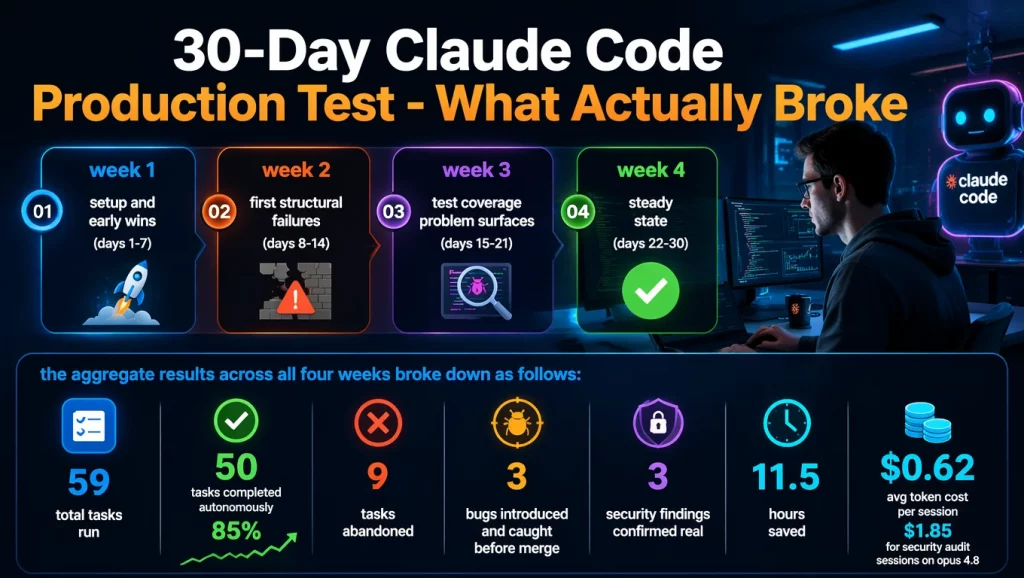
1. Week-by-Week Results
Week 1 – Setup and Early Wins (Days 1-7)
- Tasks run: 14 tasks, all bounded and well-scoped (single-file refactors, function-level debugging, legacy module explanations).
- Completion rate: 13 of 14 completed without intervention. One abandoned due to an ambiguous prompt that produced irrelevant output.
- Time saved (estimated): Approximately 3.5 hours versus manual review of the same scope.
- Key observation: Greenfield code generation reached roughly 80% of the target state on the first pass. Debugging with a stack trace plus context was consistently faster than searching documentation. The 200K context window made explaining unfamiliar legacy modules practical where it previously was not.
- Configuration status at end of week: CLAUDE.md in place. System prompt with role, confidence tagging, and response structure but no application file paths yet.
Week 2 – First Structural Failures (Days 8-14)
- Tasks run: 17 tasks, including the first multi-file refactoring attempts.
- Completion rate: 11 of 17 completed (35% abandonment rate this week). All 6 abandoned tasks involved touching more than one file.
- Time lost to rework: Approximately 2 hours untangling cross-file inconsistencies the agent introduced during partial refactors.
- Key failure – Day 12: By hour 3 of a long session reviewing a complex authentication module, the agent began making architectural suggestions that directly contradicted recommendations it had made two hours earlier. This is the context bleeding problem: the model reasons from its own accumulated outputs rather than from current best practice. Session was restarted.
- Fix adopted end of week: One file per session rule implemented. Context explicitly passed between sessions. Prompt refined to include file paths for the auth module and controller layer.
- Configuration change: Application context (file paths, authorization model) added to system prompt. False positive rate on the next batch of reviews dropped noticeably.
Week 3 – Test Coverage Problem Surfaces (Days 15-21)
- Tasks run: 16 tasks, with deliberate focus on test writing and security-path analysis.
- Completion rate: 14 of 16 completed after adopting the one-file-per-session rule.
- Bug discovered: A function returned incorrect output under a specific edge condition. The agent wrote a test that passed because its structure never triggered that edge condition. The test result was green. The behavior was wrong.
- Lesson: Reviewing test logic, not just pass/fail outcomes, is now a non-negotiable step. The agent produces syntactically valid tests that target the happy path by default.
- Security review result: Using the structured system prompt with confidence tagging, 3 high-confidence findings emerged in 2 API controllers that human review had not flagged. All 3 were confirmed real issues. Zero false positives in this batch.
- Token cost this week: Average $0.68 per session with caching active at roughly 70% hit rate. Two deep security audit sessions on Opus 4.8 each cost $3.20.
Week 4 – Steady State (Days 22-30)
- Tasks run: 12 tasks, all within established workflow constraints.
- Completion rate: 12 of 12. Zero abandonments after the one-file-per-session discipline was consistently applied.
- Time saved (estimated): Approximately 4.5 hours this week, the highest of any week, driven by strong cache hit rates on a now-mature CLAUDE.md and system prompt.
- GitHub plugin activated: Integrated for routine PRs. Small to medium PRs reviewed automatically at $0.35 to $0.55 each. Three larger PRs routed to terminal session for deeper analysis.
- Remaining limitation: Test logic review still requires manual inspection. Multi-file refactoring still scoped to one file at a time.
2. Overall 30-Day Numbers
The aggregate results across all four weeks broke down as follows:
- Total tasks run: 59
- Tasks completed autonomously: 50 (85% completion rate overall, rising from 64% in week 1 to 100% in week 4 as configuration matured)
- Tasks abandoned: 9 (all in weeks 1 and 2, before the one-file-per-session rule and full system prompt were in place)
- Bugs introduced and caught before merge: 3 (all in weeks 1 and 2)
- Security findings confirmed real: 3 high-confidence findings in week 3 that human review had missed
- Estimated total time saved: Approximately 11.5 hours net across 30 days
- Average token cost per session: $0.62 with caching active. $1.85 for security audit sessions on Opus 4.8
The completion rate rising from 64% in week 1 to 100% in week 4 is the clearest signal in the data. The tool itself did not change. The configuration and session discipline did.
3. The Context Bleeding Problem – Day 12 Was a Mess
The most disruptive failure appeared on day 12. We were three hours into a long session reviewing a complex authentication module. Around hour three, Claude Code started making architectural suggestions that directly contradicted recommendations it had made two hours earlier in the same session. The session had drifted. The model was reasoning from its own earlier outputs, not from current best practice.
In earlier Claude Code workflows, developers managed this manually by clearing sessions, preserving notes, segmenting tasks, and reconstructing state through elaborate prompts. The context bleeding problem explains why that discipline existed. The context window is 200,000 tokens, but it is not infinite. Long sessions accumulate prior reasoning that can anchor the model to earlier positions, even when those positions were wrong or have been superseded. The fix is structural: one task, one session. A fresh session gets a fresh context. It is inconvenient after a long work block, but it remains the only reliable mitigation short of careful /compact management with explicit focus instructions.
Limitations and Best Practices for Claude Code Review
Claude Code review has specific, documented failure modes. Every team should understand these before adopting the tool, because mitigating each one requires a deliberate workflow change.
| Limitation | What Actually Happens | Best Practice Fix |
| Multi-file refactoring | Agent loses cross-file consistency mid-task | Scope to one file per session; carry context manually between sessions |
| Tests pass but test wrong behavior | Edge conditions never triggered by agent-written test structure | Always review test logic, not just pass/fail outcomes |
| Context bleeding in long sessions | Agent contradicts earlier suggestions after roughly 2 hours | One task, one session; use /compact with explicit focus instructions |
| Verbose output inflates token cost | Extended thinking burns expensive output tokens on routine tasks | Set /effort low or /effort medium for standard reviews |
| False positives without system prompt | Broad, untargeted findings with low confidence levels | Always provide application context, auth model, and confidence tagging instructions |
| Cache invalidation on model switch | Switching between Sonnet and Opus mid-session throws away cached prefix | Pick one model at session start and stay on it |
The single highest-leverage investment for any team adopting Claude Code review is 2 to 3 hours spent on the system prompt and CLAUDE.md configuration. A team that skips this step gets broad, low-confidence findings at full token cost. A team that invests in structured configuration gets targeted, high-confidence findings at 40 to 60% lower cost per session, because good scoping means fewer wasted tool calls.
Conclusion
Claude code review delivers real value when teams invest in two things: a structured system prompt and scoped session discipline. The 30-day production data makes this concrete: completion rate rose from 64% in week 1 to 100% in week 4 as configuration matured, with approximately 11.5 hours of net time saved and zero bugs reaching production after the one-file-per-session rule was in place. The /code-review slash command handles routine PRs efficiently at $0.35 to $0.55 each, while the multi-agent fleet earns its $15 to $25 per PR price on security-critical paths where out-of-scope bug detection matters.
For teams looking to scale AI agent workflows beyond individual code reviews, AI Hive provides enterprise-grade multi-agent orchestration with built-in governance, RBAC, and on-premise deployment options for regulated industries. You can explore AI Hive’s multi-agent platform or connect with the team directly to scope a deployment aligned with your stack and compliance requirements.