

The biggest misconception about Claude API Enterprise is that the “Enterprise” label unlocks cheaper tokens or faster access to the models, when in reality it does neither. Token usage is billed at the exact same rate as the standard API, and the $20 per seat monthly fee actually pays for governance controls, identity management, and audit visibility that procurement teams care about far more than a per-token discount. This article breaks down the real pricing structure, unpacks the security features that show up in every enterprise security review, and walks through how to configure Claude API Enterprise correctly from day one instead of patching gaps after deployment.
Key Takeaways
|
What Is Claude API Enterprise?
Claude API Enterprise is the standard Anthropic Messages API paired with the Claude Enterprise plan’s identity, security, and compliance layer. The underlying model access is identical to what an individual developer gets with a personal API key. What changes is governance: your organization gains SSO, SCIM provisioning, audit logs, and a Compliance API that sits on top of every request your team sends.
Procurement teams run into this misunderstanding more than any other one. The API itself does not get faster, cheaper, or more capable under an Enterprise contract. If you’re evaluating Claude as part of a broader, model-agnostic AI agent platform that also runs GPT, Gemini, or open-source models side by side, the Enterprise layer only governs the Claude portion of that stack, not the others.
Key Features of the Claude Enterprise Plan
Anthropic organizes Claude Enterprise features around three needs: identity, compliance, and visibility. This governance layer matters most for organizations rolling Claude out as part of a wider enterprise AI agent strategy, not just a single standalone chatbot.
| Category | Feature | What it does |
| Identity | SSO (SAML 2.0, OIDC) | Login through Okta, Microsoft Entra ID, or Google Workspace |
| Identity | SCIM provisioning | Auto-creates and removes seats when your IdP group changes |
| Access control | IP allowlisting | Restricts API and console access to approved network ranges |
| Access control | Role-based permissions | Owner, Admin, and Member roles with granular scopes |
| Compliance | Audit logs | Full record of user actions, system events, and data access, exportable for 180 days |
| Compliance | Compliance API | Programmatic access to activity logs, chat histories, and file content, filterable by user and time range |
| Compliance | Custom data retention | Configurable window from 1 day to indefinite |
| Compliance | HIPAA-ready + BAA | Signed Business Associate Agreement on sales-assisted plans |
| Visibility | Analytics API | Aggregated adoption and engagement metrics across the org |
Two features deserve a closer look because procurement teams ask about them first. The Compliance API goes further than the audit log export: it supports on-demand retrieval and selective deletion of a specific user’s conversations and files, which operationalizes GDPR Article 15 and 17 requests instead of just recording that an event happened. Custom data retention lets a regulated team hold conversation data as briefly as a compliance window requires, or indefinitely for legal hold, without relying on Anthropic’s default policy.
Claude Enterprise Pricing: How the Cost Model Actually Works
Claude Enterprise pricing is a hybrid model: a fixed seat fee plus separately metered usage. Getting this combination right before you sign a contract is the most important budgeting decision in a Claude API Enterprise rollout.
1. Seat Fee vs. Token Usage
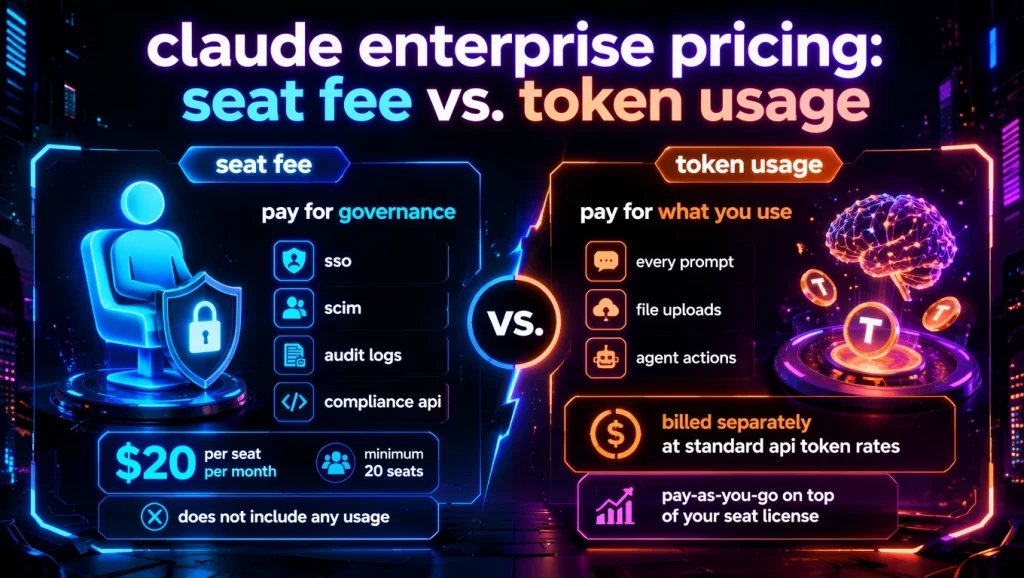
The Enterprise seat fee starts at $20 per seat per month, billed annually with a minimum of 20 seats. That fee buys governance: SSO, SCIM, audit logs, and the Compliance API. It does not include any usage.
Every prompt, file upload, or agent action bills separately at standard API token rates, the same rates a developer pays with a bare API key and no Enterprise contract at all. Team plan seats bundle a fixed usage allowance into the monthly price, which keeps costs predictable for lighter users. Enterprise removes that ceiling and shifts entirely to pay-as-you-go billing on top of the seat license.
Example: A widely discussed Reddit thread in r/ClaudeAI captured how often this catches teams off guard: users reported real-world Enterprise costs landing anywhere from $60 to over $250 per user per month, once token consumption is added to the base seat fee. That range comes from community-reported experience, not a figure Anthropic publishes, so treat it as a planning signal rather than a guarantee for your organization. A light user can stay close to the $20 base price; a heavy user running long agent sessions or large document analysis can push well past $150 in the same month.
2. Cost at Different Team Sizes
The table below models blended monthly cost at three organization sizes using that community-reported range as the usage assumption. Treat it as an illustrative planning model, since actual usage depends entirely on your workflows.
| Team size | Seat fee (seats × $20) | Estimated usage cost ($60-$150/user) | Estimated total monthly cost |
| 100 users | $2,000 | $6,000 – $15,000 | $8,000 – $17,000 |
| 500 users | $10,000 | $30,000 – $75,000 | $40,000 – $85,000 |
| 1,000 users | $20,000 | $60,000 – $150,000 | $80,000 – $170,000 |
One number stays constant across all three rows: the seat fee scales linearly with headcount, while the usage cost scales with actual behavior, not headcount. A rollout with strong prompt discipline, prompt caching, and routing simple tasks to Haiku instead of Opus sits at the low end of the range even at 1,000 seats.
This is the insight most pricing pages skip. The API portion of your bill is identical whether you’re on Enterprise or calling the raw API with your own key. The $20/seat fee pays specifically for SSO, SCIM, audit logs, the Compliance API, and HIPAA readiness. If your organization doesn’t need centralized identity management or a compliance-grade audit trail, that fee buys nothing you would otherwise pay for.
Claude API Enterprise vs. Raw API: Which Fits Your Team?
Not every organization needs the Enterprise layer, and treating it as the default answer wastes budget as often as skipping it creates compliance risk.
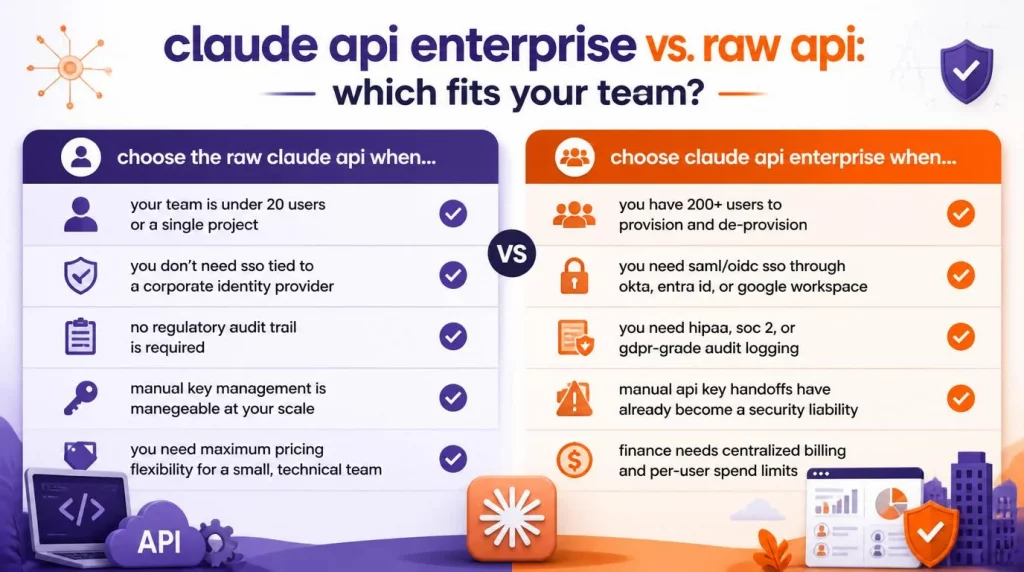
| Choose the raw Claude API when… | Choose Claude API Enterprise when… |
| Your team is under 20 users or a single project | You have 200+ users to provision and de-provision |
| You don’t need SSO tied to a corporate identity provider | You need SAML/OIDC SSO through Okta, Entra ID, or Google Workspace |
| No regulatory audit trail is required | You need HIPAA, SOC 2, or GDPR-grade audit logging |
| Manual key management is manageable at your scale | Manual API key handoffs have already become a security liability |
| You need maximum pricing flexibility for a small, technical team | Finance needs centralized billing and per-user spend limits |
When Enterprise is not worth it: Organizations with fewer than roughly 50-100 seats and no regulatory audit requirement often find the $20/seat/month governance fee costs more than the manual provisioning work it replaces. These teams do better staying on the Team plan or the raw API until either their headcount or their compliance obligations cross that line.
Security, Compliance & the Enterprise Admin API
Enterprise security features exist to answer the questions a CISO asks before approving any AI rollout: who can access it, what did they do with it, and can we prove that to an auditor. Teams connecting Claude to internal systems through Claude MCP integration need these controls even more, since every tool call an agent makes against a CRM, ticketing system, or database should trace back through the same audit trail as a direct chat message.
SSO must be configured before SCIM. Claude Enterprise SSO runs through SAML 2.0 or OIDC, supporting Okta, Microsoft Entra ID, and Google Workspace. Attempting to enable SCIM provisioning before SSO is fully tested and verified causes provisioning calls to fail, so treat SSO-first as a hard sequencing rule, not a suggestion.
Once SSO is active, SCIM provisioning maps identity-provider groups directly to Claude seats. Add an employee to the right group in your IdP and they receive a seat automatically; remove them and their access and stop without an admin manually touching the console.
For audit and legal teams, two systems matter. The audit log export covers the last 180 days of user actions, system events, and data access, downloadable by an Owner or Primary Owner. The Compliance API goes further, giving programmatic, real-time access to activity logs, chat histories, and file content, filterable by user and time range, plus selective deletion for data subject access requests.
Regulated industries also get data residency configuration at the organization level, customer-managed encryption keys provisioned in your own cloud, and HIPAA-ready configuration with a signed BAA on sales-assisted plans, per Anthropic’s Enterprise plan documentation. For teams under EU regulation, documenting this configuration against frameworks like ISO/IEC 42001 or the NIST AI Risk Management Framework is becoming standard practice ahead of EU AI Act enforcement.
How to Get Started with Claude Enterprise API
Getting a Claude API Enterprise organization running involves both an admin-side setup and a developer-side integration.
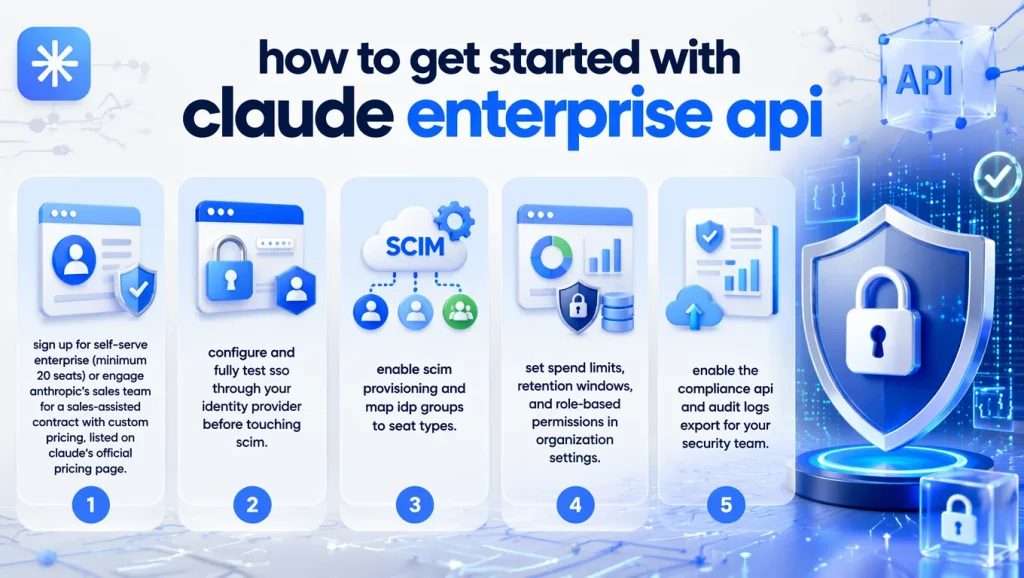
Admin setup, in order:
- Sign up for self-serve Enterprise (minimum 20 seats) or engage Anthropic’s sales team for a sales-assisted contract with custom pricing, listed on Claude’s official pricing page.
- Configure and fully test SSO through your identity provider before touching SCIM.
- Enable SCIM provisioning and map IdP groups to seat types.
- Set spend limits, retention windows, and role-based permissions in Organization settings.
- Enable the Compliance API and Audit Logs export for your security team.
Developer-side integration uses the same Messages API as any other Claude integration, authenticated with an organization-scoped API key:
| import anthropic client = anthropic.Anthropic( api_key=“YOUR_ENTERPRISE_API_KEY” # scoped to your Enterprise org ) try: response = client.messages.create( model=“claude-sonnet-4-6”, max_tokens=1024, messages=[ {“role”: “user”, “content”: “Summarize this quarterly compliance report.”} ] ) print(response.content) except anthropic.RateLimitError: # back off and retry with exponential backoff pass except anthropic.APIStatusError as e: # log the request id for support and compliance review print(f”API error {e.status_code}, request_id={e.request_id}“) |
Two integration practices matter specifically at Enterprise scale. First, your integration should build retry logic with exponential backoff around rate limit errors rather than fixed-interval retries, since a fixed interval under load tends to synchronize retries across your fleet and make the problem worse. Second, your logging should capture the request ID from every error response, since Anthropic support and your own Compliance API audit trail both key off it during incident review. If your team would rather not build and maintain this integration layer in-house, our AI engineers for hire can implement Claude API Enterprise directly into your existing stack.
Enterprise Use Cases and Best Practices
In our work standing up Claude API Enterprise for mid-market clients, four use cases account for most deployments:
- Engineering: Claude Code integrated into CI pipelines and IDEs for code review and large-codebase refactoring, using the expanded context window to load entire repositories without chunking.
- Customer support: Ticket triage and response drafting connected to a helpdesk system, with the Compliance API logging every customer-data interaction for audit purposes.
- Operations: Document processing and internal knowledge search across Microsoft 365 or Google Workspace content, provisioned automatically through SCIM as employees join relevant teams.
- Finance and compliance: Report summarization and anomaly detection on financial documents, run under a configured retention policy, similar to how we’ve deployed AI agents for banking and compliance workflows in regulated environments.
Across all four, the same operational discipline keeps the usage bill predictable: routing routine tasks to a cheaper model like Haiku instead of defaulting every request to Opus, using prompt caching for repeated context, and checking the Analytics API regularly to catch which teams are driving token consumption before it surprises finance at quarter-end.
An Illustrative Cost & ROI Model for Claude Enterprise
The following is a planning model, not a documented customer case, built from the seat-plus-usage structure above and the community-reported cost range. Use it to estimate your own break-even point rather than to predict an exact number.
The real question isn’t “API or Enterprise?” on cost alone, since usage bills identically either way. The real question is whether the $20/seat/month governance fee costs less than building equivalent SSO, provisioning, and audit infrastructure yourself:
| Enterprise total cost = (seats × $20) + (total tokens × API rate) Self-built API-only cost = (total tokens × API rate) + (engineering hours to build/maintain SSO, SCIM, audit logging, DLP) |
For a 500-user deployment, the seat fee alone runs $10,000 per month. Building and maintaining a comparable identity, provisioning, and audit pipeline internally, including ongoing engineering time to keep it aligned with SOC 2 and HIPAA requirements, commonly exceeds that figure once you account for engineer salary allocation, not just tooling cost.
Organizations under roughly 50-100 seats, without regulatory audit requirements, more often find the governance layer isn’t worth the fixed fee. The break-even point shifts earlier for any organization already subject to HIPAA, SOC 2, or GDPR audit obligations, since the Compliance API and BAA replace work that would otherwise fall on internal security engineering.
Conclusion
Claude API Enterprise is the standard Claude API with an identity, compliance, and audit layer built on top, not a separate or discounted API tier. The seat fee buys SSO, SCIM, audit logs, and the Compliance API; usage bills at the same token rate either way, which means the real decision hinges on whether your organization needs that governance layer more than it needs to save $20 per seat. Contact AI Hive and let our team help map your usage pattern against the right Claude API Enterprise deployment before you commit to a seat count.