

“Where is my order?” is the single most common question your Shopify support team answers every day. This question – known as WISMO in ecommerce operations – accounts for 30–50% of all customer service tickets across online stores, regardless of size or niche. A Shopify Chatbot for Tracking Orders solves this problem by connecting directly to your order and shipping data and delivering instant responses without requiring a human agent. The result: stores that automate WISMO report support cost reductions of $2,500–$3,000 per month for every 750 tracking inquiries handled, and your support team recovers 30+ hours of capacity every month to focus on higher-value customer interactions.
What a Shopify order tracking chatbot is NOT: It is not a simple FAQ bot that pastes a static tracking link. A genuine order tracking chatbot authenticates the customer, queries live carrier APIs, interprets shipment status in plain language, handles exceptions like delays and lost packages, and escalates to a human agent when needed.
Why Do WISMO Tickets Dominate Your Shopify Support Queue?
WISMO tickets dominate Shopify support queues because customers check order status an average of 3–5 times between purchase and delivery, and most stores do not provide proactive, real-time updates that reduce this anxiety. A store shipping 1,000 orders per month with standard 5–7 day delivery windows can expect 300–500 “Where is my order?” contacts monthly – a volume that consumes 33–66 hours of agent time and costs $660+ per month in direct labor alone.
Three structural factors drive this volume. First, standard order confirmation and shipping notification emails provide a tracking number but not a plain-language status update, forcing customers to interpret carrier tracking pages on their own. Second, carrier tracking pages display cryptic status codes – “In Transit to Next Facility,” “Awaiting Carrier Pickup” – that fail to communicate what those statuses mean for the delivery timeline. Third, the psychological anxiety gap between “I paid for this” and “I received this” creates a need for reassurance that a static tracking page simply cannot satisfy.
During peak seasons – Black Friday, holiday shopping, and flash sales – WISMO volume spikes by 200–300% as delivery networks become strained and transit times extend beyond customer expectations. Stores that have not automated order tracking before a peak season face a compounding crisis: higher ticket volume at exactly the moment when human support capacity is most stretched.
What Exactly Does a Shopify Chatbot for Tracking Orders Do?
A Shopify order tracking chatbot identifies the customer, queries your Shopify Admin API and carrier tracking APIs in real time, translates raw shipment data into plain-language responses, and handles the full range of post-purchase scenarios – from simple “where is my package?” inquiries to delay communications, exception handling, and escalation to human agents. The entire process happens in seconds, not minutes.
Merchants who want to extend automation beyond order tracking can explore customer service chatbot strategies for Shopify that handle returns, refunds, and product inquiries within the same conversational interface. Understanding this architecture helps you evaluate platforms and set realistic expectations for what automation can achieve.
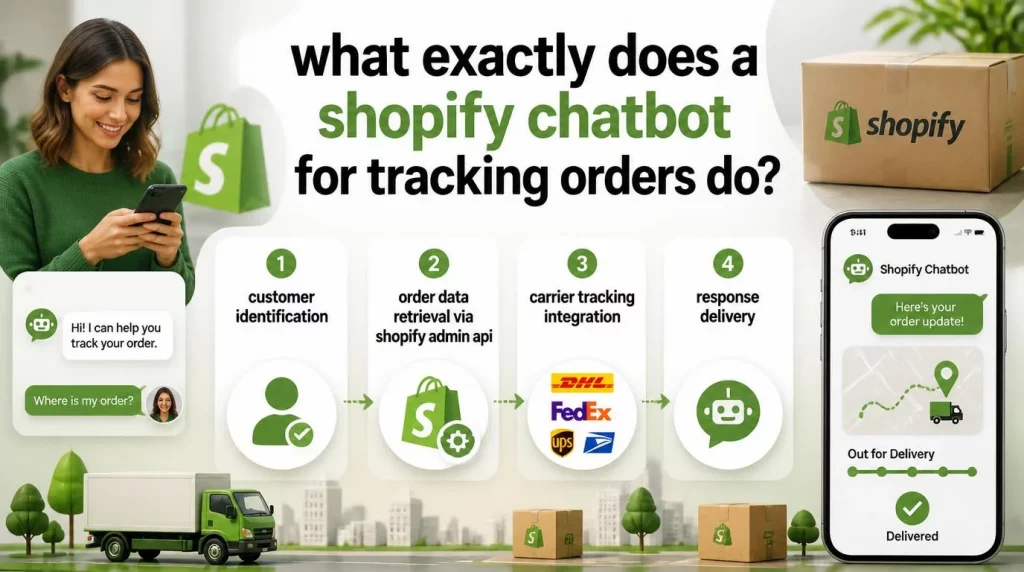
Step 1: Customer Identification
When a customer initiates a tracking inquiry, the chatbot must verify which order they are asking about. Production-grade implementations support three identification paths: the customer provides their order number directly; they provide the email address associated with the order; or the chatbot identifies them automatically through their logged-in Shopify customer account. Platforms that support only order-number identification force customers to locate their confirmation email before receiving help – a friction point that defeats the purpose of instant support and drives customers toward phone or email channels instead.
Step 2: Order Data Retrieval via Shopify Admin API
The chatbot authenticates with Shopify’s Admin API and queries the order endpoint to retrieve line items, fulfillment status, tracking numbers, and carrier information. Shopify’s native fulfillment status (unfulfilled, partially fulfilled, fulfilled) is too coarse for a satisfying customer response, which is why the next step is essential.
Step 3: Carrier Tracking Integration
The chatbot queries the carrier’s tracking API – or a tracking aggregation service such as AfterShip, Tracktor, or 17track – using the tracking number from Shopify’s fulfillment data. This integration returns the package’s current location, transit history, and estimated delivery date. The chatbot then translates carrier-specific status codes into natural language that customers can understand, replacing “USPS: Package Transferred to Destination Facility” with “Your package is in Memphis and is expected to arrive by Friday.”
Step 4: Response Delivery
The chatbot combines order and tracking data into a conversational response: “Your order #1247 shipped on Tuesday via USPS. The package is currently in Memphis, TN and is expected to arrive by Friday, July 18th. Here is your tracking link.” This response format – specific, data-driven, and written in plain language – delivers the information customers actually need and eliminates the urge to follow up with another ticket.
Which Shopify Chatbot for Tracking Orders Features Actually Separate Good from Great Order Tracking?
Not all Shopify chatbots handle order tracking with the same level of sophistication. The features below separate tools that genuinely automate WISMO from tools that simply provide a slightly faster link to a tracking page.
| Feature | Basic Tool | Production-Grade Chatbot |
| Multi-Carrier Support | USPS only or 2-3 carriers | USPS, FedEx, UPS, DHL + regional carriers via API |
| Customer Identification | Order number only | Order number + email + logged-in Shopify account |
| Proactive Notifications | None | Ships / arrives near you / out for delivery / delay alerts |
| Delivery Date Accuracy | Static label creation date | Live carrier ETA, updated at each scan event |
| Exception Handling | Shows raw carrier status | Interprets delay/lost/failed delivery + escalates |
| Guest Checkout Support | Requires Shopify account | Email-based lookup for guest orders |
| Escalation Logic | None | Transfers to human agent with full conversation context |
For a broader comparison of the best AI chatbot platforms for Shopify across all use cases, our dedicated review covers pricing, features, and integration depth.
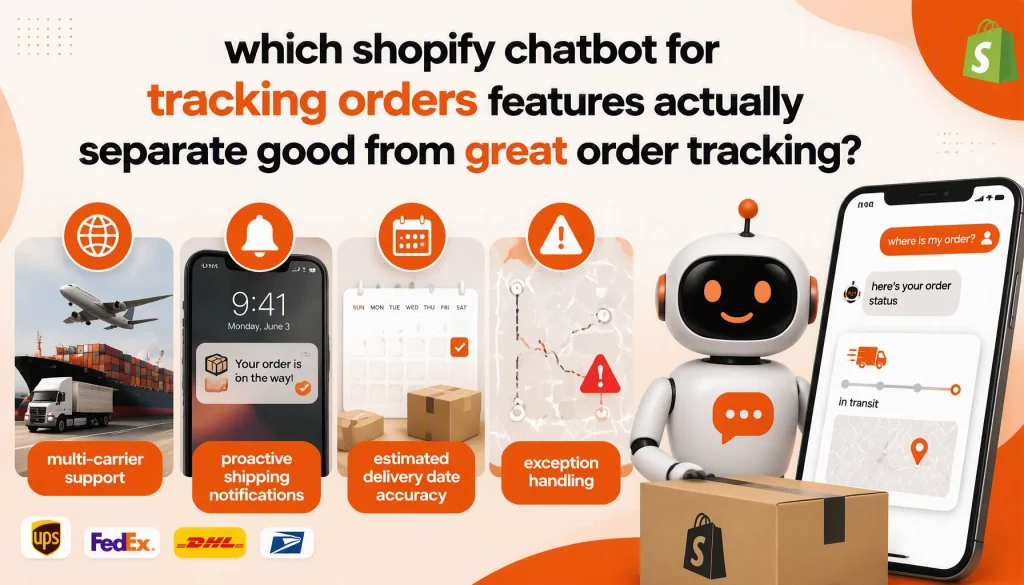
Multi-Carrier Support
Your store likely ships through multiple carriers depending on destination, package size, and shipping speed. The chatbot must support tracking across USPS, FedEx, UPS, DHL, and regional carriers without requiring the customer to know which carrier is handling their specific shipment. Platforms that support only one or two carriers create gaps where the chatbot cannot provide tracking for certain orders – forcing those customers back to human agents and erasing a portion of your automation ROI.
Proactive Shipping Notifications
The most effective approach to WISMO automation is preventing the inquiry from happening in the first place. Advanced chatbots monitor shipping events and proactively notify customers when their order ships, when it reaches a carrier facility near their delivery address, when it is out for delivery, and – critically – when a delay or exception occurs. Proactive delay notifications are particularly valuable because they address the customer’s concern before frustration accumulates and converts into a support ticket.
Estimated Delivery Date Accuracy
Customers do not just want to know where their package is – they want to know when it will arrive. The chatbot should provide estimated delivery dates based on live carrier data and update those estimates as the package progresses through the carrier network. When a delivery estimate changes, especially when it extends due to a delay, the chatbot should communicate the updated timeline proactively rather than waiting for the customer to ask.
Exception Handling
Not every shipment follows the expected delivery path. Packages get stuck in transit, delivery attempts fail, customs holds create delays, and occasionally packages are lost. The chatbot should recognize these exception states and respond appropriately: providing context for delays, offering to arrange redelivery for failed attempts, and escalating lost-package situations to human agents who can initiate carrier investigations or dispatch replacements. An effective exception-handling flow is what determines whether customers experience your chatbot as a genuine solution or as a dead end.
Order History and Multi-Order Support
Repeat customers often have multiple recent orders in transit simultaneously and may not specify which one they are asking about. The chatbot should handle this gracefully by presenting a list of recent orders and letting the customer select the relevant one, or by asking a single clarifying question when multiple active shipments are detected.
What Does 40% WISMO Automation Actually Look Like in Practice?
The 40% reduction in support tickets is a conservative benchmark based on current platform performance data. Industry data shows that well-configured Shopify chatbots resolve order tracking inquiries at a 93% rate for standard tracking scenarios. The remaining 7% involves exception cases – lost packages, customs issues, and situations requiring human judgment – that the chatbot escalates appropriately.
The 40% figure refers to overall support ticket reduction because WISMO typically comprises 30–50% of total tickets. Automating 80–93% of those tickets eliminates roughly 25–45% of your entire support queue. The following table illustrates what this means for a store handling 1,000 support tickets per month:
| Metric | Before Automation | After Automation |
| Total monthly tickets | 1,000 | 640 (handled by humans) |
| WISMO tickets | 400 (40% of total) | 40 exceptions only |
| Agent time on WISMO | 33 hours/month | 3 hours/month (exceptions) |
| Direct WISMO labor cost | ~$660/month (at $20/hr) | ~$60/month |
| Chatbot platform cost | N/A | $100–300/month |
| Net monthly savings | Baseline | $360–560/month |
According to Gartner’s 2026 Customer Service Technology report, agentic AI will autonomously resolve 80% of common customer service issues without human intervention by 2029, projecting a 30% reduction in operational costs. Merchants who deploy order tracking automation now are building the operational infrastructure to capture these efficiency gains as the technology matures – and training their customers to expect instant, accurate post-purchase communication from your brand.
How Do You Deploy Shopify Chatbot for Tracking Orders by Steps?
Deploying an order tracking chatbot on your Shopify store follows a structured six-step process. Rushing through setup results in a chatbot that frustrates customers rather than helping them – most implementation failures stem from skipping the audit and testing phases.
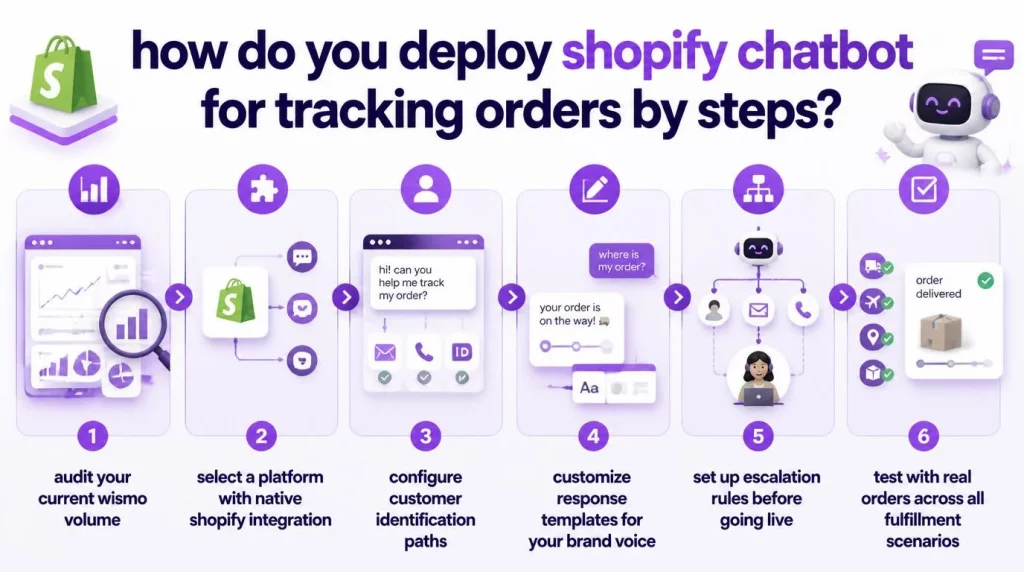
Step 1: Audit your current WISMO volume
Before selecting a platform, quantify the problem. Review your support tickets from the past 90 days and categorize WISMO inquiries by subtype: simple tracking requests, delivery date inquiries, delay complaints, and lost-package reports. This breakdown tells you which WISMO subcategories the chatbot should prioritize and which will still require human handling after deployment.
Step 2: Select a platform with native Shopify integration
The platform must authenticate directly with Shopify’s Admin API, not rely on third-party middleware or manual data exports. Verify that the platform supports your specific carriers and, if you use a fulfillment service such as ShipBob or Deliverr, that it can access tracking data from those systems directly.
Step 3: Configure customer identification paths
Set up all three identification methods: order number lookup, email-based order retrieval, and logged-in customer detection. Test each path with real orders to verify the chatbot returns accurate data. Pay particular attention to edge cases such as guest checkout orders (where the customer may not have a Shopify account) and orders placed under a different email address than the one the customer is currently using.
Step 4: Customize response templates for your brand voice
Replace generic default templates like “Your order is on the way!” with specific, data-driven responses that include carrier name, current location, estimated delivery date, and tracking link. Write customized responses for each distinct shipment state: in transit, out for delivery, delivered, delayed, and exception. Responses that match your brand’s tone build customer trust and reinforce brand consistency at a critical post-purchase touchpoint.
Step 5: Set up escalation rules before going live
Configure the chatbot to escalate to a human agent when it detects a shipping exception, when the customer’s sentiment indicates frustration, when the package appears lost (no tracking update for 5+ business days), or when the customer explicitly requests human assistance. Each escalation should transfer the full conversation context – including order details, tracking status, and the prior message thread – to the human agent so that the customer does not need to repeat themselves.
Step 6: Test with real orders across all fulfillment scenarios
Place test orders using different carriers and shipping methods. Interact with the chatbot at each stage of fulfillment – before shipping, after shipping, during transit, and after delivery – to verify that responses are accurate and helpful at every point in the post-purchase journey. Do not go live until every identification path, carrier integration, and escalation rule has been validated with real order data.
What Advanced Strategies Can Reduce WISMO Volume Even Further?
Once your basic order tracking chatbot is operational and resolving the majority of standard WISMO inquiries, three advanced strategies can further reduce ticket volume and transform post-purchase interactions into revenue opportunities.
Proactive Outreach After Delivery
Configure the chatbot to send a follow-up message 24–48 hours after delivery confirmation, asking the customer if they received their order and whether everything looks as expected. This proactive touchpoint reduces “I never received my order” tickets in cases where the package was actually delivered, and it creates a natural opportunity to request a product review while the customer’s experience is fresh.
Shipping Delay Prevention Messaging
During peak seasons or when fulfillment timelines are extending, configure the chatbot to set expectations proactively during the ordering process. A message at checkout – “Current processing time is 3–5 business days before shipping” – reduces post-purchase anxiety and the resulting WISMO inquiries before they are generated. Prevention is always more cost-effective than resolution.
Revenue-Generating Cross-Sells During Tracking Interactions
A customer checking their order status is actively engaged with your brand – a moment of attention that most stores waste on a static tracking page. The chatbot can include a personalized product recommendation alongside the tracking update: “Your skincare order is arriving Thursday. Based on your recent purchase, you might also like our new SPF moisturizer – here is 10% off your next order.” This approach transforms a support interaction into a revenue opportunity without being intrusive, because the recommendation is delivered after the customer’s tracking question has been fully answered.
Merchants interested in the full scope of Shopify AI chatbot capabilities in 2026 – from post-purchase to pre-purchase engagement – will find our comprehensive platform overview helpful. For deeper context on how AI agents handle complex multi-step automation workflows – including exception handling and cross-sell orchestration – see our guide on enterprise AI agent architecture and multi-step orchestration.
Conclusion
A Shopify Chatbot for Tracking Orders eliminates the highest-volume, lowest-complexity category from your support queue – and it does so immediately, not after months of training or implementation. The technology is mature, the Shopify integration is well-established, and the ROI is measurable within the first 30 days of deployment. Stores that automate WISMO recover 30+ hours of agent capacity per month, reduce per-ticket costs by 80–90% for tracking inquiries, and deliver the instant, accurate post-purchase communication that drives repeat purchases and positive reviews.
Our AI engineers at AI Hive build order tracking and post-purchase automation systems that integrate with your existing Shopify infrastructure – part of our broader retail AI agent solutions for ecommerce operations at scale.
Contact the AI Hive team to discuss how automated order tracking fits into your broader customer service and retail AI strategy.