

Every enterprise has a system no API will ever reach: a core banking terminal, a claims green screen, or a supplier portal that offers nothing but a login page. Integration teams quote months to expose even read access, so staff keep retyping data between screens, and every new reporting rule adds more of it. A computer use agent offers a different path, because it operates the screen your staff already use, reading it, clicking, and typing like a person. Whether that path is ready for production depends on the reliability numbers behind the demos, the cost per task compared with an API or RPA, and an isolation model your security team can sign off.
Key Takeaways
|
What Is a Computer Use Agent and How It Differs from a Chatbot
A computer use agent is an AI system that operates a computer the way a person does: it looks at the screen, decides what to click or type, and acts directly on the interface. It is not a chatbot answering questions about your systems, and it is not classic robotic process automation (RPA), which replays a recorded sequence of clicks. The agent perceives the current state, reasons about the next step, and adapts when the screen changes.
The category went mainstream in under two years. Anthropic released computer use for Claude as a public beta in October 2024, OpenAI launched Operator on its Computer-Using Agent model in January 2025 and folded it into ChatGPT agent that July, and Microsoft made computer use generally available in Copilot Studio in May 2026.
That timeline matters because the technology now ships inside enterprise suites, not only as research previews. The question has shifted from whether the approach works at all to where it belongs in your automation stack.
Screen-level automation is also one component in a wider AI agent architecture, with the same layers as any agent: perception, reasoning with guardrails, and an action layer that can be constrained, logged, and stopped.
4 Steps in How a Computer Use Agent Works: Observe, Locate, Act, Verify
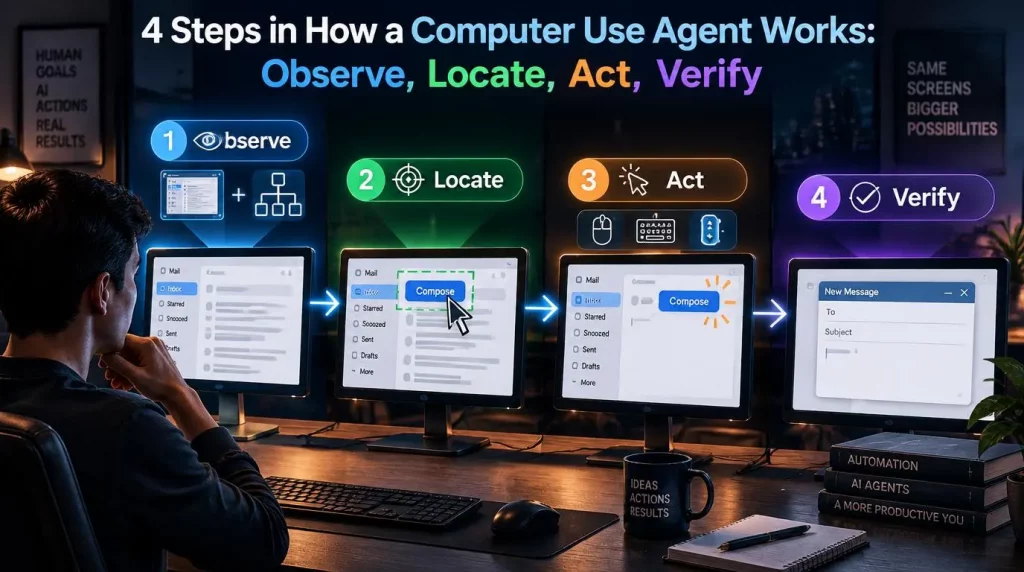
Every computer use agent runs a variation of the same observe, locate, and act loop, and knowing the loop is the fastest way to judge a vendor’s claims.
- Screen observation: The agent captures a screenshot, and on some platforms also reads the accessibility tree, to see what a human operator would see.
- Element location: The model matches the task goal to a button, field, or menu on the screen and works out its pixel coordinates.
- Action execution: The agent sends a click, keystroke, or scroll through an automation layer and waits for the interface to respond.
- Verification: A new screenshot shows whether the action worked, and the loop continues, retries, or escalates to a person.
Most misclicks come from a few predictable causes. Screenshots are usually downscaled before the model sees them, so coordinates must be scaled back to the real screen, a step Anthropic’s documentation calls out explicitly. Small text, elements that load late, pop-ups that cover a field, and a screen resolution that changes between sessions cause most of the rest.
The fixes are mostly operational. A fixed resolution, a zoom step for small text, a screenshot after every action, and example screenshots of the correct screen in the instructions reduce computer use agent errors more reliably than a bigger model does.
This loop is also what separates the approach from RPA. An RPA bot follows coordinates or selectors that break when a button moves, while the agent re-reads the screen every cycle and tolerates interface drift, at the price of a model call on every step.
Computer Use Agent Capabilities and Limits: Benchmarks vs Production
Computer use agent capability has risen faster than almost any other agent skill, but the gap between benchmark scores and production reliability is still wide.
OSWorld, published at NeurIPS 2024 by Xie and colleagues, set the reference point: people completed about 72 percent of its desktop tasks, while the best model managed about 12 percent. OpenAI reported in January 2025 that its Computer-Using Agent reached 38.1 percent on OSWorld, 58.1 percent on WebArena, and 87 percent on WebVoyager.
Computer use agent scores have kept climbing. Third-party leaderboards tracking the stricter OSWorld-Verified version listed several models above the 72.4 percent human baseline by September 2026. Those results are real progress, but they measure clean virtual machines without logins, multi-factor prompts, or hostile content.
Four limits still shape where the approach fits:
- Speed: Each step needs a screenshot and a model call, so a task a person finishes in one minute can take the agent several.
- Cost per task: A 1,280 by 800 pixel screenshot is roughly 1,400 input tokens under Anthropic’s image sizing, so a 30-step task that keeps three recent screenshots in context uses about 150,000 to 200,000 input tokens, or $0.30 to $0.40 at an illustrative $2 per million.
- Determinism: The same task can take different paths on different runs, which complicates testing and audit.
- Exposure to screen content: Anything the agent reads, including an email or a web page, can carry instructions that try to redirect it.
None of these limits rule the approach out. They decide which workflows it suits and how tightly it must be contained.
4 Cases Where a Computer Use Agent Beats API Integration
A computer use agent is not a replacement for a good API integration. It is a way to automate the systems that never got one, and the comparison below shows where each approach belongs.
| Dimension | Computer use agent | API integration | Traditional RPA |
|---|---|---|---|
| Access requirement | A user login to the existing interface | A documented, stable API | A stable interface with a fixed layout |
| Resilience to interface change | High, because it re-reads the screen each step | Not affected, because it bypasses the interface | Low, because scripts break on layout changes |
| Cost per transaction | Highest, with a model call on every step | Lowest, with a direct data exchange | Low, until maintenance accumulates |
| Speed per transaction | Slowest | Fastest | Fast |
| Auditability | Moderate, from screenshots, recordings, and action logs | High, from structured request logs | High, from deterministic step logs |
| Best fit | No-API legacy systems, cross-application tasks, exceptions | High-volume, stable systems | Simple, repetitive tasks on stable screens |
A computer use agent is the right architecture, not a workaround, in four situations:
- No API, now or later: Core banking terminals, policy administration systems, and government portals often run on platforms whose vendors stopped adding interfaces years ago.
- Work across disconnected applications: Loan origination, claims, and patient intake often mean reading one system, keying into a second, and confirming in a third.
- Exceptions, not pure repetition: A model can recognize an unusual form and route it, where an RPA script needs a developer to add every new case.
- Commercial barriers: Some vendors put their API behind an expensive tier, and automating a licensed interface can be faster, provided your legal team confirms the license allows it.
API integration still wins whenever a stable, documented API exists and the workflow runs thousands of times a day. It is faster, cheaper per transaction, and deterministic, failing with a clear error code instead of an ambiguous screen state. Sending ten thousand daily transactions through screen automation when an API exists is an avoidable cost, not a resilience strategy.
5 Leading Computer Use Agent Solutions: Model Providers to Open Source
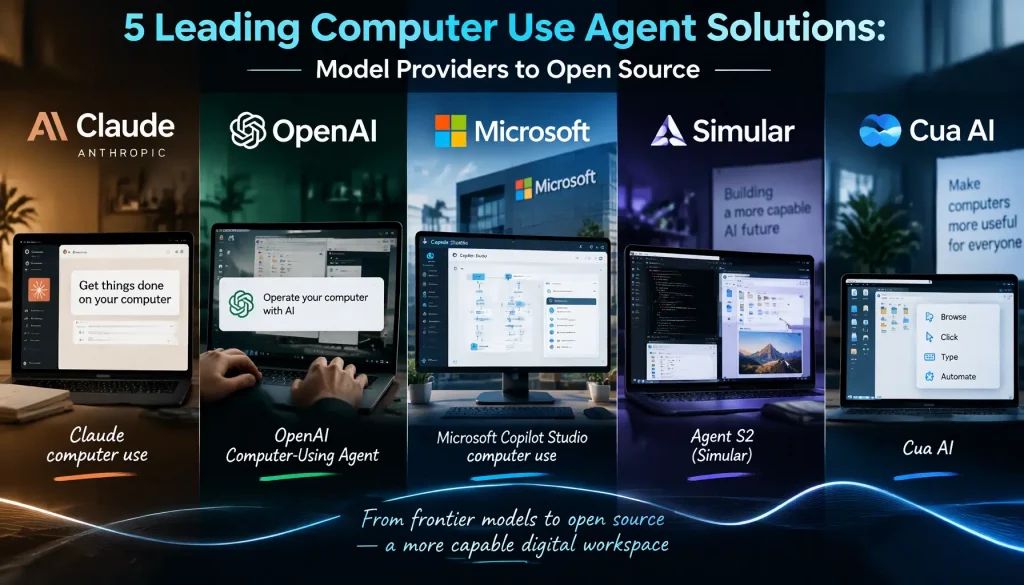
The computer use agent market now spans model providers, enterprise suites, and open-source frameworks. The table compares them by delivery model and hosting, based on public documentation read on October 2, 2026.
| Solution | Type | What it offers | Where it runs |
|---|---|---|---|
| Claude computer use (Anthropic) | Model and API tool | A computer toolset with screenshot, click, type, zoom, and other actions, generally available on the Claude API | Your own virtual machine or container |
| OpenAI Computer-Using Agent | Model, also inside ChatGPT agent | Screen operation through the API and through ChatGPT agent, which replaced Operator in 2025 | Your environment through the API, or OpenAI’s hosted browser |
| Microsoft Copilot Studio computer use | Enterprise suite feature | Web and desktop automation with a hosted browser on Windows 365, Azure Key Vault credentials, and Purview audit logs | Microsoft cloud or your own machines |
| Agent S2 (Simular) | Open-source framework | A compositional agent that combines general and specialist models for screen grounding | Self-hosted |
| Cua AI | Open-source framework | Sandboxed virtual machines and tooling for running screen-level agents | Self-hosted |
Hosting is the deciding column for regulated teams. A service that runs only in a vendor’s hosted browser sends every screenshot, including any customer data on screen, outside your network, while API-based tools can run inside a virtual machine you control. The AI agent framework you choose should let you switch the underlying model without rebuilding the guardrails around it.
5 Computer Use Agent Enterprise Use Cases: Where Screen-Level Fits
The best computer use agent use cases combine a system with no realistic API, a workflow worth automating, and an interface that changes rarely.
| Process | Typical system | Why screen-level fits | Condition to check |
|---|---|---|---|
| Data entry into legacy accounting software | Desktop accounting or ERP client | No API, or an API locked behind an add-on | Fields and screens stay stable between releases |
| Lookups on portals without APIs | Payer, customs, tax, or supplier portals | The portal offers only a login page | Terms of use allow automated access |
| Core banking back-office tasks | Terminal emulator on a mainframe | A core replacement is years away | Lookups first, with writes behind approval |
| Claims handling across systems | Policy administration, documents, payments | Three systems with no shared API | Exceptions go to an adjuster |
| Eligibility checks at patient intake | Payer portal plus intake system | Manual lookups take staff time on every visit | Patient data stays in an approved environment |
Two conditions apply to every row. The interface must be stable enough that routine releases do not move core fields, and the volume must justify the oversight, typically a process that consumes several hours of manual work a week.
Each workflow still needs engineering, including test cases, exception paths, and monitoring. That work is ordinary AI agent development, and treating a screen-level pilot as a product rather than a script is what lets it survive the next interface update.
7 Security Controls for a Computer Use Agent: The Minimum Isolation Set
A computer use agent operates production systems the way an employee does, so it inherits an employee’s blast radius. The isolation set below is the minimum for any environment with sensitive data.
- Dedicated virtual machine: Each agent runs in its own virtual machine or container, reset to a clean image between sessions, never on a staff laptop.
- Least-privilege account: A named service account holds only the permissions the workflow needs, with credentials injected from a vault instead of being visible to the model.
- Application and domain allowlist: The agent can open only approved applications and reach only approved domains, which limits both mistakes and exposure to malicious content.
- Emergency stop: An operator can halt any session instantly, and the agent stops by itself at a step limit or on an unexpected screen.
These controls mirror vendor guidance. Anthropic’s computer use documentation recommends a dedicated virtual machine or container with minimal privileges, keeping sensitive data such as login details away from the model, an allowlist of domains, and human confirmation for decisions with real-world consequences such as financial transactions.
Prompt injection is the risk specific to this category. Text on a web page, in an email, or in a document can contain instructions aimed at the agent, and Anthropic now scans screenshots with classifiers that flag likely injections. Classifiers reduce the risk without removing it, which is why the allowlist and the approval gate still matter.
For sensitive data, the strongest computer use agent operating model keeps the whole loop inside your network. Three design choices make that work:
- On-premise execution: The virtual machines, the model endpoint or a private deployment of it, and the logs all sit inside your network boundary, so screenshots with customer data never leave it.
- Approval before every write: The agent reads freely within its allowlist, but any action that saves, submits, or sends data pauses for a person to confirm the exact values.
- Full session replay: Every screenshot, action, and model decision is recorded, so a reviewer can replay the session step by step during an audit or dispute.
AI Hive supports on-premise and private cloud deployment for agents that handle regulated data. If you want to scope that operating model for a specific legacy system, you can talk to our team.
4 Reliability Findings from Public Benchmarks and Vendor Testing
We have not published test results of our own, so this section collects what public benchmarks and vendor testing show about computer use agent reliability, and what that means for a pilot.
- Steep progress: Top OSWorld scores rose from about 12 percent in 2024 to 38 percent in early 2025, and OSWorld-Verified leaderboards listed models above the human baseline by late 2026.
- Early fragility, admitted: Anthropic described computer use as slow and often error-prone when it launched in October 2024, and OpenAI called its agent early and limited at its own launch.
- Missing hard parts: Benchmark environments rarely include multi-factor logins, session timeouts, CAPTCHA, or content written to mislead the agent.
- Compounding errors: A step that succeeds 98 percent of the time succeeds on all 30 steps of a task only about 55 percent of the time, so verification after each step matters more than raw accuracy.
A pilot should measure its own numbers instead of borrowing benchmark scores. Four metrics are enough: task success rate on a fixed set of at least 50 real cases, steps and minutes per task, cost per task, and the share of tasks that needed a person. Running the same cases every week shows whether interface changes are eroding reliability.
Our view is that the technology is ready today for read-heavy work and approval-gated writes on stable legacy screens, and not yet ready for unattended writes to financial or clinical records. That line should move only when your own pilot data supports it.
Conclusion
A computer use agent is the right tool for one specific, expensive problem: legacy systems that will never get an API, and workflows that cross applications no integration budget can connect. Benchmarks show the capability is real, while cost per task, speed, and prompt injection explain why an API still wins wherever one exists. This quarter, your team can pick one read-heavy workflow on a stable legacy screen, run 50 real cases in an isolated virtual machine with approval before every write, and measure success, time, and cost per task.
The next question is how screen-level agents sit alongside API and RPA automation under one set of permissions, logs, and approval gates. Our platform features page shows how AI Hive orchestrates those layers, including on-premise deployment for regulated data.