

Most Shopify merchants handle the same 10 support questions every single day, and “where’s my order?” accounts for a large share of those tickets. At scale, this repetition consumes hours of team time that could go toward growth. The good news is that a Shopify AI chatbot resolves these queries automatically – around the clock, across chat and WhatsApp, without adding headcount – and this guide walks you through exactly which tool fits your store, how pricing actually works, and what to test before you commit.
Key Takeaways
|
What Is a Shopify AI Chatbot?
Merchants often discover the difference between a Shopify AI chatbot and a basic live chat widget only after installing the wrong one. Understanding what each tool actually does – and does not do – saves you from a frustrating month of misconfigured automation.
A Shopify AI chatbot is an AI-powered conversational assistant embedded directly in your storefront. It connects to your Shopify backend through the API to pull live product data, order status, shipping information, and store policies. Consequently, it answers customer questions with actual store context, not generic pre-written scripts.
This distinction matters in practice. A Shopify-native AI chatbot knows your specific catalog, can look up a particular customer’s order in real time, and responds based on your actual content. By contrast, a generic live chat widget relies on whatever an agent types – and agents aren’t available at 3 AM.
Three types of chatbots are available to merchants today include:
| Type | How It Works | Best For |
|---|---|---|
| Rule-based bots | Follows pre-scripted decision trees | Simple FAQs, very low traffic, zero budget |
| AI Q&A bots | Uses NLP to understand intent and pull answers from a knowledge base | Mid-range support automation, first AI step |
| Full AI agents | Understands context, takes real actions: process returns, apply discounts, recover carts | Scaling stores, high ticket volume, post-purchase automation |
The most common first use case for an AI chatbot for Shopify is WISMO resolution – the “where is my order?” queries that pile up in every support inbox. Forrester Research benchmark data shows well-configured AI chatbots achieve a 40-60% deflection rate across a typical ecommerce ticket mix. Beyond support deflection, Shopify’s 2026 platform data shows visitors arriving through AI-powered search tools convert at a rate 50% higher than organic search visitors, with average order values running 14% higher – making conversational AI a direct revenue lever for stores in 2026.
Key Features to Look For in a Shopify AI Chatbot
Not every tool labeled “AI” delivers real automation, and the differences between them are not always obvious from a feature comparison table. These five criteria cut through the marketing and tell you what actually matters before you install anything.
The first thing to check is native Shopify API integration. The chatbot should pull live order data, product catalog, and customer records directly through the Shopify Admin API – not through a manual CSV import or a weekly sync job. Real-time data is what separates an accurate answer from a hallucinated one about a product that’s been out of stock for three days.
Beyond integration depth, the following criteria should all be part of your evaluation before you start a trial:
- Verified deflection rate from your own store data: A realistic deflection rate for a well-configured AI chatbot is 40-60%. Vendors frequently report 70-90%+ in their marketing materials. Run a 72-hour trial on your live store and check the actual conversation logs before trusting any published figure.
- Pricing model transparency: Per-conversation and per-resolution plans can spike hard during BFCM or a flash sale. Flat per-reply tiers with a defined overage rate give you a predictable cost ceiling regardless of how traffic moves.
- Agentic order actions: The gap between a chatbot that answers questions and one that takes actions is significant. Look for tools that can process returns, apply discount codes, edit orders, and recover abandoned carts – not just explain your policy and redirect customers to a form.
- Setup time and training requirements: A tool that requires a week of manual knowledge-base building before it can answer a basic product question is a tool your team will not finish configuring. Prioritize tools that auto-sync with your Shopify catalog and published store pages from the moment you install.
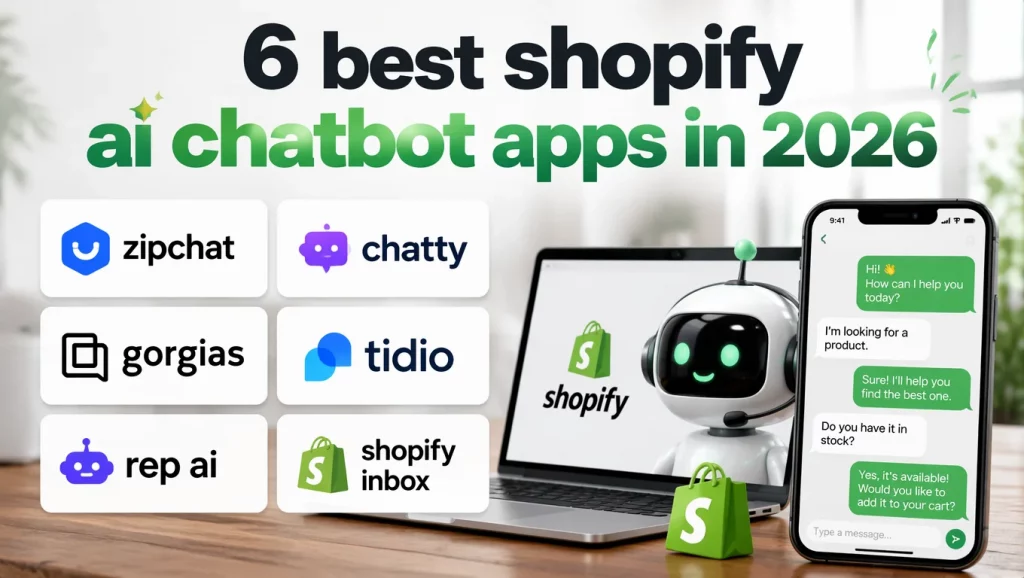
6 Best Shopify AI Chatbot Apps in 2026
The Shopify App Store lists hundreds of chatbot options, and most comparison articles rank them by star rating alone. This section takes a different approach: each tool is evaluated by the use case it actually serves best, so you can match the right app to your store profile rather than defaulting to the most popular one.
The table below gives you a quick reference across the six most relevant Shopify chatbot apps in 2026. Detailed breakdowns follow for each tool.
| App | Rating | Starting Price | Free Plan | Shopify Native | Best For | |
|---|---|---|---|---|---|---|
| Zipchat | 4.8 | $49/mo | No (7-day trial) | Yes | Native | AI-first, multilingual, WhatsApp |
| Chatty | 4.9 | $19.99/mo (AI from $68.99) | No | Yes | Native (inbox) | Budget stores, highest App Store rating |
| Gorgias | 4.3 | $10/mo + $0.90-$1.00/res. | No | Yes | Add-on | Agent-led teams, deep order actions |
| Tidio | 4.7 | $24.17/mo | Yes (limited) | Partial | Add-on | SMB all-in-one inbox |
| Rep AI | 4.7 | $99/mo | No | Yes | No | Conversion-focused DTC brands |
| Shopify Inbox | N/A | Free | Yes | Yes | No | New stores, zero budget |
1. Zipchat – Best Overall AI-First Chatbot
Zipchat is built as an LLM-native platform, which means every customer conversation is handled by AI from the first message. The platform has no rule layer underneath it – the AI decides what to do based on live store context, pulling data directly from the Shopify Admin API. It trains automatically on your product catalog and requires no manual knowledge-base setup, so accuracy on catalog-specific questions is solid from day one.
Key services:
- Live order lookup: Zipchat retrieves real-time order status via the Shopify Admin API, giving customers accurate answers without agent involvement.
- Agentic Skills: The AI applies discount codes, edits orders, and recovers abandoned carts autonomously – without waiting for human approval.
- Native WhatsApp integration: Zipchat runs the same knowledge base across website chat and WhatsApp, so a product update applies everywhere at once.
- Multilingual support: All plans include multilingual handling out of the box, with no per-language add-on costs.
Best for:
- Stores that want AI to handle the majority of pre-sales and post-purchase conversations without human intervention
- Merchants who need native WhatsApp coverage integrated with the same catalog data powering their web store
- Mid-market DTC brands with consistent traffic and international customer bases
Pricing:
- Starter: $49/mo
- Growth: $129/mo (1,500 replies, includes WhatsApp)
- Scale: $249/mo
- Enterprise: $499/mo
- Overage: $0.20 per reply on all plans
- Every plan includes a 7-day trial and a 30-day money-back guarantee
2. Chatty – Highest-Rated Budget AI Chat
Chatty holds a 4.9 rating across nearly 1,800 Shopify App Store reviews, making it the highest-rated AI-native chatbot in the ecosystem. It runs on GPT-4o, ships with a multi-channel inbox, and integrates natively with Shopify. For merchants who want proven AI chat without enterprise-level pricing, Chatty is the clearest option at the entry level.
Key services:
- Multi-channel inbox: Chatty unifies conversations from WhatsApp, Messenger, Instagram, and email in a single dashboard.
- Behavior-based product recommendations: The AI suggests products using browsing history and purchase context, not just keyword matching.
- Built-in FAQ help center: Merchants can publish a self-serve FAQ page directly through Chatty without a separate integration.
- Overnight catalog sync: The chatbot syncs with your Shopify product catalog overnight on first setup, with minimal manual configuration.
Best for:
- Small-to-mid stores on a tight budget getting started with AI support automation for the first time
- Merchants whose primary goal is reducing repetitive support questions without adding staff
- First-time AI chatbot adopters who want a large review base as a quality signal before committing
Pricing:
- Basic: $19.99/mo – downgraded AI model, 50-conversation cap; not sufficient for active stores
- Pro: $68.99/mo – full GPT-4o capability; meaningful AI performance starts here
- Plus: $199.99/mo
- Overage: $0.40 per conversation – double Zipchat’s overage rate; run the numbers at your actual volume before committing
3. Gorgias – Best for Human Agent-Led Teams
Gorgias is a full customer service helpdesk, not a standalone chatbot widget. It unifies conversations from email, chat, Instagram, Facebook, TikTok, and WhatsApp into one inbox, then layers AI automation on top. Its AI Agent handles post-purchase resolution at the deepest level in the category – modifying orders, processing refunds, and issuing discounts directly inside Shopify without a human touching the ticket.
Key services:
- Omnichannel inbox: Gorgias consolidates email, live chat, and social conversations; WhatsApp access requires a paid add-on rather than being included natively.
- Deep Shopify order actions: Agents and AI alike can edit, cancel, or refund an order and apply discount codes – all from inside a support ticket.
- AI Agent for post-purchase resolution: The AI handles common post-purchase workflows autonomously for tickets within defined policy boundaries.
- Workflow tooling: Macros, automated assignment rules, and CSAT surveys make Gorgias genuinely useful for teams managing high volumes.
Best for:
- Growing stores with dedicated support staff handling high ticket volumes across multiple channels
- Teams that need a complete helpdesk and want AI to assist agents, not replace them entirely
- Merchants processing 500 or more tickets per month who need workflow infrastructure alongside chatbot capability
Pricing:
- Starter: $10/mo (50 tickets included)
- Basic: $60/mo (300 tickets)
- Pro: $360/mo (2,000 tickets)
- Advanced: $900/mo (5,000 tickets)
- AI Agent: $0.90-$1.00 per automated resolution, on top of ticket plan cost
- Important: AI resolutions also count as billable tickets – one conversation can trigger two separate charges. Factor this into your total cost model before scaling AI automation.
4. Tidio – Best SMB All-in-One Inbox
Tidio is the most widely installed Shopify chat app and combines live chat, AI automation, and a visual chatbot builder in one tool. Its Lyro AI agent handles common questions without pre-built scripts, learning from your FAQ content and store pages over time. For small-to-mid stores that want one platform covering multiple channels without managing separate vendor relationships, Tidio offers the broadest coverage at an accessible price point.
Key services:
- Drag-and-drop chatbot builder: Tidio’s visual builder ships with Shopify-specific templates for order tracking, product recommendations, and cart recovery.
- Lyro AI agent: The AI handles FAQ deflection across common support scenarios; Lyro Actions for post-purchase workflows are rolling out through 2026.
- In-chat product cards: Customers see product images, prices, and descriptions inside the chat window, shortening the path from question to purchase.
- 17-language support: Tidio handles conversations across approximately 17 languages, a practical option for stores with international customer bases.
Best for:
- Small-to-mid stores that want live chat, AI automation, and chatbot flows in one tool rather than separate platforms
- Merchants who want to start on a free plan and upgrade as support volume grows
- Teams that don’t want to manage multiple vendor relationships for different support channels
Pricing:
- Free plan: $0/mo (100 visitors/month)
- Starter: $24.17/mo
- Growth: from $49.17/mo
- Lyro AI add-on: from $39/mo, billed separately from the base plan
- Technical note: Tidio connects via JavaScript install and catalog sync rather than direct Shopify Admin API access – a functional difference from Shopify-native tools.
5. Rep AI – Best Proactive Conversion Concierge
Rep AI is designed for revenue lift, not support deflection. It uses behavioral triggers to detect hesitating visitors and proactively engages them in a product-finder conversation, a cart recovery flow, or a comparison sequence. IP-based visitor identification allows the AI to target high-intent shoppers with personalized conversations before they leave the page.
Key services:
- Behavioral proactive chat triggers: Rep AI fires a conversation when a visitor shows exit signals or hesitation patterns – cart abandonment, long idle time, or erratic scrolling.
- Conversational product finder: The AI guides shoppers through a preference-based conversation and recommends matching products, reducing catalog navigation friction.
- On-site cart recovery: Rep AI recovers abandoned carts through proactive chat before the customer leaves, not just through post-session email sequences.
- Revenue attribution reporting: Each assisted session is tracked with revenue attribution so you can measure direct conversion lift from chatbot interactions.
Best for:
- Mid-market to enterprise DTC brands whose primary goal is conversion rate improvement rather than support cost reduction
- Stores where average order value is high enough that recovering a single additional cart per day justifies the monthly cost
- Merchants who already have support covered and want AI focused entirely on acquisition
Pricing:
- Starting at $99/mo flat rate – no per-conversation or per-resolution fees
- No native WhatsApp integration
6. Shopify Inbox – Best Free Native Option
Shopify Inbox comes included with every Shopify plan at zero additional cost. It adds a live chat widget to your storefront, gives agents real-time order lookup during conversations, and uses Shopify Magic to suggest reply drafts based on your products and policies. It’s the right starting point – and it’s worth being clear about where it stops being sufficient.
Key services:
- Real-time order lookup: Agents see a customer’s order details inside the chat window while composing a reply, without switching tabs.
- Quick Replies: Pre-set response templates for the most common questions speed up agent response times without requiring AI.
- Shopify Magic reply suggestions: The AI suggests draft responses that agents approve or edit before sending – it assists the human, it doesn’t replace the human.
- Native admin integration: Shopify Inbox lives inside your Shopify admin, so there’s no separate platform to log into or manage.
Best for:
- New stores or stores with very low support volume that need a basic chat presence at zero cost
- Merchants testing whether customers will use live chat before investing in a paid tool
- Stores processing fewer than 50 tickets per week where human response time is still manageable
Pricing:
- Free on all Shopify plans – no add-on costs or usage limits
For a full breakdown of no-cost and low-cost tools available to new merchants, the guide on free Shopify chatbot options covers which apps deliver genuine AI capability versus which ones simply add a chat bubble to your storefront.
Pricing and Hidden Limits – What to Watch Before You Commit
The number on the plan page is rarely what you pay once real traffic hits. Three pricing models dominate the Shopify chatbot market in 2026, and each has a meaningfully different cost profile depending on your volume and seasonal patterns. Understanding the model before you sign up is more important than comparing plan prices.
The following table maps each model’s risk profile at a glance:
| Pricing Model | Examples | Best Case | Worst Case |
|---|---|---|---|
| Flat per-reply tiers | Zipchat ($0.20/reply overage), SmartBot | Predictable ceiling even during BFCM spikes | Overage cost if volume consistently exceeds plan allowance |
| Per-conversation | Chatty ($0.40/conversation), Tidio Lyro | Low cost at low volume | Bill shock during flash sales or Q4 traffic surges |
| Per-resolution | Gorgias ($0.90-$1.00), Intercom Fin ($0.99) | Incentive alignment: you pay only when AI resolves | Can double-bill – Gorgias counts AI resolution as a ticket too |
To put the difference in concrete terms: a store processing 2,000 conversations per month on Chatty’s per-conversation model pays up to $800 in overage on top of the plan fee. The same volume on Zipchat’s flat $0.20-per-reply model costs roughly $400 in overage. At scale, the pricing model consistently matters more than the headline plan price.
In addition, check what the plan’s “AI” tier actually covers. Chatty’s $19.99 plan runs a downgraded AI model and caps at 50 conversations – insufficient for most active stores. Gorgias’s $10/mo plan includes 50 tickets before $0.40/ticket overage begins, and that’s before the $0.90 AI Agent fee applies per automated resolution. Reading the full pricing page rather than the comparison table is worth the extra five minutes before you sign a contract.
How to Set Up an AI Chatbot on Shopify
Most Shopify AI chatbot apps go from install to a live, trained chat widget in under 30 minutes. The steps below apply across all the major tools, with the main variation being how deeply each one connects to your Shopify data during setup.
Here is the standard process for getting a Shopify chatbot running on your store:
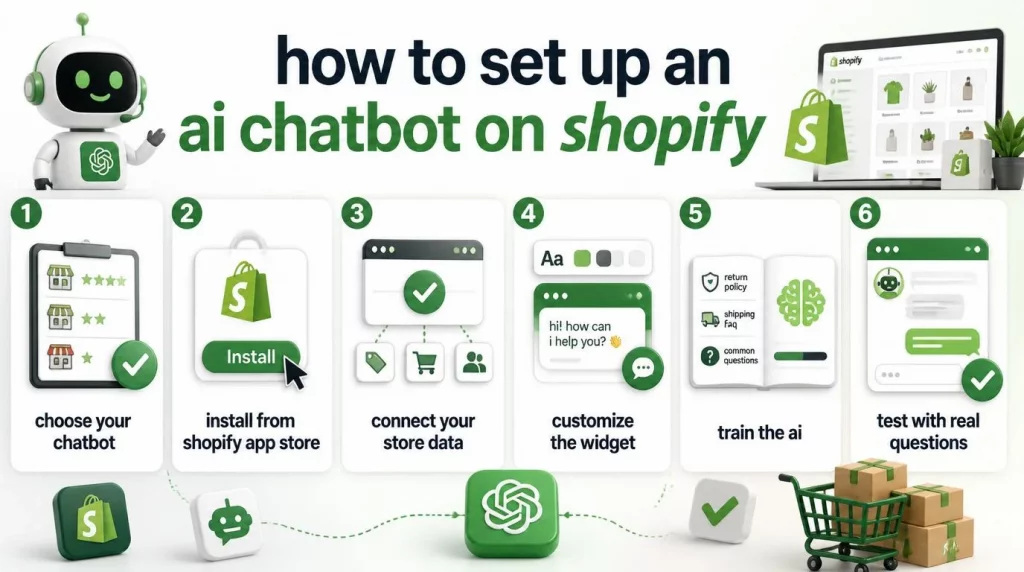
- Step 1 – Choose your chatbot based on your store size, budget, and primary goal. The store-type decision table later in this guide makes that step faster.
- Step 2 – Install from the Shopify App Store. Most tools are one-click installs that add the chat widget to your storefront automatically. You will not need to edit theme code.
- Step 3 – Connect your store data. For Shopify-native tools like Gorgias and Zipchat, this happens automatically via the Shopify API on install. For others like Tidio, you sync your catalog through the app settings panel.
- Step 4 – Customize the widget. Set your brand colors, chat button position, and opening greeting. An off-brand widget signals automation to customers before the first message is sent, which reduces engagement.
- Step 5 – Train the AI. Import your return policy, shipping FAQ, and common support scenarios. LLM-based tools typically generate training data directly from your Shopify store pages and product descriptions, with minimal manual input required.
- Step 6 – Test with real questions before going live. Ask the chatbot 10-15 questions your customers actually submit, including product-specific queries, a live order status lookup with a real order number, and at least one edge case such as a damaged goods complaint. Fix gaps before launch, not after.
The most common setup mistake is skipping Step 6. A chatbot that gives wrong answers about product specifications or return deadlines damages customer trust faster than having no chatbot at all. Testing costs 30 minutes. Rebuilding customer trust after a bad experience costs considerably more.
Shopify Inbox vs Third-Party AI Chatbots
Many merchants start with Shopify Inbox and assume it is their chatbot. It is not. Understanding the specific gap between the two tools – not just that a gap exists, but precisely where it shows up – determines whether upgrading makes economic sense for your store right now.
| Criteria | Shopify Inbox | Third-Party AI Chatbot |
|---|---|---|
| Cost | Free | $20-$900+/month |
| Automates customer conversations? | No – assists human agents only | Yes – resolves conversations without human input |
| WISMO deflection | No – human must reply | Yes – bot pulls tracking status and responds 24/7 |
| Product recommendations | No | Yes (most paid tools) |
| Cart recovery | No | Yes (Zipchat, Rep AI, Chatty) |
| Setup time | 2 minutes (already installed) | 10-30 minutes |
| Scales with ticket volume? | No – headcount scales with volume | Yes – deflection rate improves as the bot learns your store |
According to Zendesk’s 2026 CX Trends Report, 74% of customers now expect businesses to offer customer service around the clock. Shopify Inbox cannot meet that expectation at scale – a human agent still needs to be online and available to respond. Shopify’s own conversion data shows that responding quickly drives 69% higher conversion on chat-assisted conversations, which raises a practical question: can your team sustain that response speed reliably at 3 AM, on weekends, and during peak sales periods without a chatbot running?
What to Test Before You Choose
Most chatbot tools offer 7-14 day free trials, and the way you use that trial determines whether it gives you useful signal or just a polished demo experience. Running these five tests on your live store – not on a test environment with sample data – gives you the honest answer about how each tool performs for your actual customers.
Here is the evaluation checklist to run during your trial period:
- Accuracy on your own catalog: Submit 5 product-specific questions covering ingredients, sizing, compatibility, and current stock. If the chatbot returns vague answers or invents details, the API integration is too shallow to trust for customer-facing use.
- WISMO resolution speed and accuracy: Type a real order number and ask “Where is my order?” The chatbot should return a live tracking status within 2-3 seconds. Slower responses or generic answers indicate weak Shopify API access.
- Actual deflection rate from your traffic: After 72 hours of live traffic, check the conversation analytics. The percentage of conversations concluded without a human responding is your real deflection rate. Comparing that number against the vendor’s marketing claim is instructive.
- Multilingual handling: If you sell internationally, type a question in your second-most-common customer language. A chatbot that can’t detect the language and respond accurately will frustrate your most loyal international buyers.
- Escalation path quality: Trigger a question the chatbot cannot handle – a damaged goods complaint, a payment dispute, or a multi-item return. The chatbot should escalate to a human agent cleanly with the full conversation context. A chatbot that loops customers in a dead-end flow is worse than no chatbot at all.
Real Case Study: How Redmond Life Built a Production AI Commerce Agent in 10 Weeks
Most case studies in the AI chatbot category describe demo results. The Redmond Life story is different: it documents a production deployment, built by a two-person team, that went live in February 2026 and has been handling thousands of real customer conversations monthly since.
Redmond Life is a natural products company with over 10 brands, including Real Salt and Re-Lyte. The company runs its full ecommerce operation on Shopify Plus. In early 2026, its managed AI customer service tool was discontinued, and the team chose to build their own AI commerce agent using Shopify’s Storefront MCP as the foundation rather than replace one subscription with another.

Applied AI developer Phillip Hinson and development lead Jeremiah Payne completed the build in 10 weeks. Key results included:
- Thousands of customer conversations handled monthly at high accuracy on product-specific questions
- Zero manual product sync required on launch day – the Storefront MCP connects directly to Shopify’s live catalog, so new products appear in the chatbot automatically the moment they’re published
- Full system prompt control – unlike their previous managed tool, Redmond owns the response guardrails and can define exactly how the AI discusses product ingredients, sourcing, and claims
- Input token costs reduced by roughly 50% through Anthropic prompt caching, which avoids re-processing the same large system prompts on every request
- Internal store migration completed without a paid third-party app – the same MCP infrastructure handled data migration across three legacy stores
The decision to build rather than buy came down to control. Redmond’s customers ask detailed questions about ingredient sourcing and product composition – questions where a wrong answer carries real consequences for a natural products brand. Most managed AI chat tools at the time did not expose system prompt controls to merchants, which made it impossible to build the response guardrails they needed.
As Phillip Hinson described it: “The hard part isn’t the AI – it’s knowing your product well enough to teach it.”
This case illustrates where the category is heading. Off-the-shelf chatbot apps work well for most merchants. But the stores that win on customer experience are those where the AI knows their specific products, policies, and brand voice – not just a generic ecommerce knowledge base.
Which Shopify AI Chatbot Fits Your Store Type?
The most common mistake merchants make when choosing an AI chatbot is picking the most popular option rather than the right one for their current situation. The following decision table maps recommended tools to specific store profiles so you can match your stage to the appropriate tool rather than defaulting to the highest-rated app.
| Store Profile | Recommended Tool | Why It Fits |
|---|---|---|
| Just starting, under 50 orders/month | Shopify Inbox | Free, zero setup friction, sufficient at low volume |
| Growing, 50-500 orders/month, tight budget | Chatty ($68.99/mo for real AI) | Highest App Store rating, multi-channel inbox, predictable price |
| Mid-market, 500+ orders/month, dedicated support team | Gorgias | Full helpdesk tooling, deepest agentic order actions, scales with headcount |
| DTC brand focused on conversion | Rep AI ($99/mo flat) | Built for revenue lift, not support deflection |
| Multi-channel, international, WhatsApp needed | Zipchat (from $49/mo) | LLM-native, native WhatsApp, strongest Shopify Admin API depth |
| Dropshipping or high WISMO volume | Tidio or Zipchat | Both handle WISMO well; Tidio is cheaper, Zipchat more accurate |
If you’re evaluating chatbot capability alongside broader automation needs – including order management, CRM integration, or multi-channel workflows – the AI solutions for retail and ecommerce from AI Hive offers a broader view of what AI agents can handle at the retail and ecommerce level, beyond the support use cases covered in this guide.
If your store is below 50 orders per month, starting with Shopify Inbox and revisiting the decision in 90 days is the right call – you won’t have enough volume to evaluate deflection rate meaningfully before that. If you’re above that threshold and support is already consuming meaningful hours each week, starting a Chatty or Zipchat trial this week is a better use of time than continuing to research.
Do You Need a Chatbot or a Full AI Agent Platform?
For most Shopify merchants, an app-store chatbot is the right tool. For some, it will eventually not be enough. Understanding where that line sits saves you from either underinvesting now or overbuilding before you need to.
Most merchants – those running stores with roughly 100 to 2,500 orders per month – will find the tools covered in this guide adequate for their current needs. These tools install in minutes, train on your catalog automatically, and deliver measurable ticket deflection without a development team or an implementation project behind them.
The ceiling becomes visible under specific conditions: compliance requirements such as HIPAA, GDPR, or PCI-DSS; multiple brands across separate storefronts; deep integration dependencies with ERP or CRM systems; or AI agents that need to coordinate across internal workflows. In those situations, a standalone chatbot app hits its limits quickly. The article on enterprise AI agent deployment explains when and how organizations move from a single chat widget to a coordinated AI agent infrastructure – a useful read before making that decision.
Enterprise AI agent platforms like AI Hive address these requirements at a different architectural level. The platform connects to 100+ enterprise systems, deploys on-premise for data sovereignty, and includes dedicated engineering teams who build and maintain agents alongside your internal team. Deployment timelines run in weeks rather than months, and agents operate across your full operational stack – not just the customer-facing chat widget.
Conclusion
Choosing the right Shopify AI chatbot comes down to matching the tool to where your store actually is right now, not where you plan to be. Shopify Inbox is the right start at zero budget. Chatty or Tidio are the right step up when you need real AI at an accessible price. Gorgias fits when you have a support team and ticket volume to justify a full helpdesk. Zipchat is the right pick when AI-first automation across every channel is the goal. Whatever tool you shortlist, run a live trial against your actual catalog and your actual customers before committing – the chatbot that performs well on generic demo data won’t necessarily perform the same way on your specific products, policies, and edge cases.
For merchants whose needs go beyond what an app-store chatbot can handle – compliance-sensitive industries, multi-brand operations, or AI agents that need to act across your full operational stack – the comparison between a chatbot widget and an enterprise AI agent platform is worth making before you scale. If that’s the direction your store is heading, get in touch with the AI Hive team to explore what a production-grade AI agent implementation looks like for your ecommerce operation.