

Most enterprise AI pilots stall in a demo, answering questions but never touching a live system or closing a real task. The companies in this article moved past that stage: Klarna’s agent now does the work of 853 full-time staff, AMD cut HR resolution time by 80%, and General Mills booked $20 million in savings tied directly to AI-driven shipment decisions. Here is what changed when each of these enterprise AI agent use cases went from pilot to production, with the company, the metric, and the source named.
What Are Enterprise AI Agent Use Cases?
Enterprise AI agent use cases are the specific business processes where autonomous AI systems complete multi-step tasks end to end, from gathering information to taking action, without a human managing each step. A chatbot answers a question and stops there. An AI agent goes further: it pulls customer data, checks a policy, issues a refund, and closes the ticket in one pass. That difference changes how teams measure success. A chatbot’s metric is “did it answer correctly.” An AI agent’s metric is “did the task get completed without a human handoff,” and that is why production deployments track containment and resolution rate instead of response accuracy alone.
What actually separates an agent from earlier automation comes down to a few things. It reasons across multiple steps instead of following one fixed script, it connects to live systems such as a CRM or ERP and writes to them rather than just reading from them, and it knows when to hand off to a person so risk stays contained in regulated decisions. That hand-off logic is what governance teams care about most, since it determines how much of a workflow the agent gets to orchestrate on its own versus where a human still has to approve the outcome. Gartner projects that 40% of enterprise applications will integrate task-specific AI agents by the end of 2026, up from less than 5% in 2025. That jump shows enterprise AI agent use cases moving from experimentation into actual deployment, a shift covered in more depth in our broader guide to enterprise AI agents.
6 AI Agent Use Cases by Business Function
Before looking at industries, it helps to see how AI agent use cases apply across functions inside almost every enterprise, regardless of sector. The table below maps common functional use cases to the outcome typically tracked, and the named cases below it show what each one looks like in production.
|
Business Function |
Primary Use Case |
Typical Outcome Tracked |
|---|---|---|
|
Customer Service |
Conversational resolution, ticket triage, escalation routing |
Containment rate, resolution time |
|
Finance & Accounting |
Invoice processing, accounts payable, fraud detection |
Processing cost per invoice, cycle time |
|
HR |
Employee helpdesk, onboarding coordination, leave management |
Resolution time, self-service rate |
|
IT |
Code review, incident triage, access provisioning |
Developer hours saved, mean time to resolution |
|
Sales & Marketing |
Lead qualification, campaign personalization, CRM updates |
Conversion rate, time-to-lead-response |
|
Supply Chain |
Demand forecasting, shipment routing, supplier risk monitoring |
Cost savings, on-time delivery rate |
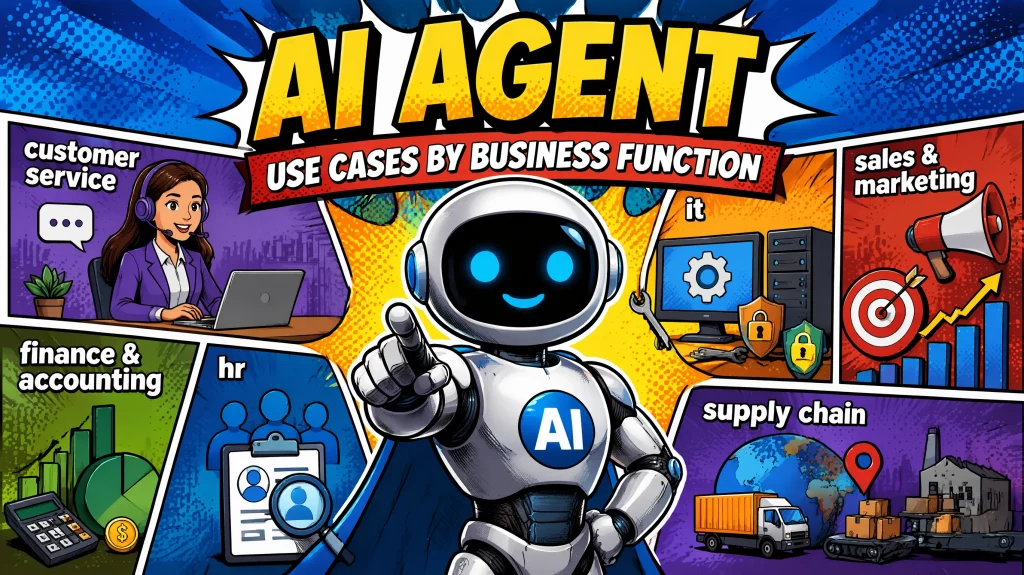
Finance & Fraud Real Case: JPMorgan
JPMorgan runs more than 450 AI agent use cases in production daily, spanning fraud detection, document processing, and internal operations. That scale did not happen overnight. It reflects years of incremental deployment, where each new use case got easier to add once governance and integration patterns were already proven. Enterprises earlier in this journey often start with a smaller, pre-built template rather than building each function from scratch.
IT & Engineering Real Case: Morgan Stanley
Morgan Stanley deployed a GPT-based code review agent called DevGen.AI in January 2025. The agent reviewed more than 9 million lines of legacy code and saved the bank’s developers an estimated 280,000 hours, freeing 15,000 developers from manual code translation to focus on product work. This single function-level deployment shows how a narrowly scoped agent can produce enterprise-wide time savings without touching every department at once.
HR Real Case: AMD
AMD, a global computing hardware company with roughly 30,000 employees, deployed an agentic HR system built on Kore AI. The agent handles unified access to HR information, self-service for common transactions, and escalation of sensitive cases to HR staff. The results were immediate: an 80% reduction in HR resolution time, 50% of queries resolved through self-service, and a 70% increase in employee satisfaction scores. “Our work with Kore.ai shows what’s possible when you use AI not to replace people, but to enhance how they work, connect, and lead,” said Robert Gama, SVP and Chief Human Resources Officer at AMD.
Companies evaluating a similar rollout can review AI agent solutions for HR built around the same self-service and escalation pattern.
5 Industry-Specific Enterprise AI Agent Use Cases
Function tells you what an agent does. Industry tells you why the stakes, compliance requirements, and data sensitivity differ from one deployment to the next.
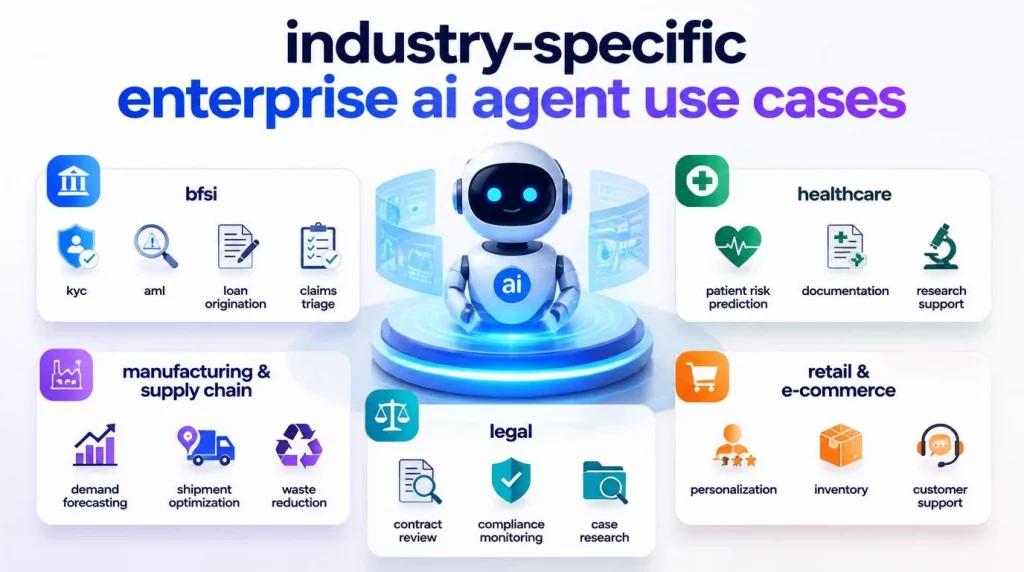
BFSI: KYC, AML, Loan Origination, Claims Triage
Banks and insurers operate under tight compliance requirements, which makes BFSI AI agent use cases heavier on audit trails and human-in-the-loop checkpoints than in other sectors. Four use cases dominate: KYC automation, AML transaction monitoring, loan origination support, and insurance claims triage. Each involves a high volume of repetitive, rules-based decisions where a documented audit trail matters as much as speed. Financial institutions weighing this path can see how AI agent solutions for BFSI handle these compliance requirements out of the box.
Example: JPMorgan’s fraud detection workflows, part of its 450-plus production use cases, fall directly into this category and run continuously rather than project by project. The bank’s scale reflects an operating model where adding the next compliance use case becomes incremental once the first one is proven.
Healthcare: Patient Risk Prediction, Documentation, Research Support
Healthcare AI agents work inside a stricter constraint than most industries: every output touching patient care needs a clinician in the loop before it becomes a decision. Documentation and clinical coding are the other major entry point, since they are repetitive, rules-bound tasks that consume hours per physician per shift without requiring autonomous clinical judgment. Healthcare organizations exploring this path can see how AI agent solutions for healthcare handle HIPAA-aligned deployment requirements.
Example: Johns Hopkins Hospital adopted Microsoft Azure’s AI-powered predictive analytics to flag early signs of patient deterioration and readmission risk, giving care teams a head start on intervention instead of reacting after a patient’s condition has already declined. The agent surfaces the risk signal, and a clinician makes the call, which is the pattern that works in regulated healthcare settings.
Manufacturing & Supply Chain: Demand Forecasting, Shipment Optimization, Waste Reduction
Manufacturing and supply chain operations generate the kind of high-volume, structured data that AI agents handle well: shipment records, production line sensor feeds, and procurement transactions. Manufacturers evaluating a similar path can review pre-built AI agent solutions for manufacturing before committing to a custom build.
Example: General Mills, the global food manufacturer behind brands sold in more than 100 countries, gave a direct account of this during a 2025 investor conference. CFO Kofi Bruce told investors the company’s AI models assess more than 5,000 daily shipments from plants to warehouses, a deployment that produced more than $20 million in savings since fiscal year 2024 through reduced transportation costs and improved customer service levels. That number came from a public earnings disclosure rather than a vendor case study, which is part of why it carries weight. General Mills also reported that real-time manufacturing performance data is expected to generate more than $50 million in waste reduction this year.
Retail & E-Commerce: Personalization, Inventory, Customer Support
Retailers face a different pressure: customer-facing agents need to perform at consumer scale, often during peak demand windows where a single bad interaction is visible immediately on social media.
Example: DoorDash built a voice agent on Amazon Bedrock powered by Anthropic’s Claude, handling hundreds of thousands of support calls daily for delivery drivers. The system holds conversational latency at or below roughly 2.5 seconds and reduces escalations to human agents by several thousand per day, according to AWS’s published case study. Intercom’s Fin AI Agent, also powered by Claude, reports an average resolution rate near 51% across its customer base. In one documented case, Synthesia used Fin to save more than 1,300 support hours over six months while resolving over 6,000 conversations, and during a 690% spike in support volume, 98.3% of users were served without any human escalation at all.
Legal: Contract Review, Compliance Monitoring, Case Research
Legal AI agents concentrate on document-heavy, time-sensitive work: reviewing contracts against a playbook, flagging non-standard clauses, and tracking regulatory changes that affect existing agreements. The function overlaps with finance and compliance use cases, since contract risk and regulatory exposure are often the same problem viewed from a different department. Vendors in this space report that legal teams using AI agents for document review can save roughly 240 hours per year per professional, based on enterprise legal operations benchmarking.
How to Identify and Prioritize AI Agent Use Cases
Picking the right first use case determines whether your AI agent program builds momentum or stalls after one disappointing pilot. The framework below draws on the pattern shared by every named case above: a well-scoped agent, a defined outcome, and an honest read of whether your own data already supports automation.
- High-volume, repetitive decision points come first. Tasks your team handles dozens or hundreds of times a day, governed by clear rules rather than judgment calls, are the strongest starting point. Customer service triage, invoice matching, and HR query handling fit this profile, which is why they show up first in nearly every deployment above.
- The task should end in a clean decision, not a request for ongoing human judgment. An agent that owns the full outcome, like Klarna’s assistant closing a support conversation, produces stronger ROI than one that only assists a human who still has to finish the task. When a human sign-off is always required at the end, the agent should be scoped to prepare that decision rather than make it.
- Your data infrastructure needs to support the agent before you commit to a timeline. General Mills built its supply chain agent on a data pipeline that had matured over multiple years, and that sequencing mattered. If your systems are fragmented with no shared source of truth, that integration work has to happen first, not as a side task during the build.
- The success metric has to exist before you write a single line of agent logic. Every named case study above had a number attached to it: hours saved, dollars saved, resolution time. A pilot without a pre-defined KPI is one of the most common reasons agentic AI initiatives never make it past proof of concept.
The table below shows how complexity and typical cost scale together, useful for sequencing a roadmap realistically instead of starting with the hardest use case first.
|
Use Case Complexity |
Example |
Typical Deployment Cost Range |
Time to First Measurable Result |
|---|---|---|---|
|
Low |
FAQ resolution, password reset agents |
Lower, often subscription-based per-agent pricing |
60-90 days |
|
Medium |
HR helpdesk, invoice processing, contract review |
Mid-range, scoped to one department |
90-180 days |
|
High |
Cross-system supply chain orchestration, fraud detection at scale |
Higher, requires data infrastructure investment |
6-12+ months |
Companies with limited AI engineering capacity tend to get the fastest return by starting at the low end of this table, proving the operating model works, then reinvesting the saved time into the higher-complexity use cases.
Implementation Best Practices: From Pilot to Scale
Moving from a successful pilot to an enterprise-wide rollout is where most AI agent programs lose momentum. McKinsey’s research shows roughly two-thirds of enterprises remain stuck in pilot mode, and the companies named above avoided that trap by following a consistent sequence.
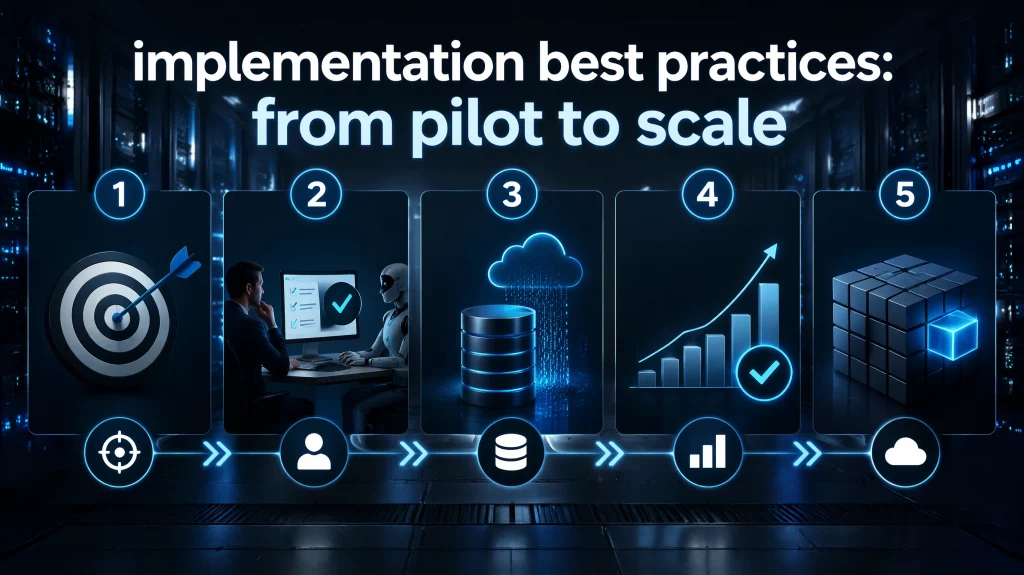
- Step 1: Start with one narrow, well-defined task. AMD did not launch HR, IT, and finance agents all at once. The team scoped the HR helpdesk first, measured it, then turned it into a template for adjacent workflows. Enterprises that try to automate an entire department in one project tend to stall, since failure points multiply with every added handoff.
- Step 2: Build in a human checkpoint wherever judgment, not just rules, drives the outcome. Healthcare deployments like the one at Johns Hopkins are built around this principle: the agent flags risk, and a clinician decides. The same pattern shows up in BFSI claims triage and legal contract review, where regulators expect a documented audit trail behind every decision an agent influences.
- Step 3: Get the data ready before you write the agent’s logic. General Mills’ supply chain results came after years of data infrastructure investment, not alongside a rushed build. An agent can only act as well as the data it can actually reach.
- Step 4: Set the success metric before the pilot starts. A missing KPI is the single most common reason pilots never graduate to production. Containment and resolution matter more than raw message volume here, since a high message count with a low resolution rate signals an agent that stays busy without closing the loop.
- Step 5: Pick a deployment model that will not box you in later. Enterprises in regulated sectors or with strict data residency rules often need to run agents on-premise, in a private cloud, or across multiple LLM providers. That flexibility becomes a real requirement the moment a pilot has to scale into a market with its own compliance rules.
Conclusion
These enterprise AI agent use cases share one pattern: every company named above picked one repetitive, high-volume task, defined the metric before building, and proved the model before expanding. The same approach works for any team starting out: scope one narrow use case, attach a number you can measure within 90 days, and the path from pilot to production gets considerably shorter.
If your team is mapping out which AI agent use case to tackle first, AI Hive’s no-code builder and industry-specific templates can help. You can test a scoped deployment, customized to your sector and existing systems, without committing to a year-long build cycle. Talk to our team about your automation workflow, and we will help you scope a first AI agent use case around a measurable outcome.