

Enterprise AI agent platforms have moved from innovation experiments to operational infrastructure. According to Gartner’s August 2025 forecast, 40% of enterprise applications will embed task-specific AI agents by the end of 2026 – up from less than 5% just one year ago. Yet despite that momentum, 88% of agent pilots still fail to reach production, according to Forrester’s 2026 data. The gap is not technical. It is a platform selection problem. This guide compares the top enterprise AI agent platforms available in 2026 – AIHive, Kore.ai, IBM Watsonx Orchestrate, Salesforce Agentforce, and lightweight tools – across the six criteria that determine production success: deployment flexibility, model agnosticism, governance depth, integration breadth, total cost of ownership, and time to first agent in production.
Key Takeaways
- 40% of enterprise applications will embed AI agents by end of 2026 (Gartner) – but 88% of pilots still fail to reach production. Platform selection is where most organizations lose.
- Not all “enterprise-grade” platforms are equal. Five criteria separate genuine enterprise platforms from tools dressed up in enterprise language – and most vendors fail at least two.
- Pricing opacity is a feature, not a bug, for incumbent vendors. The real cost gap between platforms is wider than most procurement teams realize before they sign.
- On-premise deployment sounds standard. Full on-premise – including the LLM inference layer – is a different requirement entirely, and few platforms actually deliver it.
- The fastest path to production is not always the most obvious platform choice. A real logistics deployment in Southeast Asia shows what the numbers look like when you choose right.
What Defines an ‘Enterprise-Grade’ AI Agent Platform?
Not every AI platform that claims to be ‘enterprise-ready’ meets the actual requirements of production deployments in regulated industries. A genuine enterprise-grade AI agent platform must satisfy five non-negotiable criteria before a technology leader should consider it for production use.
- Autonomous multi-step workflow execution: The platform must handle end-to-end processes – not just single-turn responses – across multiple integrated systems without human intervention at each step.
- Model-agnostic LLM routing: The platform must support multiple LLM providers (OpenAI, Anthropic, Google, open-source Llama) so your organization is never locked into a single vendor’s pricing or availability.
- On-premise and air-gapped deployment: Regulated industries – banking, healthcare, government – require data to remain within their own infrastructure. Any platform that offers SaaS-only deployment is not enterprise-grade for these sectors.
- Governance, audit trails, and PII controls: Every agent decision must be logged, every data access must be auditable, and personally identifiable information must be masked automatically before it reaches any LLM.
- Production support model: Enterprise deployments fail not because of the software but because of the absence of experienced AI engineers to configure, test, and optimize agents. A platform without an expert support option is a platform that assumes you already have a full internal AI team.
The platforms that satisfy all five criteria are few. The sections below evaluate each major vendor against this framework with verified data.
The Six Evaluation Criteria CIOs Must Apply Before Signing Any Contract
Enterprise AI agent platform purchases routinely become multi-year commitments. A poor selection decision costs more than the platform license – it costs the organizational momentum lost during re-platforming. The following six criteria give you a structured framework for evaluation that goes beyond vendor marketing claims.
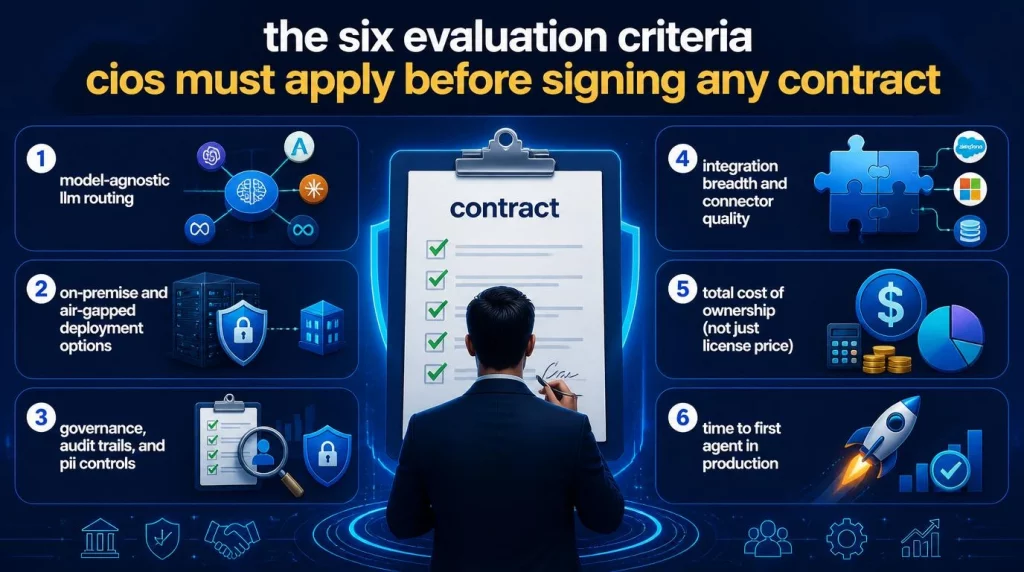
1. Model-Agnostic LLM Routing
Single-model platforms create a structural dependency on one vendor’s pricing, uptime, and capability roadmap. When OpenAI, Anthropic, or Google adjusts pricing – which has happened multiple times since 2023 – single-model deployments absorb the full cost increase with no recourse. Model-agnostic platforms route each task to the most appropriate LLM based on cost, latency, and accuracy requirements. Our clients who have moved to multi-model routing on AIHive have reduced LLM inference costs by 35-60% without sacrificing output quality.
2. On-Premise and Air-Gapped Deployment Options
For organizations in BFSI, healthcare, and government – particularly those operating under Vietnam’s AI Law No. 134/2025/QH15 or EU GDPR – on-premise deployment is not optional. Your AI agent cannot send customer data to an external cloud API. The platform must support full private infrastructure deployment, including the LLM inference layer. Platforms that offer ‘hybrid’ deployment but still require external LLM API calls for inference do not meet this requirement.
3. Governance, Audit Trails, and PII Controls
Every enterprise AI agent decision that affects a customer, employee, or financial record must be logged with a complete audit trail: which agent took the action, which data it accessed, which model it called, and what output it produced. PII masking must occur before data reaches any LLM, not after. Platforms that treat governance as a post-launch add-on consistently fail compliance audits.
4. Integration Breadth and Connector Quality
An enterprise AI agent is only as useful as the systems it can connect to. Platforms with fewer than 100 pre-built connectors will require custom integration work for almost every deployment. Custom integrations consume 40-60% of total implementation time and introduce ongoing maintenance overhead. Prioritize platforms with verified connectors for your specific ERP, CRM, core banking, or healthcare systems.
5. Total Cost of Ownership (Not Just License Price)
License fees represent only one component of TCO. Implementation services, custom connector development, ongoing model inference costs, internal engineering time, and re-training overhead all contribute significantly. A platform with a lower annual license fee but no pre-built connectors and no expert support often delivers a higher 3-year TCO than a platform with a higher starting price but faster deployment.
6. Time to First Agent in Production
The metric that separates genuinely deployable platforms from sophisticated demos is how quickly your organization can move a specific use case from configuration to production. Platforms that claim ‘deploy in hours’ but require 6-18 months of implementation work consistently disappoint. Ask every vendor for a reference client in your industry who went from contract signature to production agent in under 60 days.
Top 5 Enterprise AI Agent Platform Comparison: AIHive vs. Kore.ai vs. IBM Watsonx vs. Salesforce Agentforce vs. Lightweight Tools
The following comparison reflects verified, publicly available data as of Q2 2026. We have included AIHive alongside the incumbent platforms to give technology leaders a direct reference point across all relevant dimensions.
| Criterion | AIHive | Kore.ai | IBM Watsonx | Salesforce Agentforce | Lightweight Tools |
| Model-agnostic routing | Yes (GPT-4o, Claude, Gemini, Llama) | Yes (limited models) | Partial (IBM models preferred) | No (OpenAI only) | Usually single-model |
| On-premise deployment | Yes (full stack) | Yes | Yes (air-gapped) | No (SaaS only) | Rarely |
| PII masking & audit trail | Full, built-in | Full, built-in | Full, built-in | Via Einstein Trust Layer | Minimal to none |
| Pre-built agent templates | 500+ (industry-specific) | 100+ (function-specific) | 80+ (enterprise apps) | Limited (Salesforce workflows) | Varies |
| Time to first agent | 4 weeks | 2-4 months | 3-6 months | 4-6 weeks (Salesforce-centric) | 1-2 weeks (simple tasks only) |
| Annual starting cost | $30K-$120K | $300K+ | Custom enterprise pricing | $550/user/month (Agentforce 1) | $20K-$80K |
| AI Engineers for Hire | Yes (embedded team option) | No | No | No | No |
| Vietnam / SEA compliance | Yes (on-premise, local law support) | Limited | Limited | Not supported | Not supported |
| Best for | Mid-market to Enterprise, regulated industries, SEA market | Large enterprise CX automation | Heavily regulated, IBM-stack orgs | Salesforce-native enterprises | Simple, single-function automation |
A note on Kore.ai pricing: Enterprise contracts with Kore.ai typically start at $300,000 per year, according to multiple independent reviews including Retell AI’s 2026 Kore.ai review. The platform also uses session-based billing (per 15-minute session) that can make actual costs run 40-60% higher than initial estimates for organizations with complex, longer-duration interactions. Implementation typically requires 2-4 months and dedicated AI specialists.
Deployment Models Compared: SaaS, Private Cloud, and On-Premise
The deployment model decision is the most consequential technical choice in an enterprise AI agent platform evaluation. It determines where your data lives, which compliance frameworks you can satisfy, and what your long-term infrastructure costs look like. The three primary models each serve a distinct organizational profile.
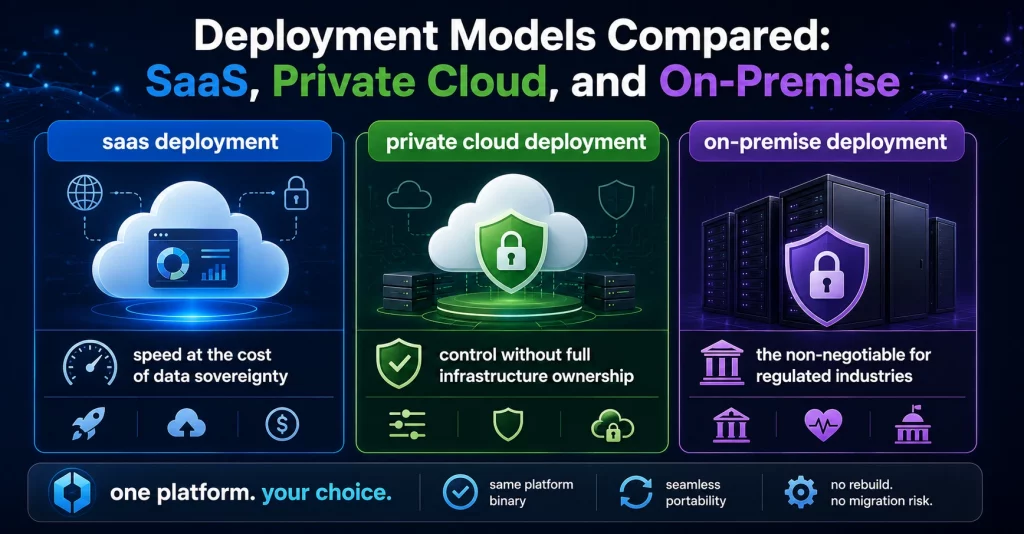
SaaS Deployment: Speed at the Cost of Data Sovereignty
SaaS deployment delivers the fastest time to first agent and the lowest initial infrastructure cost. The trade-off is that your data traverses the vendor’s cloud infrastructure, which creates compliance exposure for organizations handling financial records, patient data, or government information. SaaS is appropriate for non-regulated workflows or for pilots where speed of evaluation matters more than data residency.
Private Cloud Deployment: Control Without Full Infrastructure Ownership
Private cloud deployment runs the platform within your organization’s cloud tenant (AWS VPC, Azure Private, GCP VPC) rather than on the vendor’s shared infrastructure. This approach satisfies most GDPR and SOC 2 data residency requirements without the capital expenditure of on-premise hardware. Private cloud is the fastest-growing deployment model among enterprise buyers in 2025-2026.
On-Premise Deployment: The Non-Negotiable for Regulated Industries
On-premise deployment keeps all agent execution, LLM inference, and data processing within your organization’s own physical or virtual infrastructure. For banks in Vietnam operating under AI Law No. 134/2025/QH15, for hospitals handling HIPAA-regulated patient data, and for government agencies with air-gap security requirements, on-premise is the only compliant option. AIHive’s on-premise AI agent deployment supports full-stack private deployment – including the LLM inference layer – so no data ever leaves your controlled environment. This is the key differentiator that SaaS-only platforms like Salesforce Agentforce cannot match.
Total Cost of Ownership: What You Are Actually Paying Across the Top Platforms
License price is the least reliable indicator of actual cost. The following TCO comparison reflects a 3-year horizon for a mid-sized enterprise (500-2,500 employees) deploying AI agents across 3 core business workflows. All figures are indicative ranges based on publicly available pricing data, independent reviews, and AIHive client engagement data.
| Cost Component | AIHive | Kore.ai | IBM Watsonx | Lightweight Tool |
| Year 1 License | $30K-$120K | $300K+ | Custom ($200K-$500K+) | $20K-$80K |
| Implementation / Setup | $15K-$40K (AI Engineers included) | $50K-$150K (specialist required) | $100K-$300K (SI partner required) | $5K-$20K |
| Year 1 LLM Inference | Optimized via multi-model routing | Single or dual model (higher cost) | IBM-preferred models (premium) | Single model (unpredictable at scale) |
| Year 2-3 Scaling Cost | Predictable (transparent pricing) | Session-based (40-60% cost overrun risk) | Enterprise contract re-negotiation | Compliance gaps emerge (re-platform cost) |
| Estimated 3-Year TCO | $150K-$400K | $1M-$2M+ | $800K-$2M+ | $100K-$300K (before re-platform) |
The hidden cost most evaluations miss: Every platform that requires dedicated AI specialists to deploy and maintain adds an ongoing hidden cost. A single AI engineer with production deployment experience commands $120,000-$180,000 annually in the US and $60,000-$100,000 in Southeast Asia. If your platform selection requires hiring two to three such engineers, that labor cost alone exceeds the AIHive platform license within the first year.
A Real Procurement Decision: Why a Logistics Company Chose AIHive Over Kore.ai
- Client profile: A logistics and freight management company in Southeast Asia with 800 employees and operations across 6 countries. Annual revenue approximately $120M USD.
- The challenge: The company’s operations team was manually processing 1,200+ freight documentation requests per day across email, WhatsApp, and a legacy ERP. Each document required verification against customs regulations in 3-6 jurisdictions. The average processing time was 4 hours per shipment, and errors caused an average of $180,000 in annual penalty fees.
- The shortlist: The IT Director evaluated Kore.ai and AIHive. Kore.ai’s proposal came in at $420,000 for year one, with a 3-4 month implementation timeline and a requirement to hire two specialist engineers to manage the platform. Data would reside on Kore.ai’s cloud infrastructure – a compliance concern given the multi-jurisdiction customs data.
- Why they chose AIHive: AIHive’s year-one cost was $87,000, including implementation. The on-premise deployment option kept all customs data within the company’s own infrastructure. The AI Engineers for Hire model provided a dedicated engineer for the first 90 days without a headcount addition. The first production agent – freight document classification – went live on day 26.
- Results at 6 months: Processing time per shipment dropped from 4 hours to 28 minutes. Documentation error rate fell from 4.2% to 0.3%. Annual penalty fees reduced by an estimated $160,000. The company has since deployed two additional agents for invoice reconciliation and customs duty calculation.
Industry-Specific Platform Recommendations
1. Banking, Financial Services, and Insurance (BFSI)
BFSI organizations require the highest governance standards of any sector. Our BFSI AI agent solutions are built around on-premise deployment with full PII masking, SOC 2 Type II compliance, and audit trails that satisfy regulatory examination requirements. For KYC automation, fraud monitoring, and loan processing, the combination of model-agnostic routing and on-premise data residency is non-negotiable. IBM Watsonx is the strongest incumbent for organizations already deep in the IBM stack. AIHive is the fastest path to production for mid-market BFSI organizations without an existing IBM infrastructure.
2. Healthcare
Healthcare AI agent deployments must maintain HIPAA compliance from day one. Agent platforms that route data through external cloud APIs – even with BAA agreements – introduce risk during incidents or outages. On-premise or private cloud deployment is strongly recommended. IBM Watsonx and AIHive are the two platforms in this comparison that fully support air-gapped healthcare deployments.
3. Manufacturing and Logistics
Manufacturing and logistics enterprises typically operate across multiple geographies with legacy ERP systems (SAP, Oracle, custom-built). Integration breadth is the primary selection criterion. AIHive’s 500+ pre-built connectors and AI Engineers for Hire model address the integration complexity that lightweight tools cannot handle and that IBM Watsonx addresses only with expensive system integrator partnerships.
4. Retail and E-Commerce
Retail enterprises prioritizing customer-facing automation – personalized recommendations, inventory agents, pricing optimization – will find Salesforce Agentforce most compelling if they are already on the Salesforce platform. For organizations not in the Salesforce ecosystem, AIHive’s retail-specific agent templates and model-agnostic routing provide equivalent capability at lower cost and without ecosystem lock-in.
How to Run a 30-Day Proof of Concept That Actually Predicts Production Performance
Most enterprise AI agent platform PoCs are structured to impress, not to predict. The vendor configures the demo environment with clean data, a simplified workflow, and optimal conditions that rarely match your actual production environment. The following framework ensures your 30-day PoC generates data you can use to make a real procurement decision.
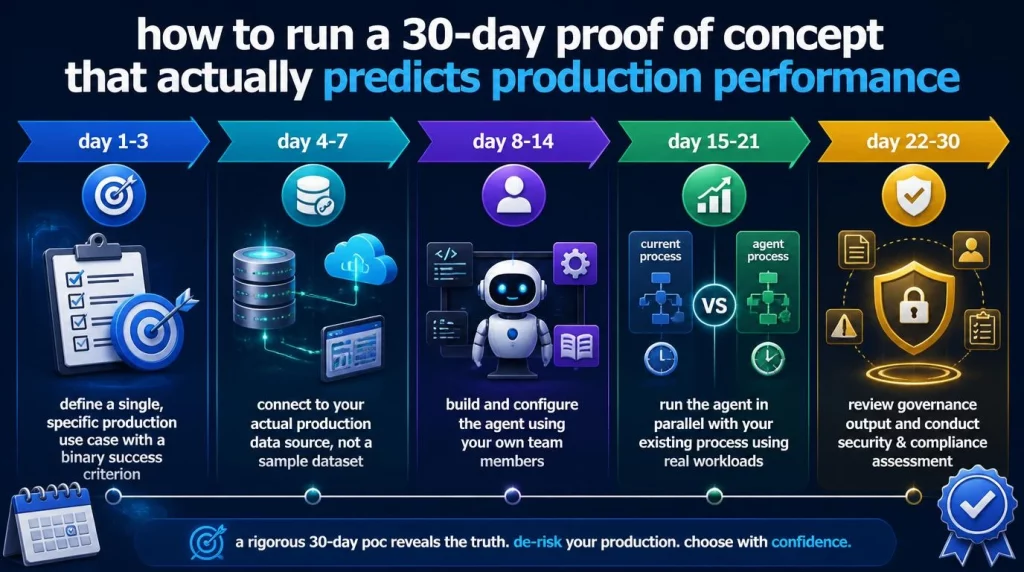
- Day 1-3: Define a single, specific production use case with a binary success criterion. Not ‘improve customer service efficiency’ – but ‘reduce average document processing time from 4 hours to under 1 hour with accuracy above 96%.’ Vague objectives produce vague PoC results.
- Day 4-7: Connect to your actual production data source, not a sample dataset. Any platform that cannot integrate with your real systems during PoC will struggle in production. This step reveals connector quality and integration complexity.
- Day 8-14: Build and configure the agent using your own team members (not the vendor’s engineers) with the vendor’s documentation as the only guide. If your team cannot configure a basic agent in two weeks using the platform’s documentation, the platform is too complex for your organization.
- Day 15-21: Run the agent in parallel with your existing process using real workloads. Compare accuracy, processing time, and error rates against your current baseline. Measure actual LLM inference costs, not the vendor’s estimates.
- Day 22-30: Review the governance output: audit logs, PII handling records, escalation events. Conduct your IT security team’s assessment of the platform’s data handling. Verify the vendor’s compliance claims against your specific regulatory requirements.
The PoC metric that matters most: Can your team reproduce the PoC results independently, without the vendor’s engineers present? If the answer is no, your organization is not buying a platform – it is buying vendor dependency.
Conclusion
The enterprise AI agent platform market in 2026 is not a market where the best technology wins. It is a market where the best match between platform capability and organizational readiness wins. IBM Watsonx is the right choice for large, IBM-stack enterprises with dedicated AI teams and 6-month implementation budgets. Salesforce Agentforce is the right choice for Salesforce-native enterprises focused on customer service. Lightweight tools are the right choice for non-regulated, single-function automation that does not need to scale.
For mid-market and enterprise organizations that need production-grade governance, on-premise deployment, and a fast path to ROI without building an internal AI team, AIHive delivers the fastest time to production, the lowest total cost of ownership, and the only AI Engineers for Hire model that removes the talent barrier from enterprise AI deployment.
The next step is a structured evaluation, not a sales demo. Contact AIHive’s team to schedule a 30-day PoC with your actual data, your specific use case, and your compliance requirements – and measure the results yourself.